- Home
- What’s new
Changelog
What’s new in Daxova Staff
Every change you can see, in plain English. This page is updated with each release, newest first.
- 29changes listed
- 19new features
- 6improvements
- 4security changes
Across 10 release days, October and November 2026. All live.
By area
Where the changes were made.
Each entry says where to find the change in the product, and links to the guide that explains it.
- Locations3 changes
- Company3 changes
- Payroll2 changes
- Everywhere2 changes
- Rota2 changes
- Reports2 changes
- Clock-in tablet2 changes
- Your data2 changes
- Team & access2 changes
- Sign-up1 change
- Holidays1 change
- Requests1 change
- Documents1 change
- Live1 change
- Alerts1 change
- Staff records1 change
- Hosting1 change
- Clock-in fixes1 change
October and November 2026
29 changes, newest first
20 November 2026
Friday
1 change
-
NewPayroll
Payroll sent to HMRC by Daxova
Daxova Staff can now send your Full Payment Submission (FPS) and Employer Payment Summary (EPS) to HMRC for you. Add your HMRC Online login on the HMRC page in Payroll and choose Send to HMRC for real: after that, each pay run’s FPS goes to HMRC once a Director approves it, and you see HMRC’s answer on the same page.
It is your choice. Leave it on Test and your accountant, or you, keeps sending them from the details Daxova makes. Your login is kept encrypted and you can remove it at any time.
WherePayrollHMRC
How payroll works
21 October 2026
Wednesday
2 changes
-
NewSign-up
Start a trial online
Start your free trial yourself, without emailing us first. Fill in the form, confirm your email from the link we send, see your price and trial, and press Create my company. Then set your password and two-factor, and add your staff.
- Founding 50: applied automatically while places last, with a 60-day trial. The sign-up page shows the places left.
- No card: nothing is charged automatically when the trial ends.
Wherestaff.daxova.co.uk/start
How the trial works -
NewPayroll
UK payroll
Run payroll from a locked pay period. Daxova works out pay, tax, NI, student loans, statutory pay and pensions, and makes payslips, the bank file and the reports, including the P32 and a journal.
HMRC has not yet recognised Daxova Staff, so Daxova does not send the FPS or EPS to HMRC yet: until then, your accountant, or you, files them.
Directors and HR see every payslip in the portal now; staff see their own in the staff app from its next update.
Payroll is on for every company: £1 per staff member on payroll a month, free during your trial.
WhereReportsPayroll
Pricing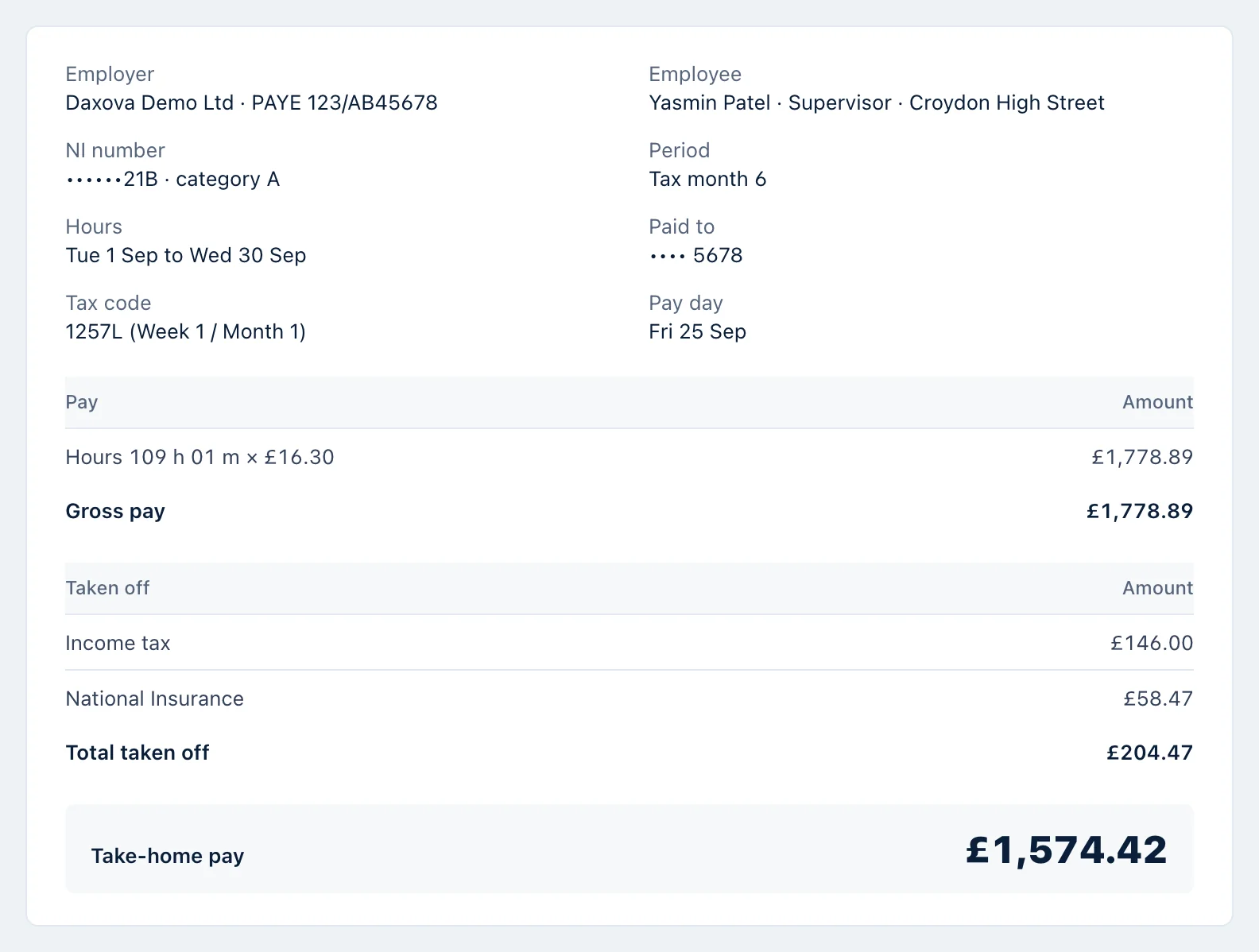
A payslip as Directors and HR see it in the portal. Made-up data.
13 October 2026
Tuesday
2 changes
-
ImprovedLocations
Places are now locations, and “punch” is now “clock in”
Daxova Staff is for any place people work, so the words changed everywhere: Shops is now Locations, a shop’s lock is its Clock-in rule, and the Shop tablets tab is Tablets. Staff tap Clock in and Clock out, and Punch edits is now Clock-in fixes.
- Add a location: easier, in three short steps: the name and address (type the postcode and press Find address), how staff clock in, and the working hours.
- Several clock-in tablets: a location can have up to ten tablets, each with its own name. Pairing a new one leaves the others working.
WhereManageLocations
Add your locations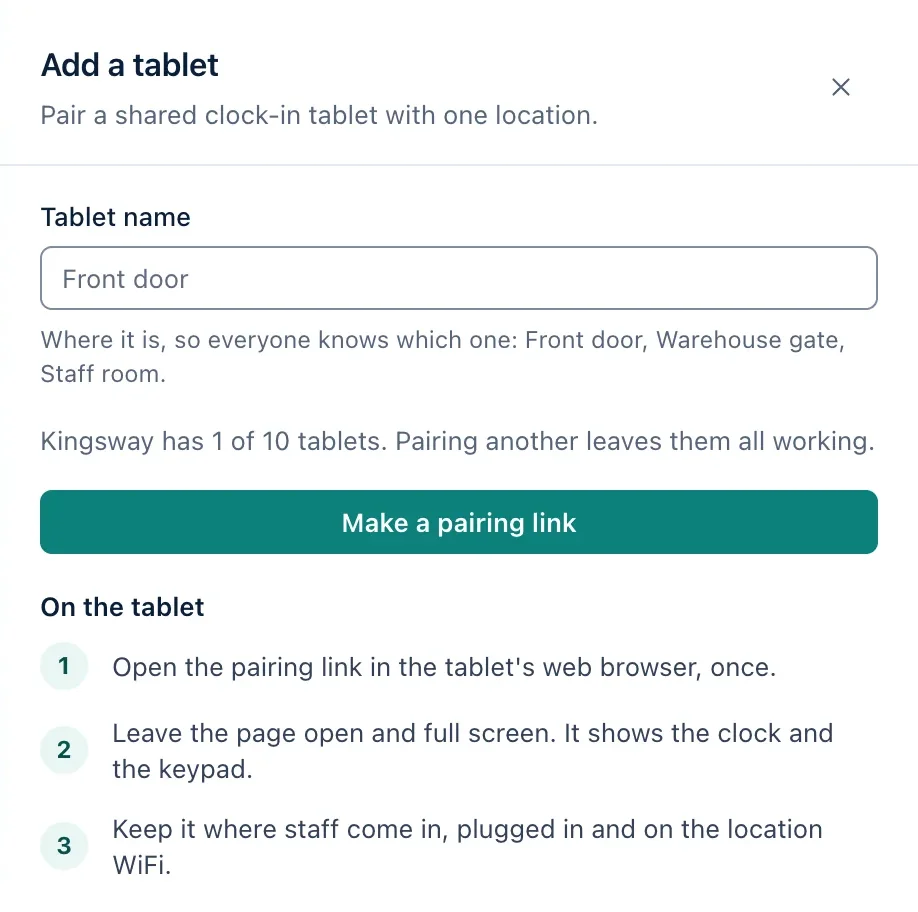
Add a tablet: each one gets its own name, and pairing another leaves the others working. -
ImprovedEverywhere
Clearer words, and Today keeps itself up to date
- Today and Live: Today now updates itself every 30 seconds, as Live does, and both pause after 30 minutes without use until you press Refresh. Live has one Fire roll call button at the top, which asks which location.
- Clearer words: the menu says Rota and uses sentence case. A published week on the Rota shows its version. On the clock-in tablet, the number on a staff badge is usually enough, for example 174 for DS-00174.
- UK rates and bank holidays: minimum wage rates and bank holidays are now data we add from GOV.UK when they are published, so a new April or a new year no longer waits for a release. A locked pay period keeps the figures it was worked out with.
- Prices and offers: our own console now holds the normal price and trial, offers such as Founding 50, and the wording of each email. Changing, pausing or ending an offer never changes what a company already on it pays.
Starting a trial yourself online was built in this release and opened on 21 October 2026.
10 October 2026
Saturday
9 changes
-
NewHolidays
Holidays and sickness
Staff ask for holiday in the app, in whole or half days, and see the days they have left. Managers decide in the portal, seeing who else is off and the location’s limit on how many can be off at once.
Staff tell you from the app when they cannot come in and when they are back. A sickness note is seen only by HR, the Director and the person, and is erased 90 days after the absence ends. There is no field for a diagnosis.
WhereManageHolidays
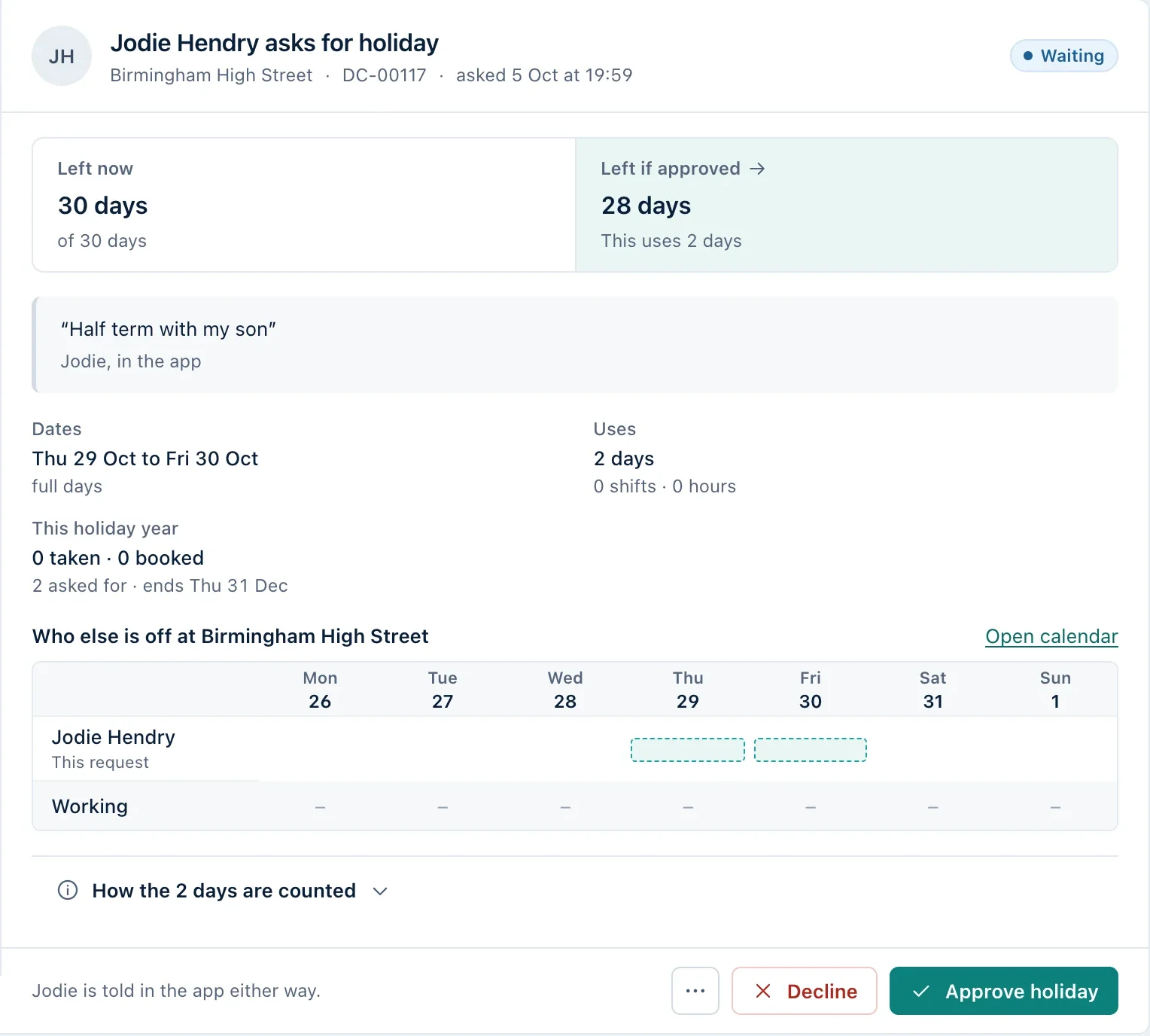
A holiday request: the days left, and who else is off that week. Made-up data. -
NewRota
Draft the rota, then publish the week
Build next week as a draft that staff do not see. Copy last week or import from Excel, then check the warnings beside each shift. Publish week shows what changed for whom, and tells only the people whose shifts changed.
- Warnings, not blocks: short rest, more than 48 hours in a week, no day off, a weekly hour limit, availability and holidays show beside the shift for you to check. An overlapping shift, or one after someone’s right to work check runs out, is refused.
- Availability: staff set in the app when they can work each week (all day, mornings, evenings or set times) and the dates they cannot. The rota shows it while you plan. If someone becomes unavailable for a shift already published, their manager is told.
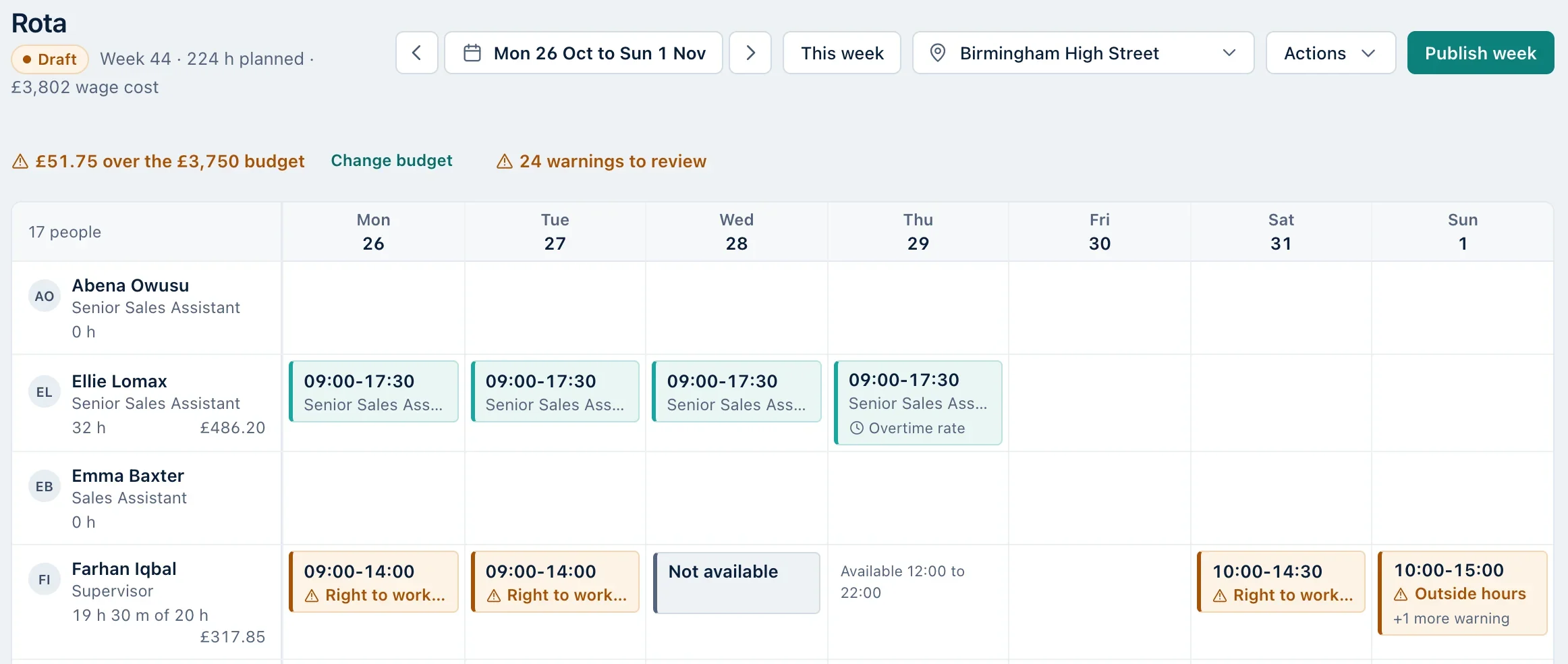
A draft week: the warnings sit beside each shift until you press Publish week. Made-up data. WhereRota
How rotas work -
NewRequests
Shift swaps and extra hours
Staff offer a shift to swap or give away in the app. The colleague accepts, a manager approves, and the rota changes straight away.
Managers offer extra hours to a location or an area, or extra time on someone’s shift. Staff put their name forward and the manager picks; nothing is given out automatically. Nobody is offered hours that would take them over their weekly limit.
WhereInboxRequests
-
NewReports
Wage cost
Planned wage cost from the rota against actual cost from clock-ins, for each location and day, with a weekly budget per location.
HR and the Director also see each person’s cost and a check against the minimum wage for their age. Managers see location totals only. These are estimates before tax and deductions.
WhereReportsWage cost
-
NewDocuments
Staff documents with expiry reminders
Right to work, visas and permits, training certificates and contracts for each person, with the right to work check recorded (never the share code).
HR and the Director get reminders 60 and 30 days before a document or check runs out. Staff can send a photo of a new copy from the app for HR to check. Only HR and the Director can open copies, which are stored encrypted.
WhereManageDocuments
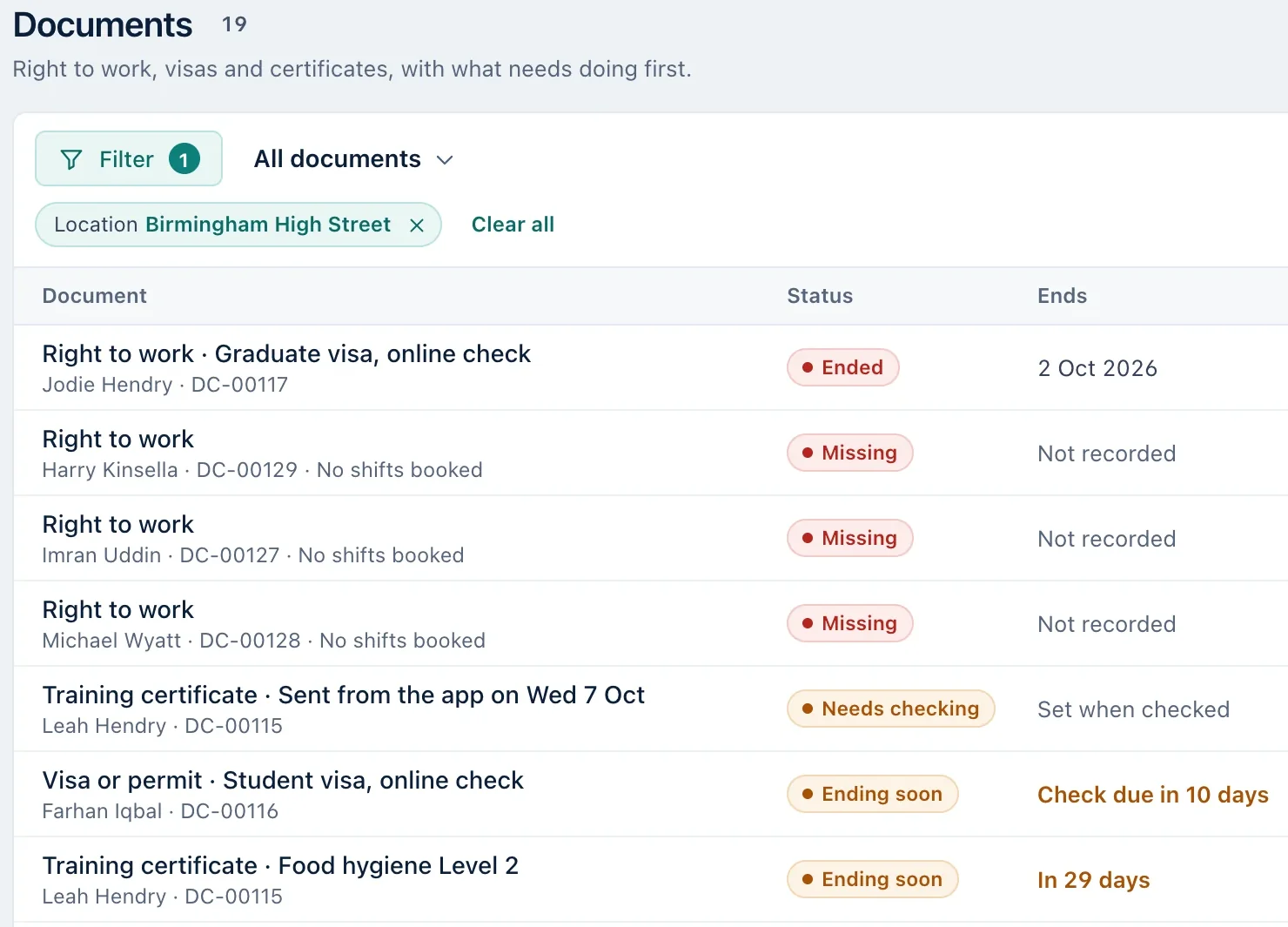
Documents for one location, with what needs doing first. Made-up data. -
NewReports
Pay periods and a payroll CSV
Set a pay calendar (weekly, fortnightly, four-weekly or monthly). Each pay period gets an estimate of every person’s gross pay from their clock-ins and pay rate, including overtime, weekend, night and bank holiday rates, holiday at the basic rate, salaries and days off sick.
Clear the checks (such as a missing clock-out or a holiday waiting for a decision), lock the period and download a payroll CSV for your payroll provider. Only the Director unlocks.
On its own it is not payroll. For payslips, tax, NI, pensions and Statutory Sick Pay, use UK payroll (21 October 2026) or your payroll provider.
WhereReportsPay
-
NewLocations
Open a location, and set its opening hours
A Director or HR opens the location’s page, gives a reason and taps Open this location. Only the Director reopens a location that was closed. The same page shows the location’s opening hours, Monday to Sunday, up to three sets of hours a day, and a Director or HR can change them with a reason.
A location’s status does not stop clock-ins: the clock-in rule decides where a clock-in is accepted. An open location shows on Today and Live while nobody is in, and its clock-in tablet can raise the offline alert.
WhereManageLocations
Add your locations -
NewLocations
Bank holidays, location by location
Each location now has its own bank holidays: England and Wales, Scotland or Northern Ireland, with England and Wales as standard. A Director or HR chooses them on the location’s page, with a reason. Holiday requests, the bank holiday rate in pay and wage cost all follow them.
On a bank holiday a location keeps its normal opening hours, so its clock-in tablet can raise the offline alert as on any other day it is open. Tick the Closed on bank holidays box for a location that shuts on them.
WhereManageLocations
When the tablet alert is raised -
NewClock-in tablet
A passcode link for staff without the app
Staff without the Daxova Staff app can now choose their own six-digit passcode for the clock-in tablet. A manager taps Passcode link beside the person and shows them the QR code, or sends them the link. The person opens it on any phone or computer and chooses a passcode that nobody else sees, including the manager. The link works once, for 72 hours.
HR or the Director can also mark the tablet as somebody’s normal way to clock in, so the tablet does not ask them for a reason.
WhereManageStaff & phones
What staff see on the tablet
9 October 2026
Friday
1 change
-
SecurityYour data
Nightly backups, encrypted and kept off the server
Every night, a copy of the database is encrypted on the server and sent to separate storage in London. Copies are kept for 7 days, 4 weeks and 12 months. On 9 October we restored the newest copy into a separate test database and checked it, and we repeat that test every month.
Clock-in photos are not in these copies yet. They stay encrypted on the server until the period you set for them ends.
8 October 2026
Thursday
7 changes
-
NewClock-in tablet
Find your name on the clock-in tablet
Staff can now find their name instead of typing their staff code: they type the first letters of their first name and tap their name. Only this location’s staff are listed, as a first name and a surname initial, five at most. The passcode step is the same as before.
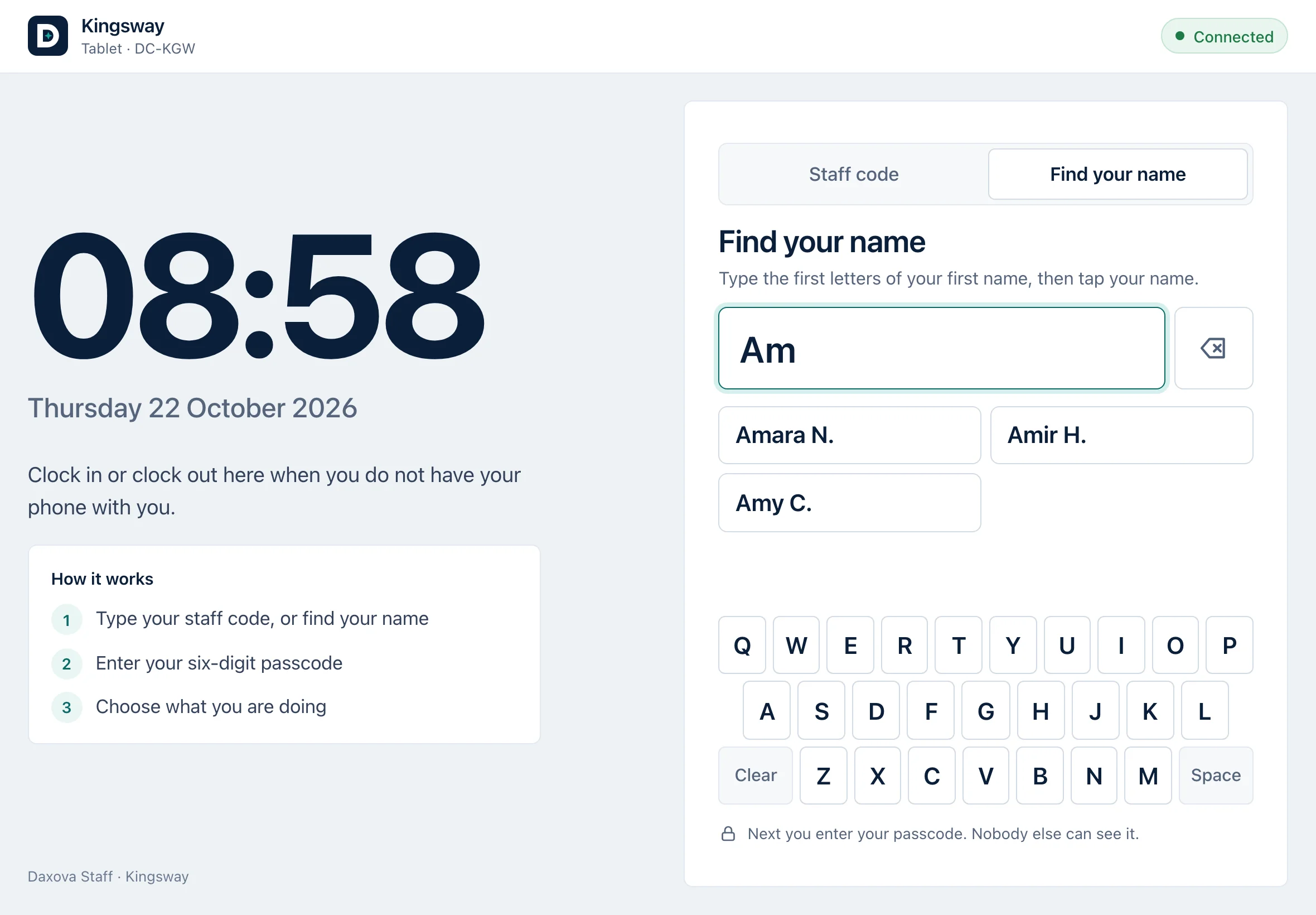
Find your name: the first letters typed, then three names to tap. Made-up names. -
NewLive
Fire roll call: off site by phone, and every roll call kept
- Off site (phoned): mark someone who is away from the premises and has told you so by phone. They count as accounted for.
- Past roll calls: every roll call that has ended, newest first, with who started it, how long it took and who marked whom.
- Download CSV: one row per person, ready for a fire officer.
WhereLivePast roll calls
Run a fire roll call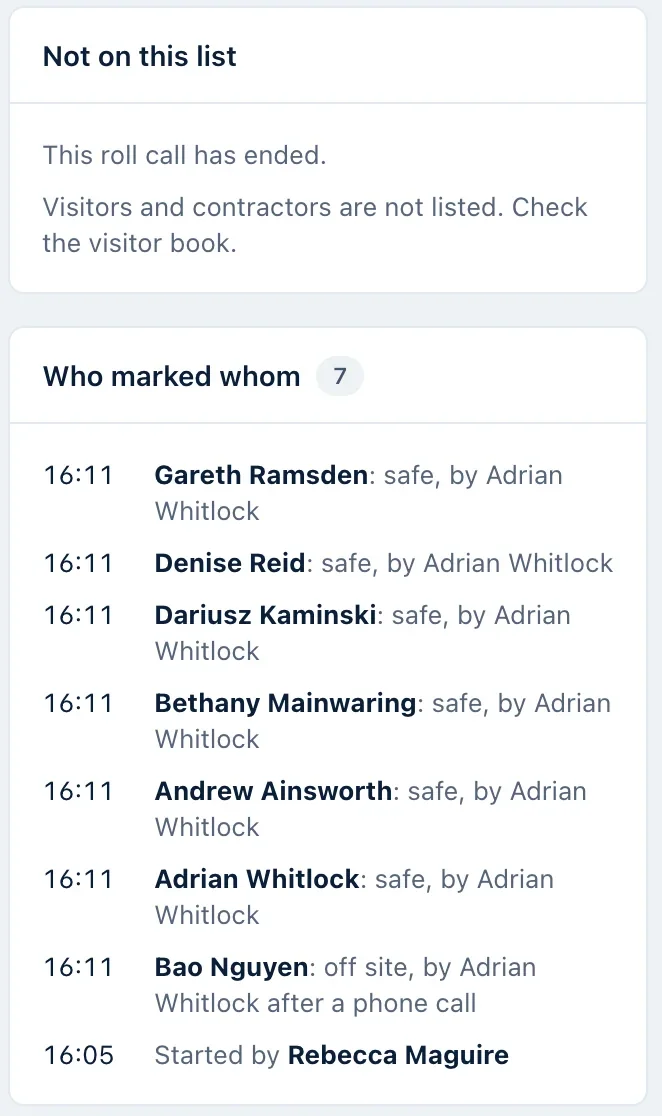
Who marked whom, kept with the roll call: one person off site after a phone call. Made-up names. -
NewAlerts
Two new alerts: long break, and tablet offline
- Long break: raised when somebody is still on break after the location’s limit (60 minutes as standard, anything from 10 to 240).
- Tablet offline: raised when a paired tablet at an open location goes quiet during its opening hours or while somebody is on shift (after 15 minutes as standard). It closes by itself when the tablet is back.
Each location can change the time, or switch either alert off, in Alert settings.
WhereInboxAlertsAlert settings
Handle alerts -
ImprovedRota
A refused shift now says what to do next
When the Rota screen, or Copy last week, refuses a shift, for example because it overlaps another shift, it now adds a plain line saying what to do about it.
-
ImprovedStaff records
New staff codes start DS-
Everyone added from now on gets a staff code like DS-04217. Codes already given stay exactly as they are.
-
ImprovedEverywhere
The Daxova Staff name and mark
The portal, its sign-in pages, the clock-in tablet and the app icons now carry the Daxova Staff name and mark.
-
SecurityHosting
Running on our own server in London
Daxova Staff now runs on its own server in London, at staff.daxova.co.uk, over HTTPS everywhere.
5 October 2026
Monday
2 changes
-
NewCompany
Messages from Daxova
Service notices and news from us now arrive in the portal, for Directors and HR.
WhereCompanyMessages from Daxova
-
NewCompany
Your data export, if you ever leave
When a company’s service is ending, its Director can make and download a zip copy of the company’s own records, including the record of every clock-in with its hashes. The copy leaves out clock-in photos, bank details and copies of documents. Everything is deleted from our live systems 30 days after the last day of service.
WhereCompanyYour data export
Your data when you leave
3 October 2026
Saturday
1 change
-
SecurityCompany
Support access, only with your Director’s approval
If we need to look at your account to help you, we ask first, with a reason and a length of 1, 4 or 24 hours. Only your Director can approve it, and a request that is not answered lapses after 48 hours.
- The look is read-only, and a banner shows on every page while it lasts.
- Every page we read is logged for your Director to see.
- Your Director can end it at any time.
WhereCompanySupport access
How support access works
2 October 2026
Friday
3 changes
-
NewTeam & access
Invite your managers, each with two-factor
Directors and HR can invite HR, area managers and location managers, with their role and their locations. Each person opens a one-time link that works for 72 hours, chooses a password, sets up two-factor with an authenticator app and saves ten recovery codes.
- Sign in with a recovery code when your phone is not with you.
- Reset two-factor for someone with a lost phone.
- Disable sign-in for someone who leaves, and keep their history.
- Nobody can give a role above their own, or change their own access.
WhereCompanyTeam & access
Invite your managers -
NewTeam & access
Link a manager’s sign-in to their own staff record
A manager who also works shifts can have their portal sign-in linked to their own staff record, so their clock-ins count as theirs. The record has to belong to that person, and the usual rules about changing your own record still apply.
-
ImprovedClock-in fixes
A Director’s own clock-in fixes tell HR
Nobody can change their own clock-ins, with one exception: a Director can make a clock-in fix on their own shift. It is recorded as a Director self-change, and HR is told.
1 October 2026
Thursday
1 change
-
SecurityYour data
A wall between companies, built into the database
Every table that holds company data now records which company each row belongs to, and the database itself refuses to show one company’s rows to another. This is PostgreSQL row-level security, switched on and forced for every company table, and an automated check tries to cross the wall from both sides.
Before October
Before this log starts, the core of Daxova Staff was already in place: clocking in on phones and the clock-in tablet, Today and Live, Rota, the Late & early, Total hours and Hour limits reports, Clock-in fixes and Record check. See every feature.
About this log
How this page works
We add an entry each time we release a change you can see, and we update this page with every release. Each entry is dated by the day the change was finished, and everything under October 2026 is live in Daxova Staff today.
Some features are switched on for each company: if you cannot find something listed here, email helpdesk@daxova.co.uk.
Want a change explained?helpdesk@daxova.co.ukWe aim to reply within one working day.
Try it with your own team.
£2 per staff member a month, everything included, with no VAT charged. Start with a free 30-day trial online in a few minutes, with no card.