UK payroll is here: £1 per staff member on payroll a month, free during your trial. See how it works

Time and attendance, HR and UK payroll

From clock-in to payslip, in one place.

Staff clock in on the staff app or your clock-in tablet. You see who is in at every location, plan the rota, decide holidays and run UK payroll. Every change is kept, with who made it, when and why.

Or take the product tour.

Short looping demo of the real portal, with made-up data. The Today screen shows 62 people on today’s rota across 12 locations, with 36 of 62 in now, 6 late and 28 missing clock-outs. The cursor opens Live, which shows who is in, on a break or not yet in at each of the 12 locations, and the fire roll calls.
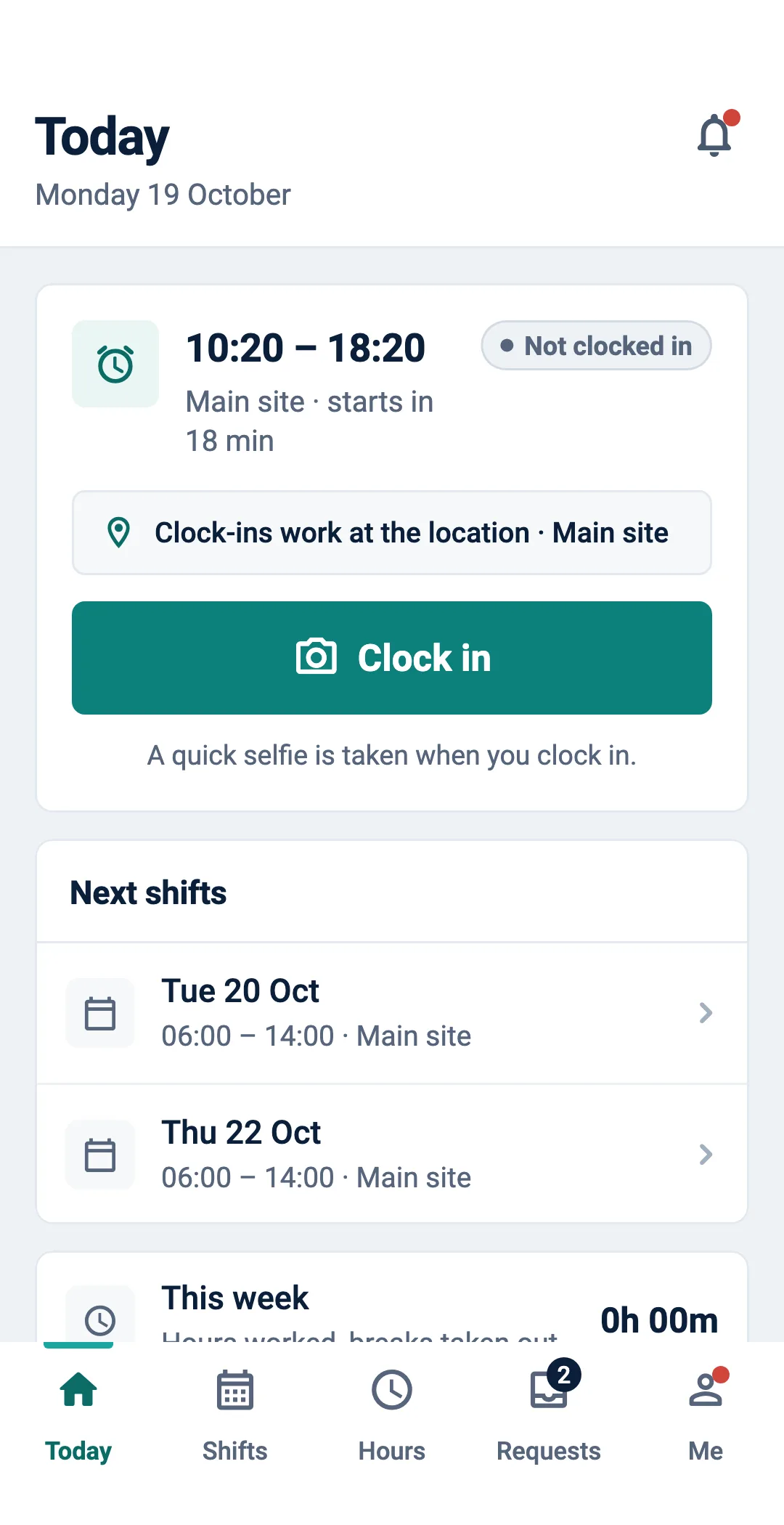
The staff app’s Today screen with made-up data: a 10:20 to 18:20 shift marked Not clocked in, the location rule, a Clock in button with a note that a quick selfie is taken, and the next shifts.

Who it’s for

Whatever your size, there’s a door for you.

  • Small businesses

    1 to 5 staff: a café, a salon, a trades firm, a small office.

    £12 a month covers up to 6 staff, and office users are free. It takes a few minutes to start, free for 30 days, with no card.

  • Growing and multi-site companies

    Several locations, managers, a payroll to run.

    Every location on one screen. Managers see only their own sites. Payroll is included, and Daxova sends the FPS and EPS to HMRC when you choose.

  • Accountants and payroll bureaus

    Payroll for more than one client.

    One login for every client’s payroll, with each client in charge of its own account. You earn 20% of what your clients pay us.

Guides by industry: care homes, hospitality, warehouses, retail, multi-site companies and student and visa staff.

Everything in one place

One system for the whole job.

Pick a part of the work and see the real thing. Every picture is the Daxova Staff portal with made-up data.

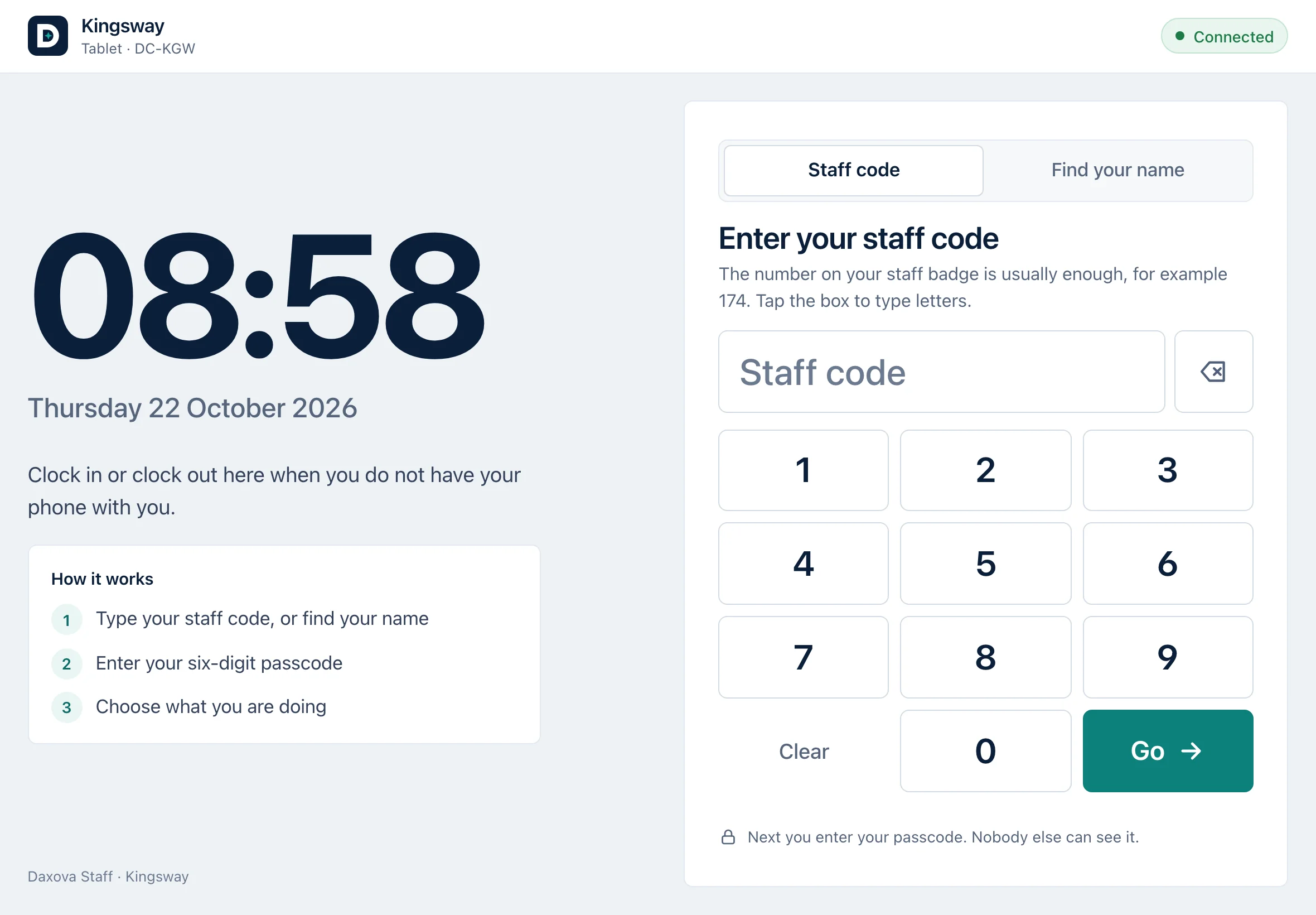
The clock-in tablet’s home screen with made-up data: a large clock, the date, how it works in three steps, and a staff code keypad with Staff code and Find your name tabs.
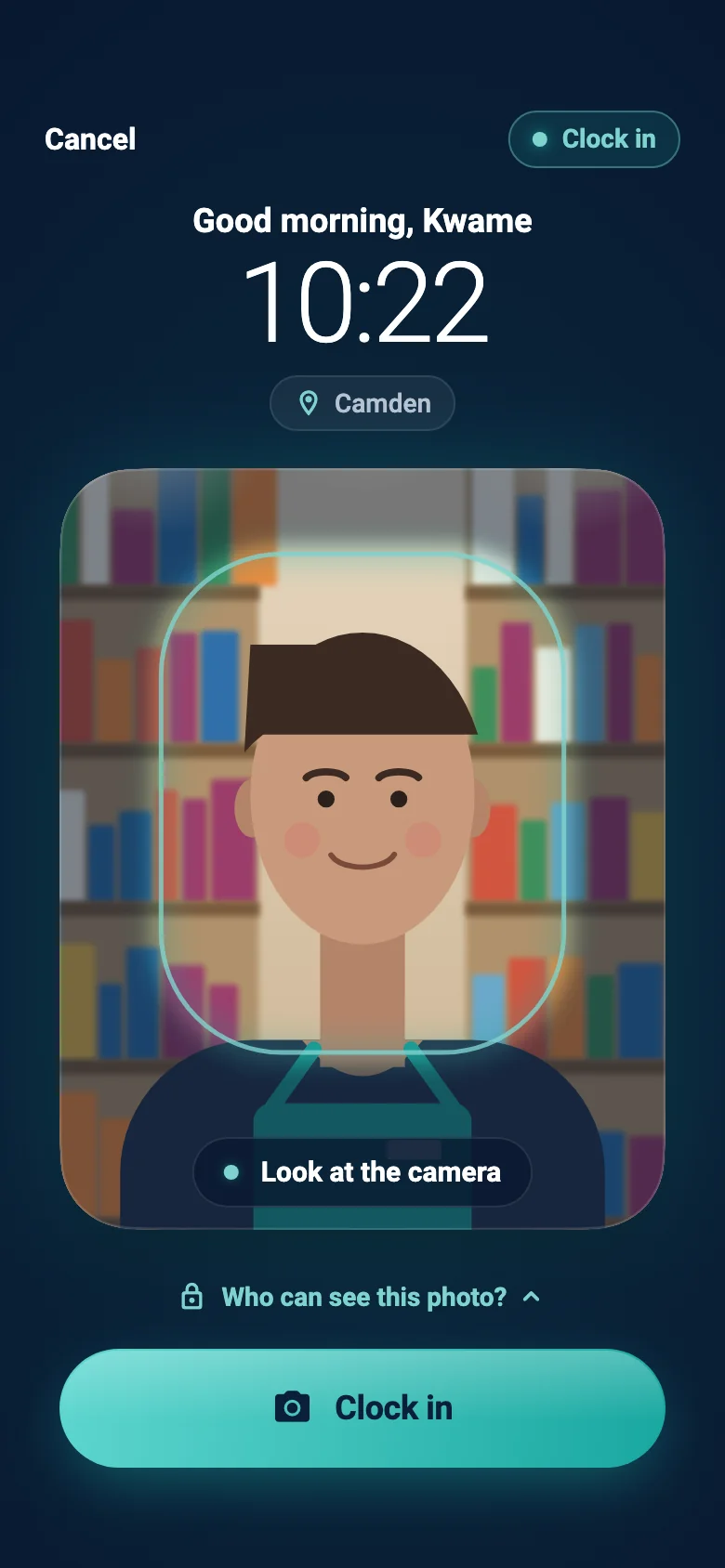
The staff app’s clock-in camera step with made-up data: a live front-camera photo frame, the time 10:22, the location, and a Clock in button.

Clocking in that you can trust

Staff clock in on the staff app or a clock-in tablet. Each clock-in is checked before it is recorded.

  • Their own phone, at your location, with a live photo
  • The clock-in tablet works in any browser, with a staff code and passcode
  • Nothing biometric and no face recognition
Learn more
Short looping demo of the real portal, with made-up data. On a location’s rota the cursor moves to next week, copies last week’s shifts into a draft, and presses Publish week. A list shows who will be told and the warnings to review, then Publish and tell staff confirms that 7 people were told.

Plan the week, then publish it

Build a draft that staff cannot see, check the warnings, and publish when you are ready.

  • Start from last week or an Excel template
  • Working-time warnings show beside the shift
  • Staff are told when you publish
Learn more
Short looping demo of the real portal, with made-up data. The Today screen shows 62 people on today’s rota across 12 locations, with 36 of 62 in now, 6 late and 28 missing clock-outs. The cursor opens Live, which shows who is in, on a break or not yet in at each of the 12 locations, and the fire roll calls.

See every location, right now

Who is in, on a break or not in yet, at every location, with a fire roll call ready.

  • One screen for all your locations
  • Late and not in yet at a glance
  • A named roll call you can print and keep
Learn more
Short looping demo of the real portal, with made-up data. A holiday request for 26 to 30 October shows days left now, 15 of 15, and days left if approved, 10, with who else is off that week. The cursor presses Approve holiday and a green message says the shifts are marked as off, not deleted, and the person has been told in the app.

Holidays and requests, decided in one click

Staff ask in the app. You see the balance and who else is off, then decide.

  • Days left now, and days left if you approve
  • Shift swaps and extra hours, with a manager’s say
  • Staff are told either way
Learn more
Short looping demo of the real portal, with made-up data. The Documents screen counts valid, missing, ending in 90 days and ended documents. The cursor filters to the two ending soon, a visa or permit and a food hygiene certificate, then asks for a new copy, and a green message says it was asked and will show in the app.

Right to work and documents, in date

Everyone’s checks, visas and certificates in one list, with the ones running out at the top.

  • Reminders 60 and 30 days before a document runs out
  • Ask for a new copy in one click
  • Staff send it from their phone
Learn more
Short looping demo of the real portal, with made-up data. The Pay runs list shows each run, its pay day, people, gross and net pay. The cursor opens a paid run for 1 to 30 September, where Check, Approve and Done are all ticked, £3,513.79 is paid to 2 people, and it was approved by the Director, with a payment list to download.

UK payroll from the same hours

Pay, tax, NI and pensions worked out from the hours you already record.

  • Payslips, the bank file and reports
  • Check, approve, then send to HMRC when you choose
  • A £1 add-on, free during your trial
Learn more
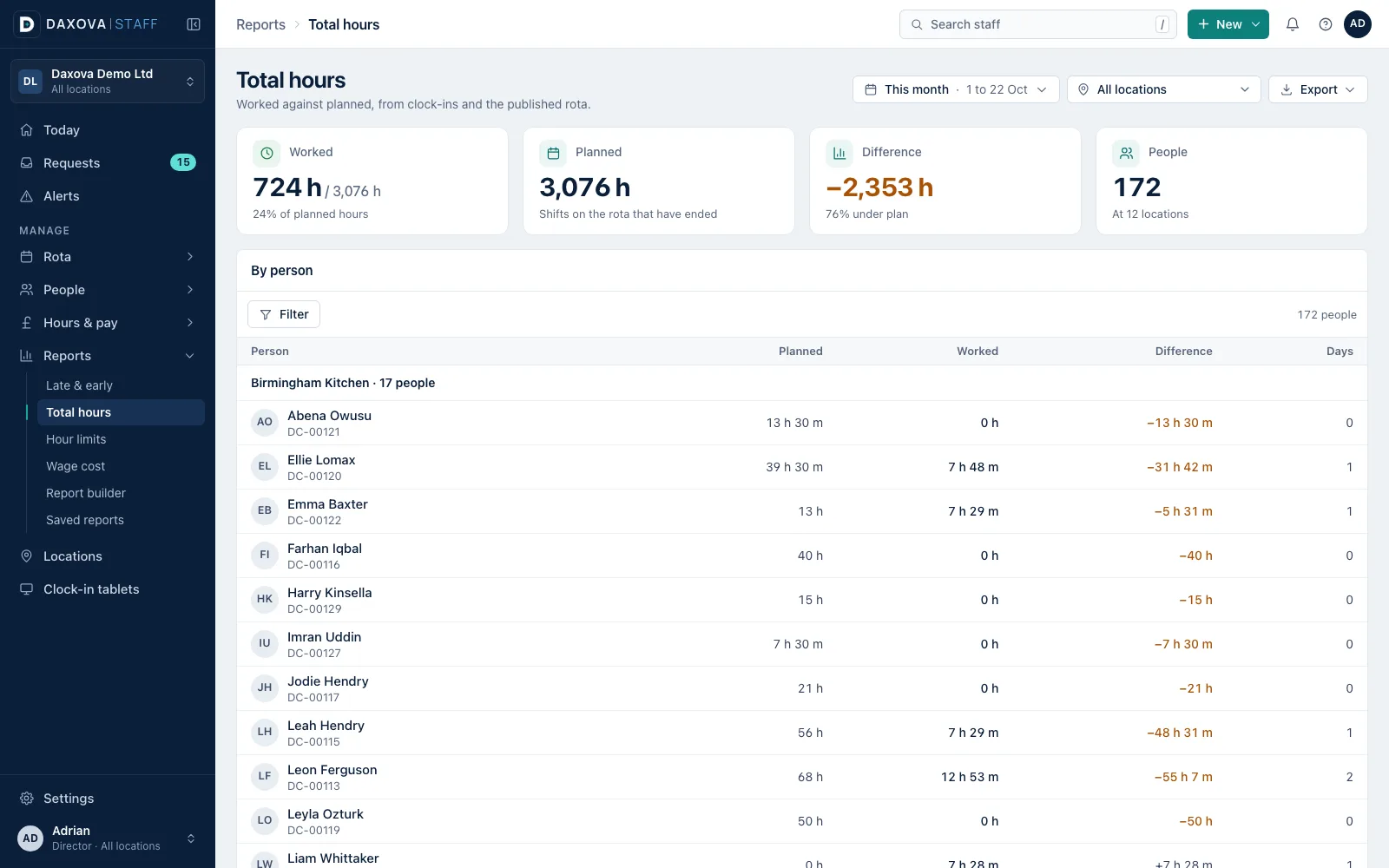
The Total hours report with made-up data: 724 hours worked of 3,076 planned across 172 people, and a table by person for Birmingham Kitchen showing planned, worked and difference.

Reports your accountant will ask for

Hours worked against the rota, late and early, wage cost and hour limits.

  • Excel and PDF downloads
  • Weekly hour limits for students and anyone with a cap
  • A monthly file with the free checking tool
Learn more

Why teams switch

Replace the patchwork.

Before Daxova

  • Paper timesheets and clocking-in books that someone has to type up
  • Spreadsheets for the rota, copied from last week and emailed round
  • A separate payroll tool, fed by hand at the end of the month
  • Holiday requests and shift swaps lost in WhatsApp messages
  • “Who is in right now?” answered by phoning around

With Daxova

  • Clock-ins arrive on their own, with a live photo
  • One rota, with working-time warnings, published in a click
  • Payroll runs from the same hours, with no re-typing
  • Requests land in one list and are decided in one click
  • Every location on one screen, right now

Clocking in

Was it really them, really there?

Each clock-in passes three checks before it is recorded.

  1. 1

    Their own phone

    Tied to the person’s own linked phone, so a friend can’t clock in for them.

  2. 2

    At your location

    Checked against the location’s WiFi or the phone’s position there. Location is read only at the moment of a clock-in.

  3. 3

    A live photo

    A front-camera photo at every clock-in, stored encrypted, with every viewing logged. No face recognition.

No smartphone? The clock-in tablet runs in any web browser, with a staff code and passcode, or Find your name.

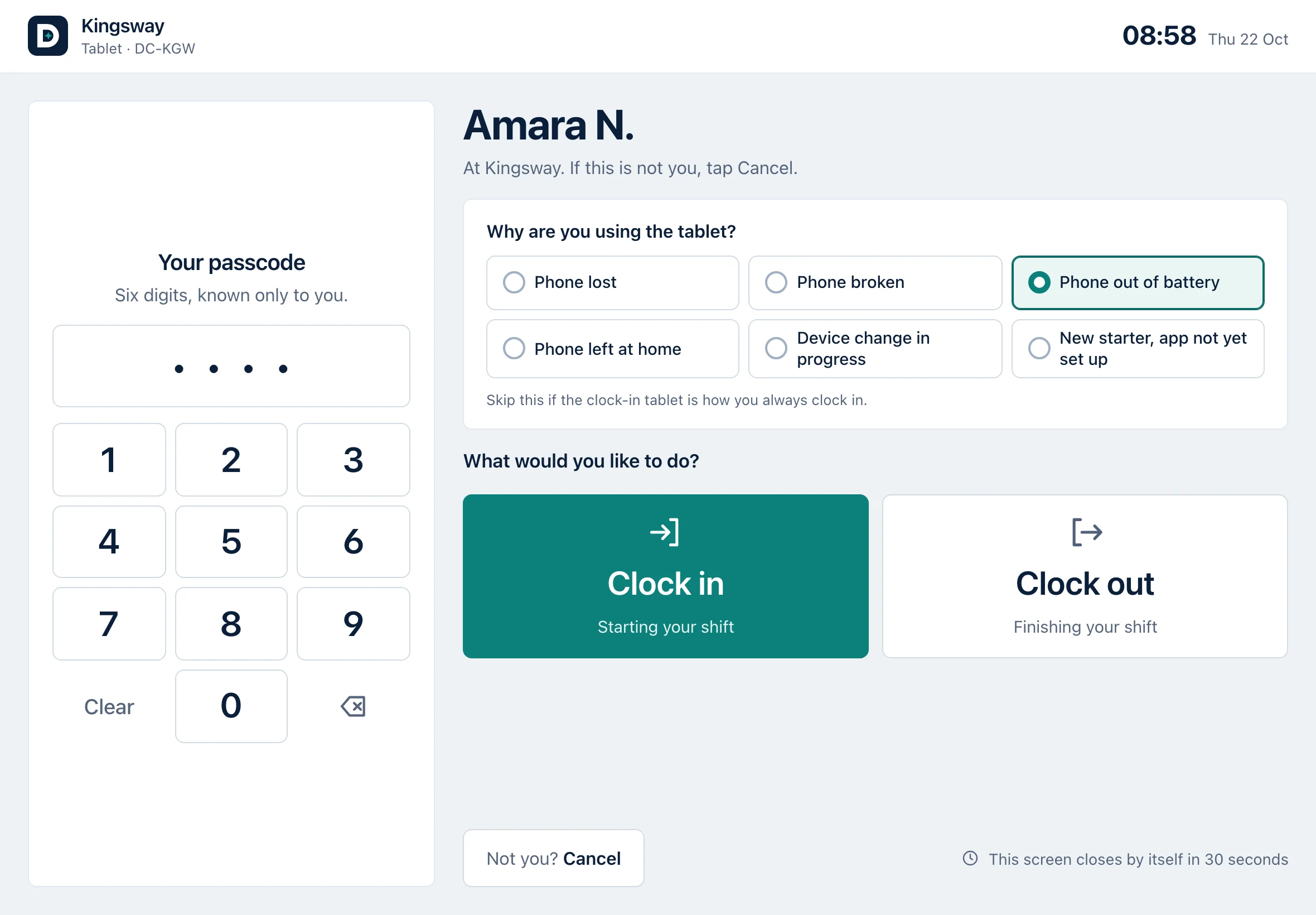
The clock-in tablet with made-up data: a passcode keypad, a person’s name, a question about why the tablet is being used, and large Clock in and Clock out buttons.
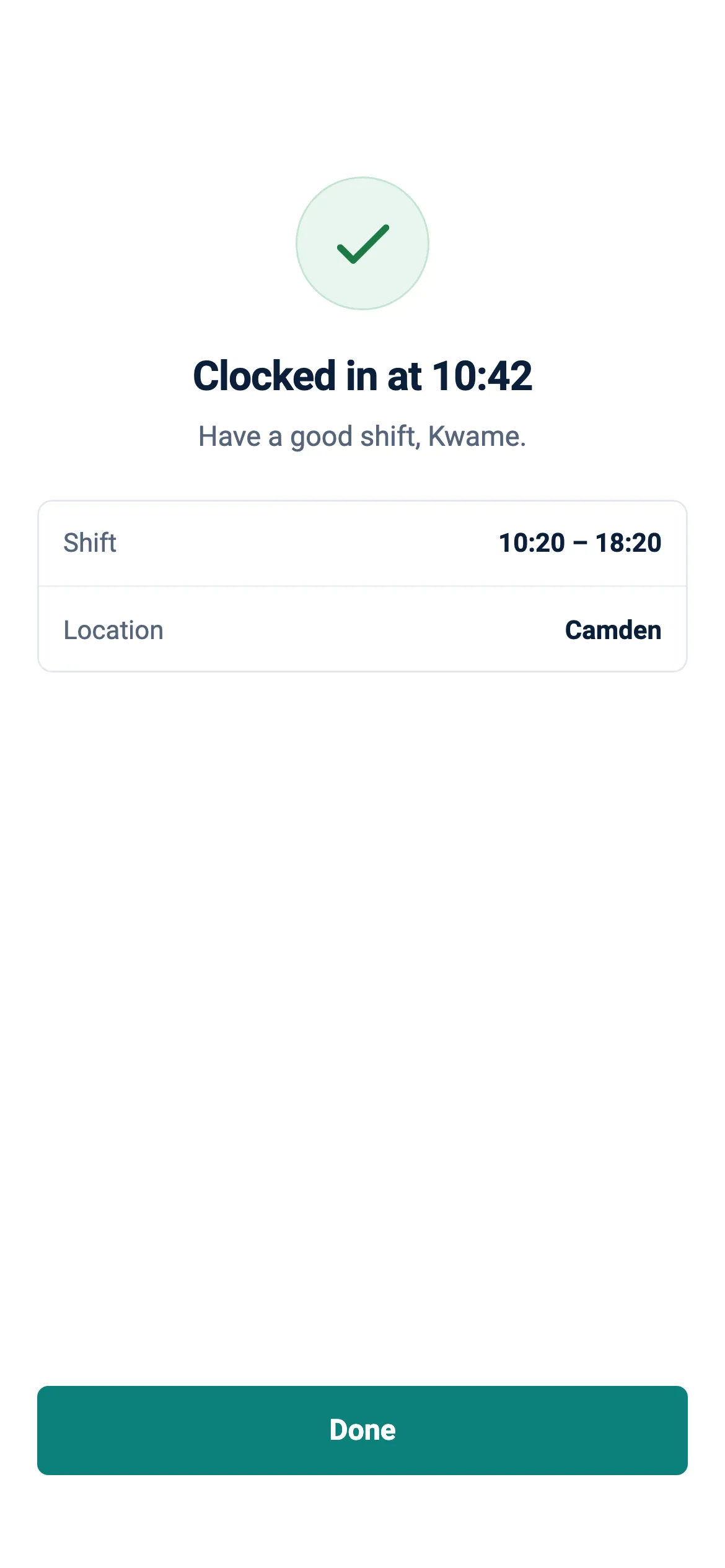
The staff app’s clock-in camera step with made-up data: a live front-camera photo frame, the time 10:22, the location, and a Clock in button. The staff app after clocking in, with made-up data: a tick, Clocked in at 10:42, the shift time 10:20 to 18:20, the location, and a Done button.

Rotas

Build next week in minutes. Check it before it goes out.

A weekly rota for each location, built as a draft that staff don’t see. Publish when you are happy.

  • Less than 11 hours’ rest
  • No day off in the week
  • More than 48 hours
  • Weekly hour limits
  • Availability and holidays
  • Right to work running out

Warnings never stop you. You decide, and the publish step shows exactly what staff will be told.

How rotas work
Short looping demo of the real portal, with made-up data. On a location’s rota the cursor moves to next week, copies last week’s shifts into a draft, and presses Publish week. A list shows who will be told and the warnings to review, then Publish and tell staff confirms that 7 people were told.
Copy last week, publish, and staff are told.

Holidays and requests

Staff ask in the app. You decide in the portal.

  • The balance is right there. Days left now, and days left if you approve.
  • See who else is off at that location before you say yes.
  • Swaps and extra hours go through the same list, with a manager’s say.
  • Nothing changes until someone decides, and staff are told either way.
How holidays work
Short looping demo of the real portal, with made-up data. A holiday request for 26 to 30 October shows days left now, 15 of 15, and days left if approved, 10, with who else is off that week. The cursor presses Approve holiday and a green message says the shifts are marked as off, not deleted, and the person has been told in the app.
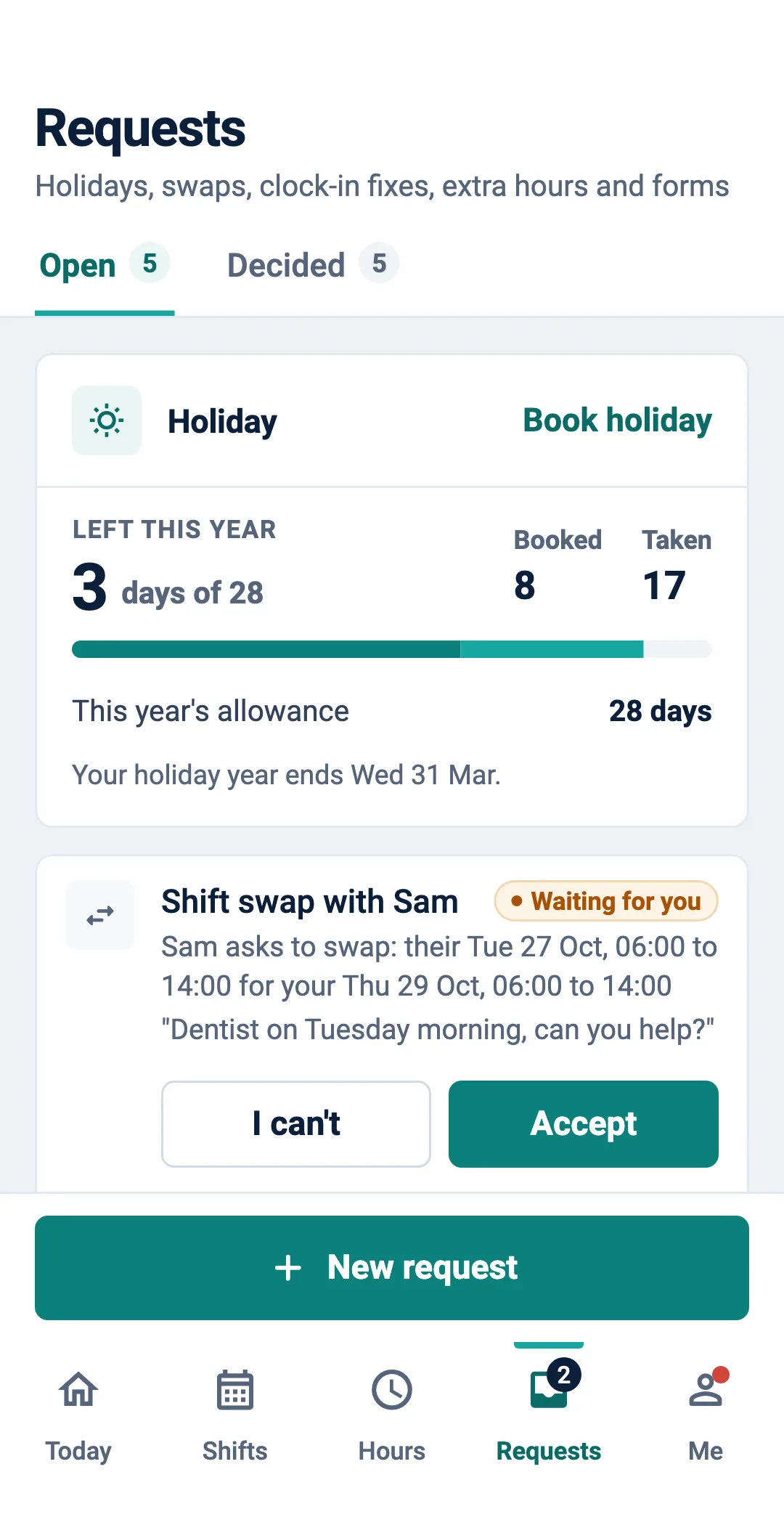
The staff app’s Requests screen with made-up data: a holiday request with 3 of 28 days left, 8 booked and 17 taken, a shift swap waiting for you with I can’t and Accept buttons, and a New request button.
Approve a holiday. The shifts are marked off, not deleted.

Documents and right to work

Everyone’s allowed to work, and you can prove it.

  • One list for right to work checks, visas and certificates, with the ones running out at the top.
  • Reminders 60 and 30 days before a document expires.
  • Ask for a new copy in one click. Staff upload it from their phone.
  • The check is recorded, never the share code.
How documents work
Short looping demo of the real portal, with made-up data. The Documents screen counts valid, missing, ending in 90 days and ended documents. The cursor filters to the two ending soon, a visa or permit and a food hygiene certificate, then asks for a new copy, and a green message says it was asked and will show in the app.
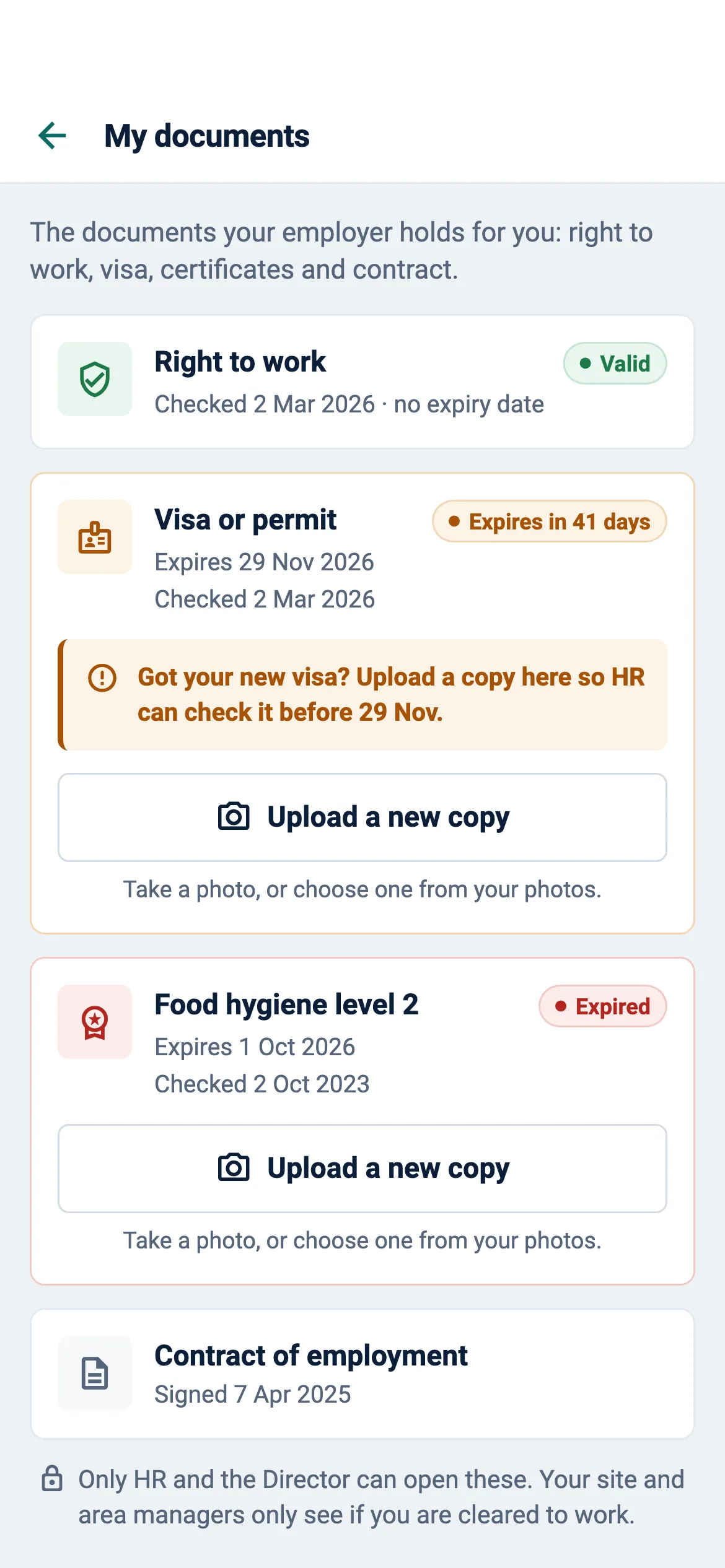
The staff app’s My documents screen with made-up data: a valid right to work check, a visa or permit that expires in 41 days with an Upload a new copy button, an expired food hygiene certificate, and a contract of employment.
Filter to what is ending soon, and ask for a new copy.

UK payroll

Payroll from the hours you already record.

No re-typing at the end of the month. The same clock-ins become payslips, the bank file and what HMRC needs.

Short looping demo of the real portal, with made-up data. The Pay runs list shows each run, its pay day, people, gross and net pay. The cursor opens a paid run for 1 to 30 September, where Check, Approve and Done are all ticked, £3,513.79 is paid to 2 people, and it was approved by the Director, with a payment list to download.
The pay runs list, then a finished run. Made-up data.
  • Pay and tax

    Weekly to monthly pay, tax codes including Scottish and Welsh, National Insurance for every category and for directors, and student and postgraduate loans.

  • Statutory pay

    SSP, SMP and SPP worked out from the dates and the rules, with the right rates for the year.

  • Pensions

    Auto-enrolment worked out for you, with contribution files for NEST, The People’s Pension, Smart Pension and others.

  • Paperwork

    Payslips, the bank file, the P32 and a journal. Benefits in kind payrolled, and the P11D at the year end.

Sent to HMRC when you choose.

Daxova sends your FPS and EPS to HMRC once you add your HMRC Online login and switch on sending for real. Or your accountant files from the details Daxova makes. Daxova has passed HMRC’s External Test Service, including the full 12-month scenario. Our PAYE Recognition application is in progress.

How UK payroll works
  1. 1

    Hours come across

    The hours Daxova has recorded fill the pay period.

  2. 2

    Check the pay run

    Look at every payslip and the checks Daxova raises, before anything is locked.

  3. 3

    Approve

    The pay period locks, and the payslips, bank file and reports are made.

  4. 4

    Send to HMRC

    Send for real when you choose, or hand your accountant the details.

A full history

Every change on record. The original is never lost.

  • Fix mistakes the right way. A manager adds a correction with a reason. The original stays.
  • Who, when and why. Every change is kept with the person who made it, the time and the reason.
  • Checked every night. Each location’s history is chained together, so a missing or altered entry shows up.
  • Your accountant can check it. A monthly file and a free checking tool let them verify the hours themselves.
How we keep the history honest
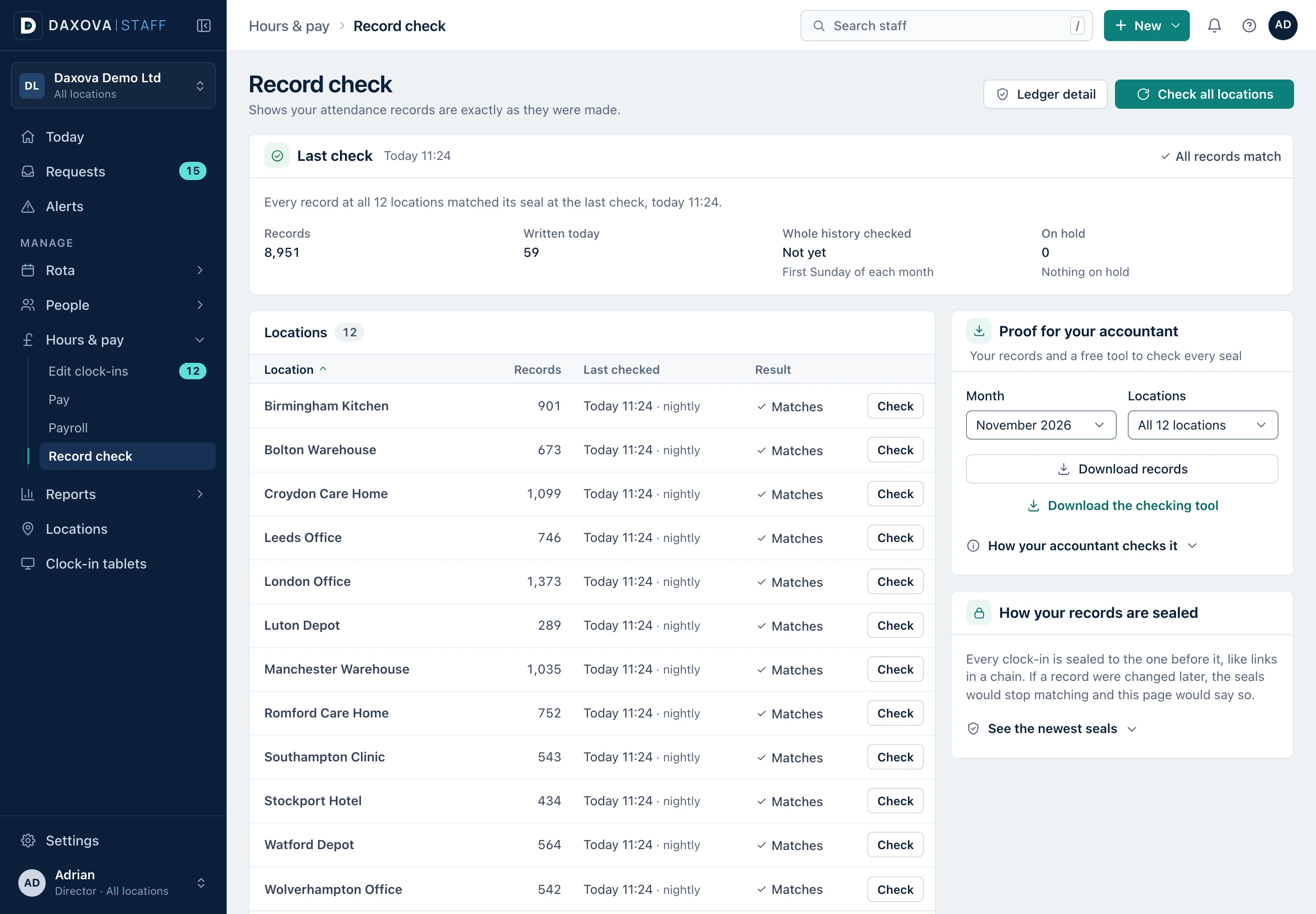
The Record check screen with made-up data: every record at all 12 locations matched its seal at the last check, 8,951 records in all and 59 written today. A table lists each location, such as Birmingham Kitchen with 901 records, all matching. A box offers a monthly records download and a free checking tool for your accountant.
Record check: every location, matched to its seal.

Reports and alerts

What to hand your accountant. What needs you today.

  • Hours worked against the rota, late and early, and wage cost, by person and by location.
  • Weekly hour limits for students and anyone with a cap, before the week starts.
  • Excel and PDF downloads, and a monthly file with the free checking tool.
  • Alerts say what happened and where, such as no clock-out after the shift ended. They wait for an explanation, never blame.
All the reports
The Total hours report with made-up data: 724 hours worked of 3,076 planned across 172 people, and a table by person for Birmingham Kitchen showing planned, worked and difference.
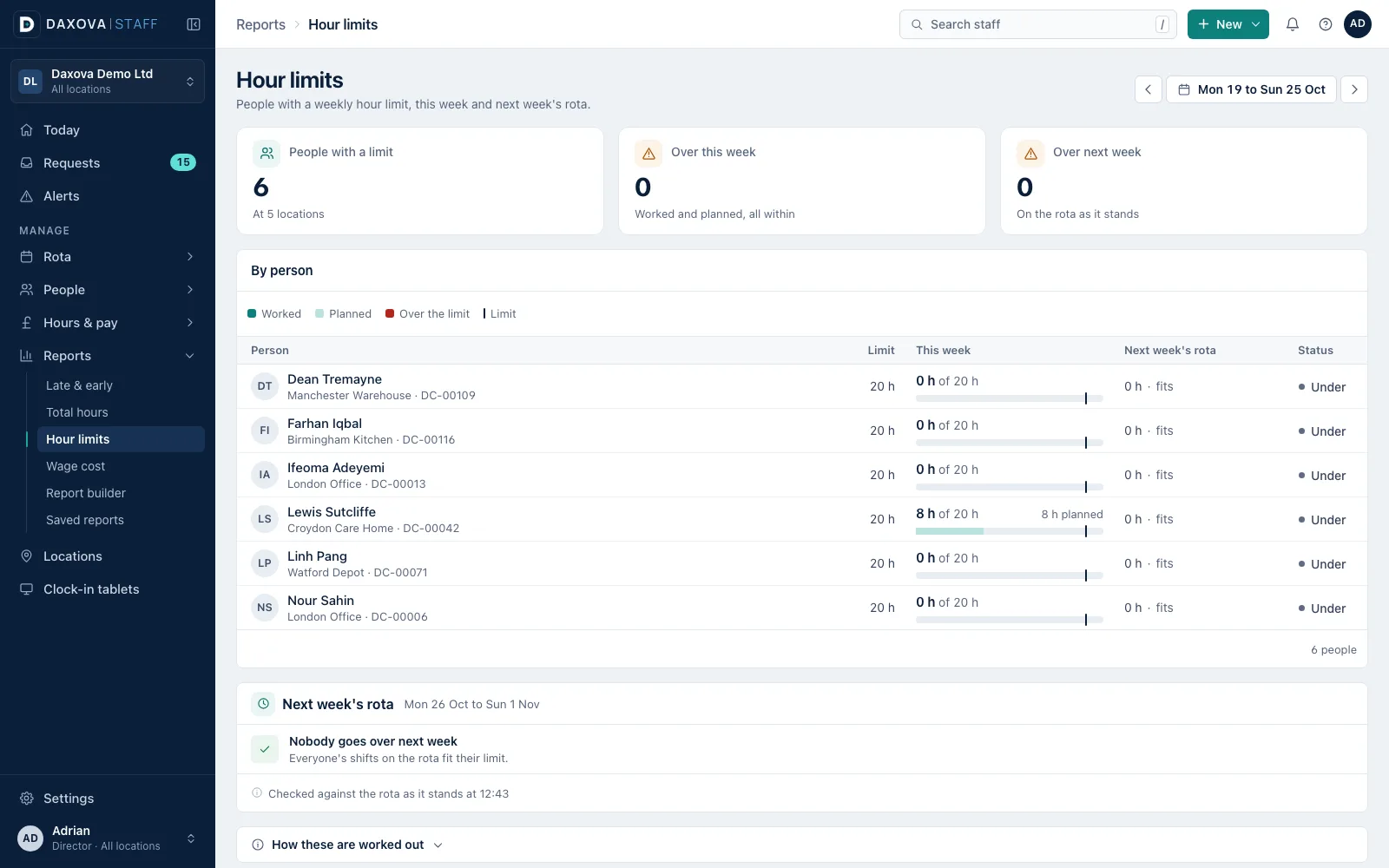
The Hour limits report with made-up data: 6 people with a weekly limit, none over this week, and each person’s worked and planned hours against a 20 hour limit.
Total hours, and weekly hour limits.

The staff app

An app your team will actually use.

Clock in, see shifts, ask for holiday and send documents, all from their own phone.

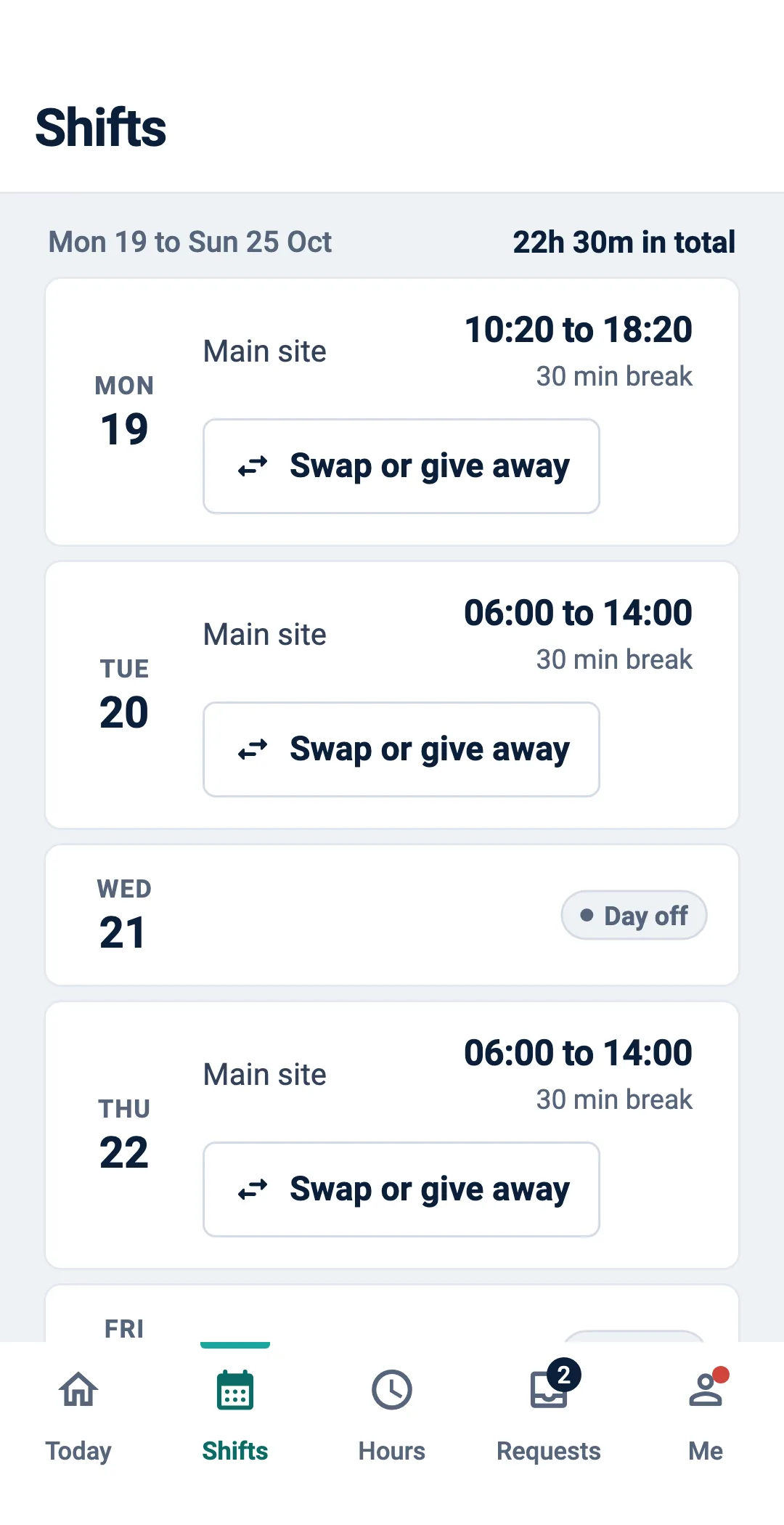
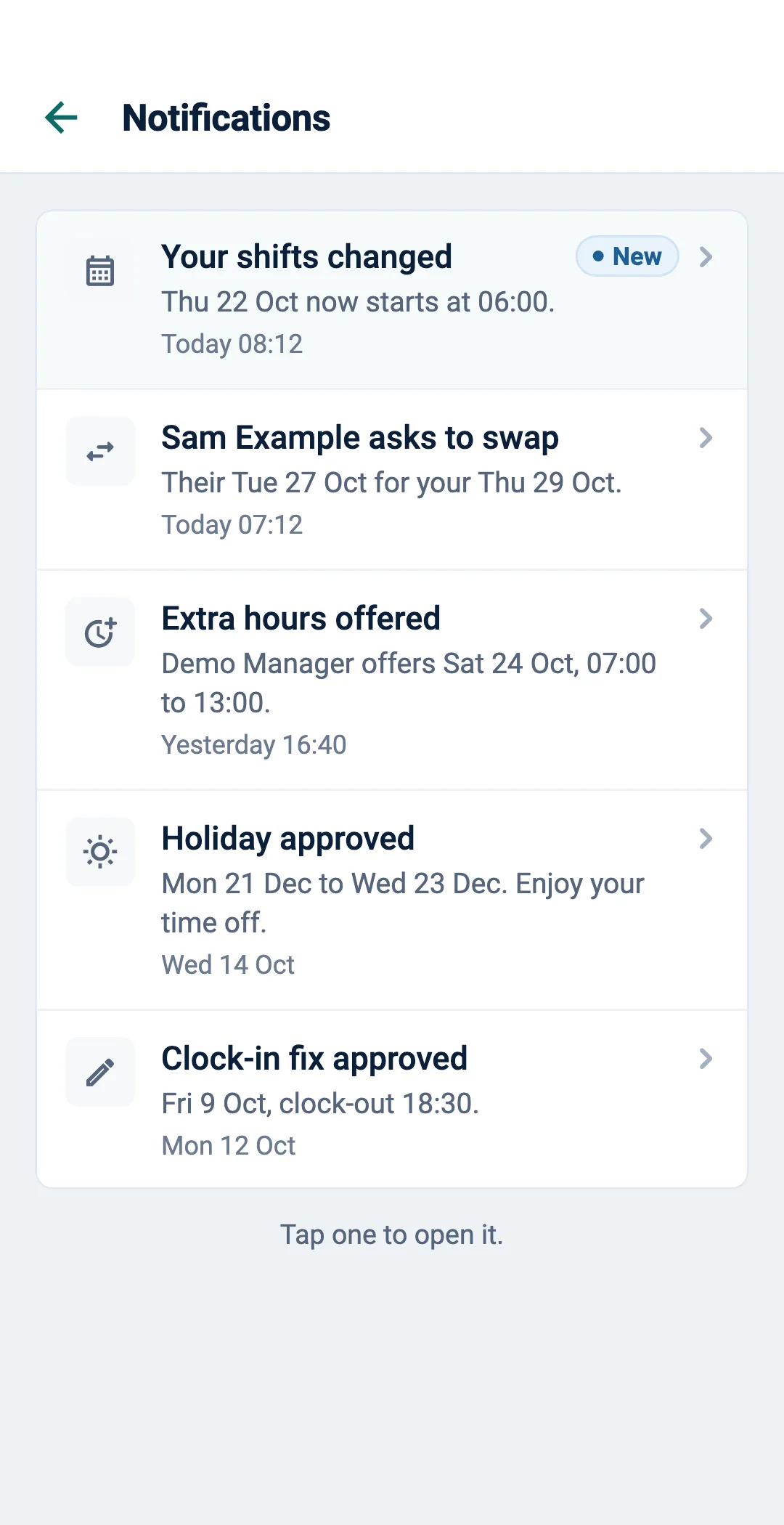
The staff app’s Shifts screen with made-up data: the week from Monday 19 to Sunday 25 October, 22 hours 30 minutes in total, each shift with its location, times and a Swap or give away button. The staff app’s Today screen with made-up data: a 10:20 to 18:20 shift marked Not clocked in, the location rule, a Clock in button with a note that a quick selfie is taken, and the next shifts. The staff app’s Notifications screen with made-up data: shifts changed, a swap request, extra hours offered, holiday approved and a clock-in fix approved.
  • Clock inOne tap, with a quick live photo.
  • Shifts and hoursNext shifts, and hours worked.
  • Swaps and extra hoursSwap, give away or put a name forward.
  • DocumentsSend a new copy when one runs out.
  • NotificationsTold when shifts change or a request is decided.
  • HolidayDays left, and book in a few taps.

Where it is today. The Android app is in testing. The iPhone app is not in the App Store yet. The clock-in tablet works in any web browser from day one, and staff choose their own passcode from a link.

For accountants and payroll bureaus

Every client’s payroll. One login.

  • This week’s pay days and HMRC deadlines for every client, in one list.
  • Each client stays in charge of its own account and data, and sees every visit from your practice in its own log.
  • Your own practice is free, and you earn 20% of what your clients pay us.
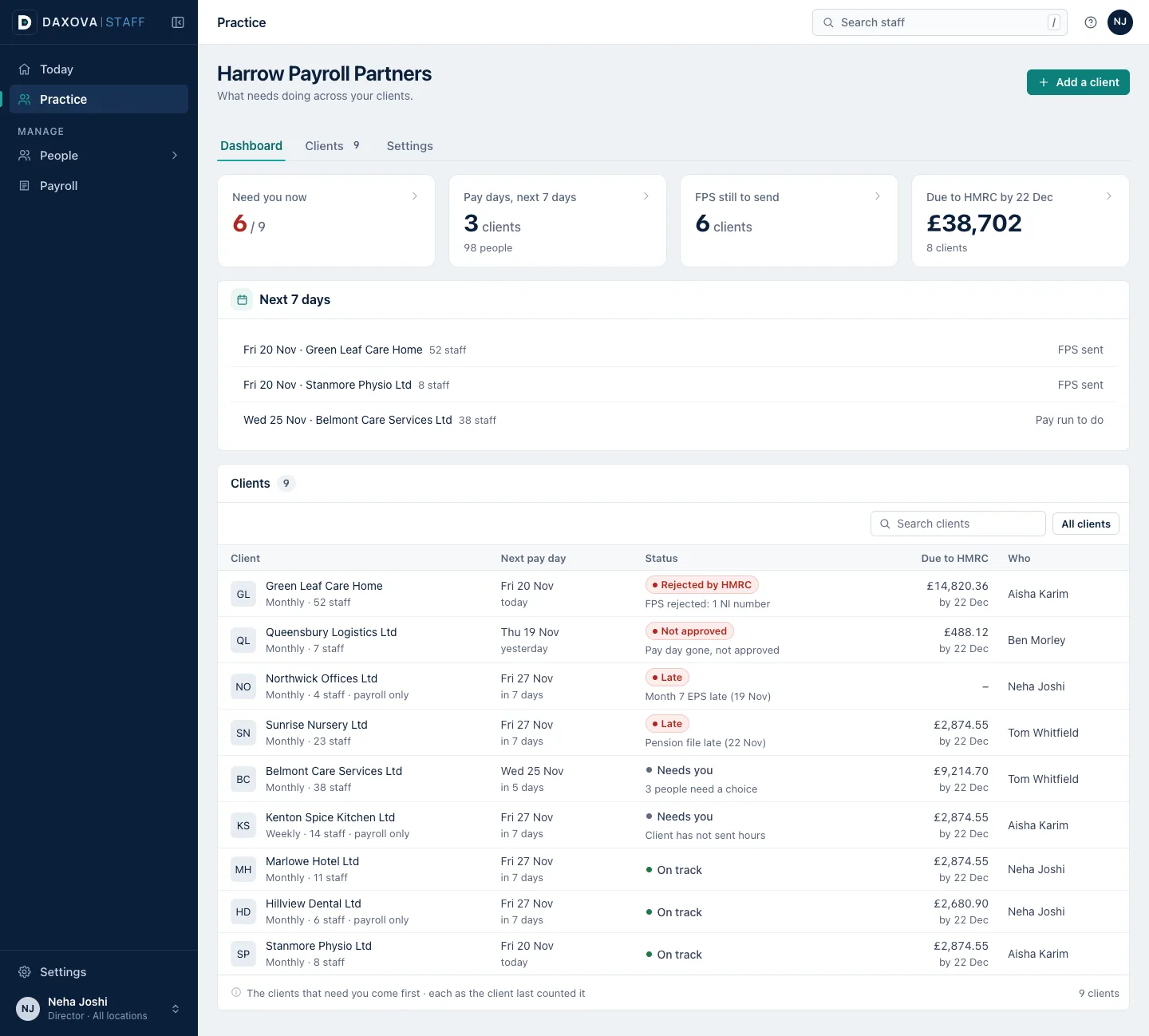
The practice dashboard with made-up data: four figures (6 of 9 clients need you now, pay days for 3 clients in the next 7 days, 6 FPS still to send) and a list of clients with their next pay day and HMRC deadline.
The practice dashboard, with made-up clients.

Trust and security

Built for the most private things a company holds.

Contracts, bank details and clock-in photos need care. Here is how we look after them.

  • Kept in the UK

    Your records, clock-in photos and encrypted backups are kept in London, run by a UK company.

  • Private details locked twice

    National Insurance numbers, bank details, clock-in photos and document copies are encrypted again with AES-256-GCM.

  • Two-factor, always

    Every office user signs in with a password and a code from an authenticator app. No exceptions.

  • Nightly encrypted backups

    Copied off the server every night. The last restore test passed on 1 November 2026.

  • You approve support access

    If we ever need to look inside your account, one of your Directors approves it first, and every page we read is logged.

  • Privacy done properly

    A staff privacy notice each person reads in the app, and a Data Processing Agreement for your company.

Read the security pageData Processing AgreementPrivacy notice

The facts, plainly

  • £2per staff member a month, with UK payroll £1 more
  • 30 daysfree to try it, with no card
  • 6,900+automated checks before every release
  • 12 monthsof HMRC’s test scenario passed on its External Test Service

Pricing

One price. Payroll is the only add-on.

£2 per staff member a month

£12 minimum, which covers up to 6 staff. Office users who only use the web portal are free.

  • Clocking in, live view and fire roll call
  • Rotas, holidays and documents
  • Reports and a full history of every change
  • UK payroll: £1 more per person on payroll, free during your trial

10 staff cost £20 a month, or £30 with all ten on payroll.

30-day free trial, no card, nothing charged automatically. No VAT charged, no contract, no set-up fee.

Founding 50

£1.50 per staff member a month

£9 minimum. For the first 50 companies that start a trial before 31 March 2027. Your price is locked until 31 March 2030.

  • A 60-day free trial
  • Set-up done with our team
  • A direct line to the people who build it
See the offer

Questions

Straight answers

Who counts as a staff member?

Only people on your staff list that month: anyone employed on at least one day of the month, including people who joined or left part way through, and anyone who punched in. Owners, HR and managers who only use the web portal are free.

Is it too much for a very small team?

No. The minimum is £12 a month, which covers up to 6 staff, and owners and managers who only use the web portal are free. Start a free trial, add your people and your first location, and you can be clocking in the same day. There is no card for the trial.

Is there a contract, a set-up fee or VAT?

None of the three. You pay monthly and can cancel any time. We set up your locations and import your staff list with you at no charge. DAXOVA LIMITED is not VAT-registered, so the price you see is what you pay.

What happens when my trial ends?

Nothing is charged automatically. We ask whether you want to carry on. If you don’t, we export your data for you and close the account.

Can a clock-in be changed?

A manager can fix a mistake by adding a correction with a reason. The original is always kept, with who made the change and when. If a Director changes their own clock-ins, HR gets an alert.

Can staff clock in from home?

No. Each phone clock-in is checked against your location’s WiFi or the phone’s position there. A phone’s location is read only at locations that check it, at the moment someone clocks in or out, so nobody is tracked in between. Clocking in needs the location’s WiFi or mobile data.

Does Daxova run payroll and send it to HMRC?

Yes. UK payroll is an add-on: £1 per staff member on payroll a month, free during your trial. Daxova works out pay, tax, NI, student loans, statutory pay and pensions, and makes payslips, the bank file and the reports, including the P32 and a journal. Daxova sends your FPS and EPS to HMRC when you choose: add your HMRC Online login and switch on sending for real. Or leave it to your accountant, who files from the details Daxova makes. Our HMRC PAYE Recognition application is in progress.

Do I need to buy any hardware?

No. The clock-in tablet runs in a web browser on a tablet or screen you already own, and staff use their own phones.

Is the staff app in the App Store and Google Play?

Not yet. The Android app is in testing, and the iPhone app is not in the App Store yet. The clock-in tablet works in any web browser today, and staff without the app choose their passcode from a link, so your team can clock in from the first day of your trial.

Where is my data kept?

In London. Daxova Staff runs on our own server in DigitalOcean’s London data centre, and your records, clock-in photos and encrypted backups are kept there. Two Google services can handle some information outside the UK: our company mailbox, and phone notifications once they are switched on.

Something else on your mind? Email sales@daxova.co.uk and we’ll reply within one working day.

Try Daxova Staff free for 30 days. No card needed.