See who is in at every location right now, give each manager exactly the locations they look after, and keep one record for staff who work at more than one.
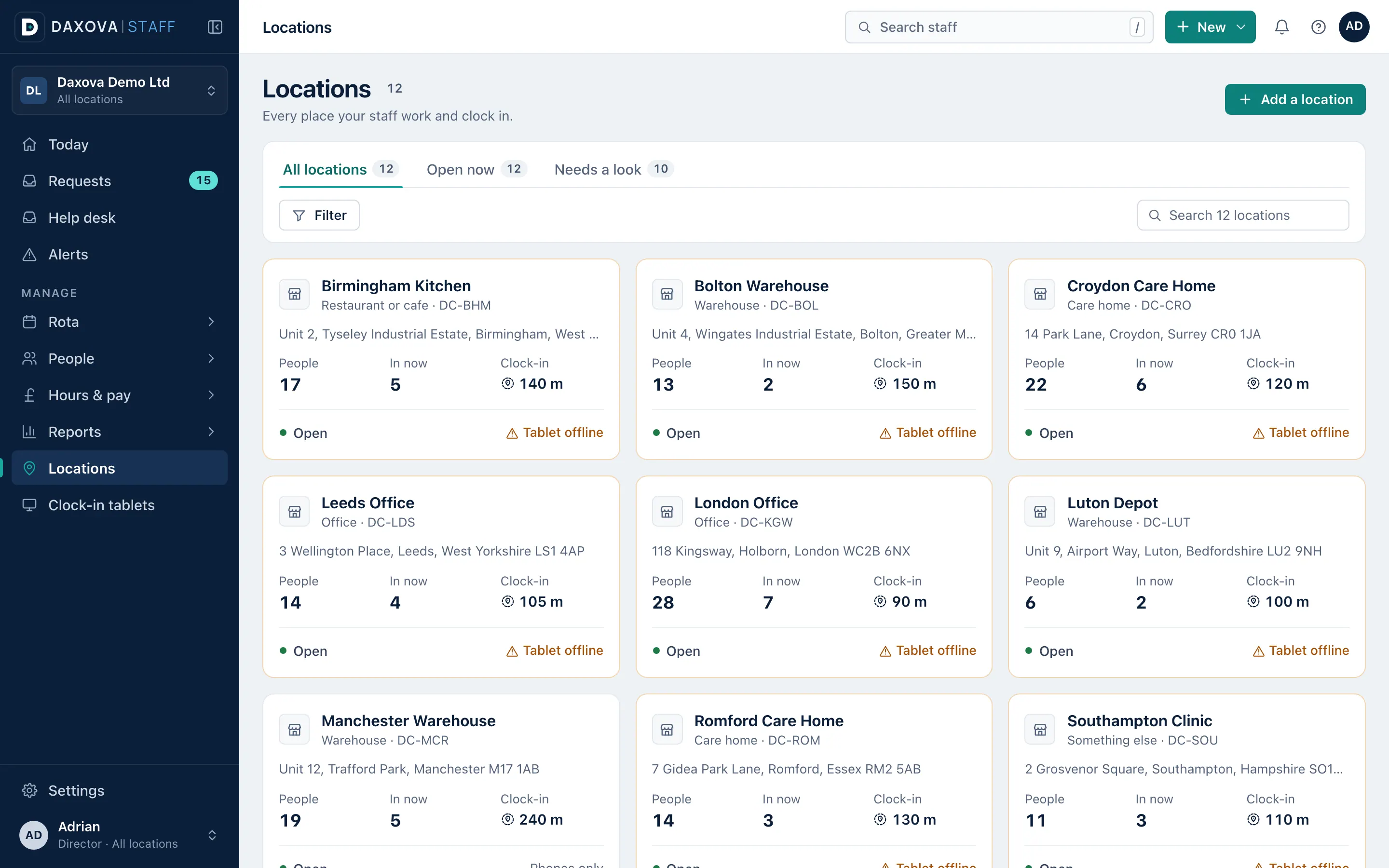
Twelve demo locations: people, who is in now, the clock-in rule and tablet status. Made-up data.
£0per location. Add as many as you like.
4office roles: Director, HR, Area Manager and Site Manager
10clock-in tablets a location, each with its own name
1staff record, however many locations someone works at
Every location at a glance
Ringing round at nine to find out who turned up? Not any more.
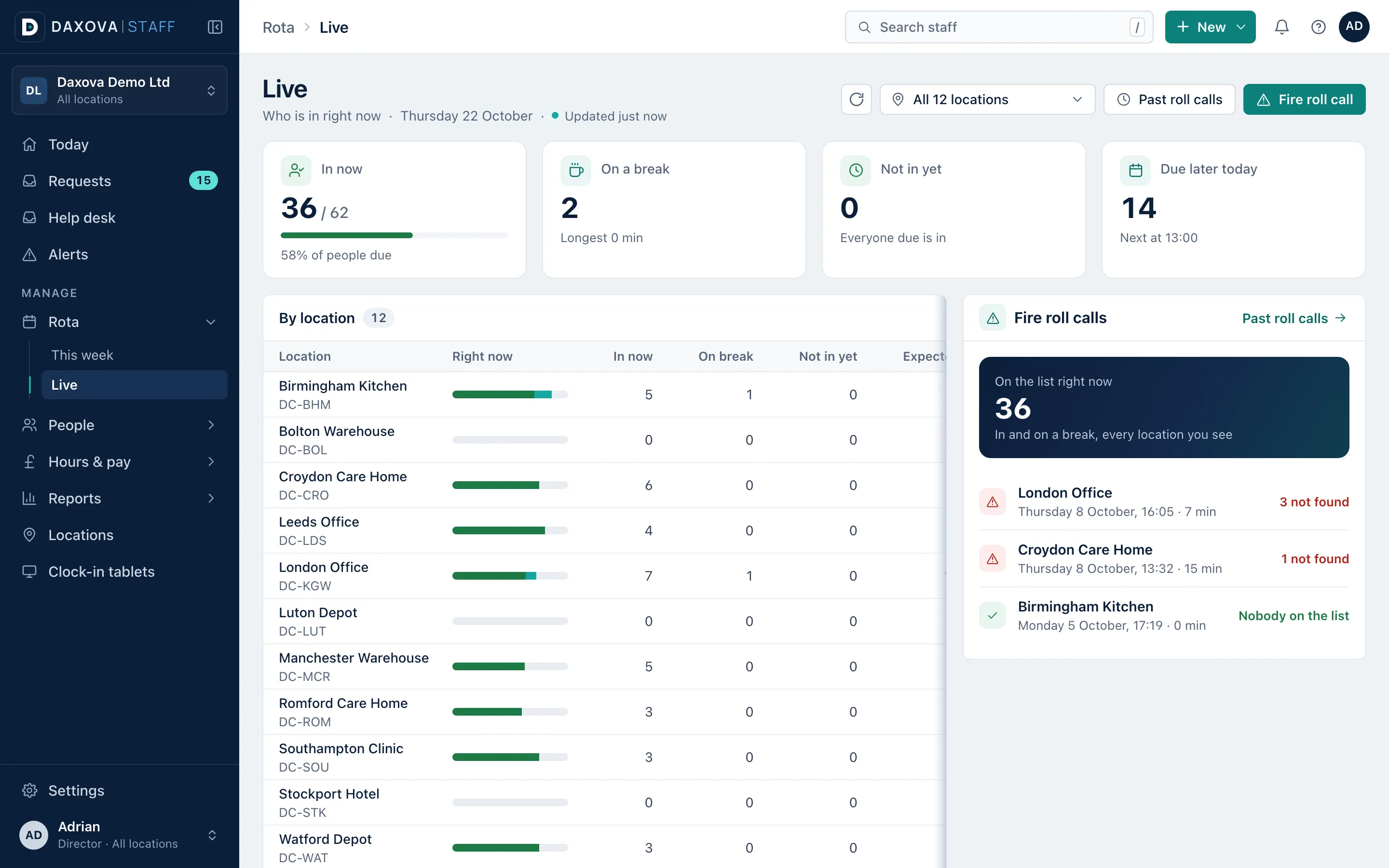
Today shows who is in, late and on break across every location, and what needs your attention, most urgent first. Choose one location at the top to see just that one. Live shows who is in at each location, person by person, every 30 seconds, in a browser on a computer or a phone.
Today, for all your locations. Clock-outs to complete, shifts started without a clock-in, and locations with no shifts set for next week
Live, one location at a time. Who is in now, on a break and not in yet, how each person clocked in, and anyone who never clocked out
When the alarm goes, start a fire roll call for that location from Live
A shared login, or a spreadsheet emailed round every Monday? Neither.
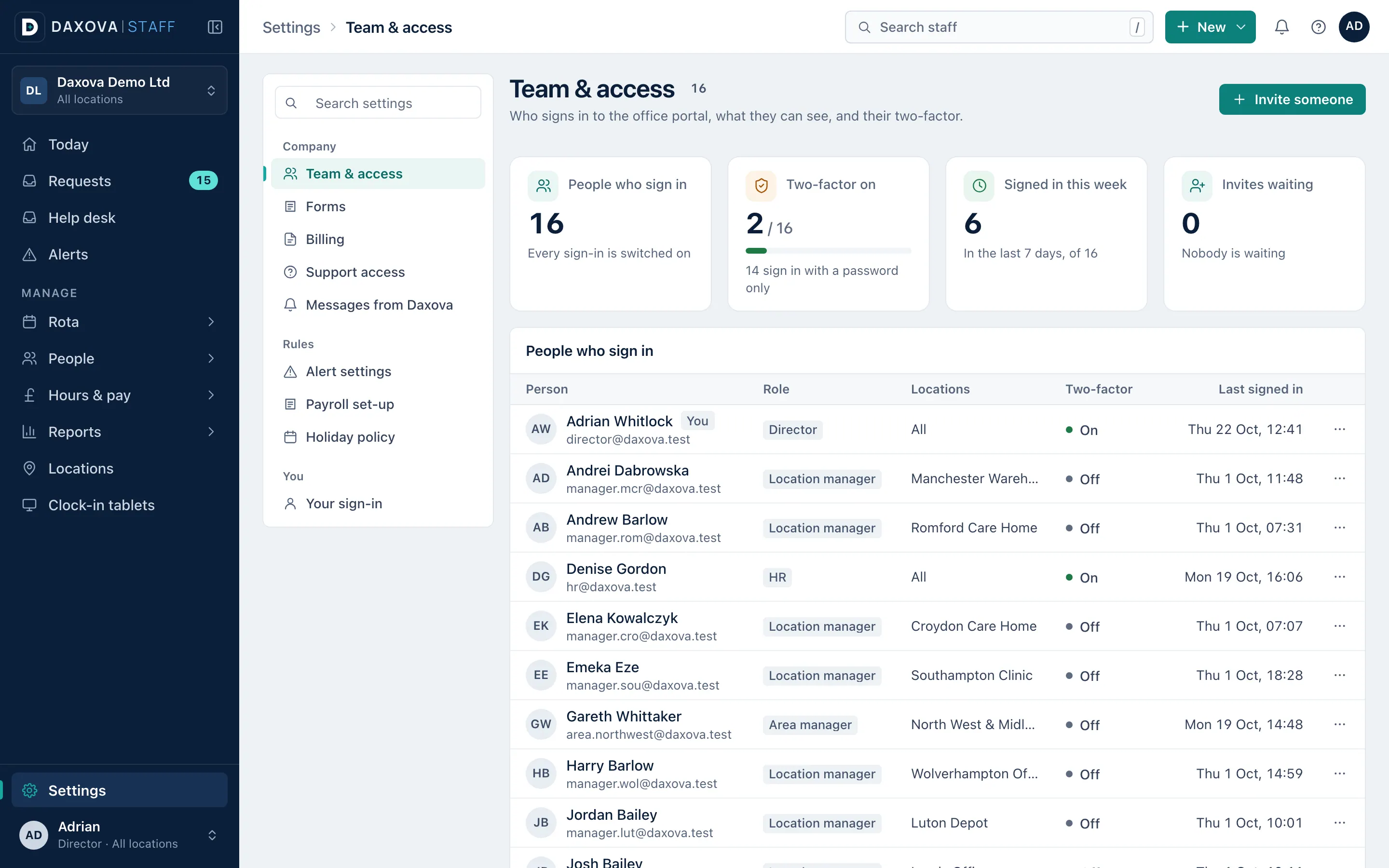
Directors and HR see every location. An Area Manager sees the locations in their area, and a Site Manager their own. The server checks every request against the locations each person looks after, so it is not just hidden in the menu.
Their own two-factor sign-in, with 10 recovery codes
Only their locations, on every screen and in every report
Wage cost as location totals for managers; HR and the Director also see each person’s cost
You can only give a role at or below your own
Director and HREvery location
Area ManagerThe locations in their area
Site ManagerTheir own location
You choose each manager’s locations, or their areas, when you invite them.
staff.daxova.co.uk
Team and access: who signs in, their role, two-factor and last sign-in. Made-up data.
Each location runs its own way
Its own hours, its own clock-in rule, its own alerts.
A location open late and one open on weekdays do not have to share the same rules. A Director or HR adds locations, opens them and sets each one up.
Opening hours and bank holidays for England and Wales, Scotland or Northern Ireland. Holiday requests, bank holiday pay and wage cost follow it
Clock-in rule: only on its WiFi, only near it, or anywhere. Every change needs a reason, kept with your name
Alert settings by location. Long break and Tablet offline can be switched off for one location
Up to ten tablets, each with its own name. Pairing a new one leaves the others working
staff.daxova.co.uk
One location’s tabs: clock-in rule, working hours and tablets. Made-up data.
One record, however many locations
Their hours sit on two sheets, and nobody adds them up.
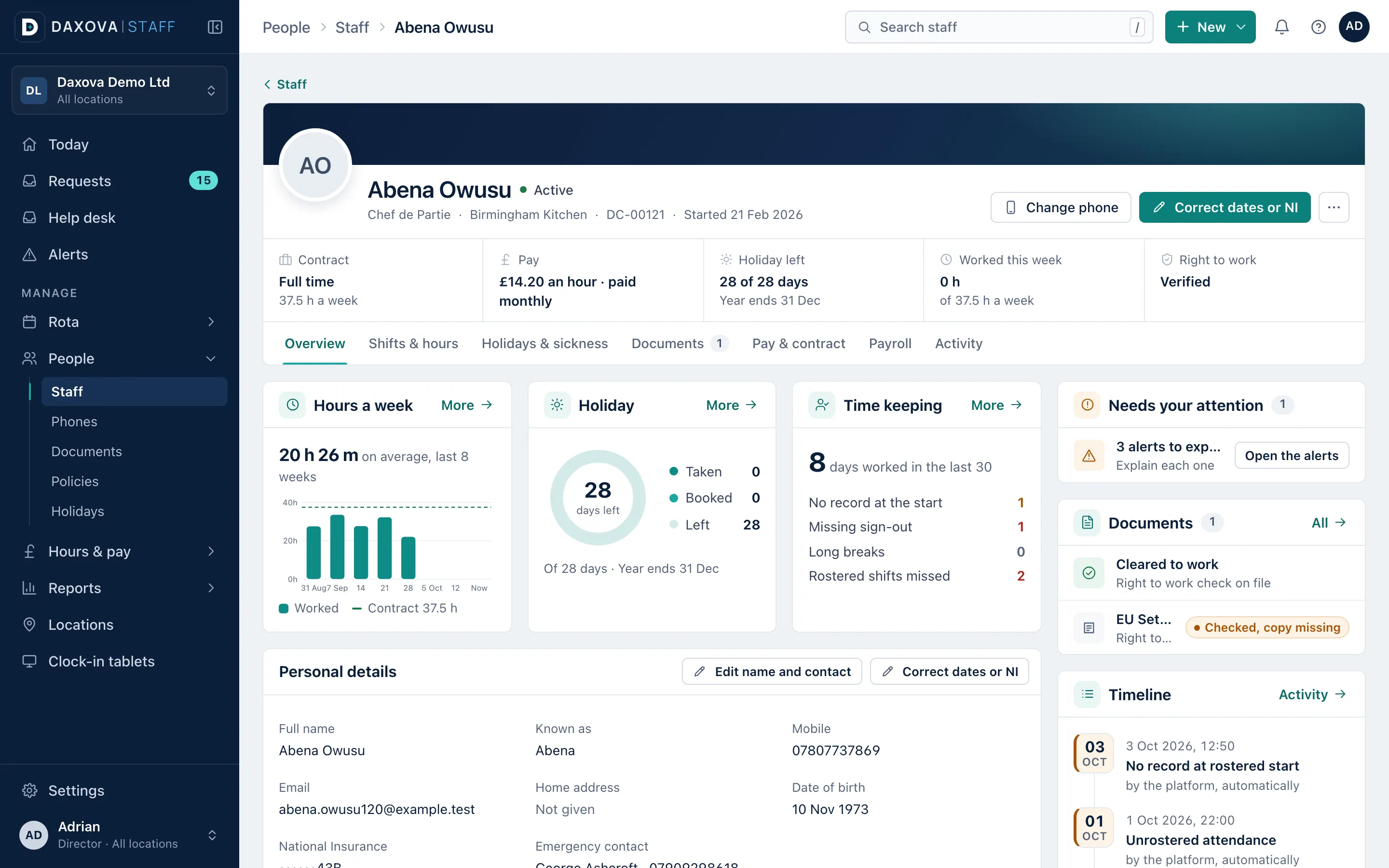
One staff record for the whole business. Add a second location to someone’s record and they can clock in at both, and their shifts at every location show in their staff app.
An example: one person, two locations, a 20-hour weekly limit
12 h6 h
Location A, 12 hLocation B, 6 h2 h left before the limit
Hours worked and planned at any of your locations count towards the same weekly limit
Travel time: two clock-ins at different locations closer together than the journey allows give you a note to check
One staff profile, whichever locations the person works at. Made-up data.
Set your locations side by side
Which location is over its plan, and where do the late clock-ins happen?
Reports run for one location or all of them, with a row for each. Planned cost from the rota against actual cost from clock-ins, for each location and day, beside a weekly budget you set for each location. These are estimates before tax and deductions.
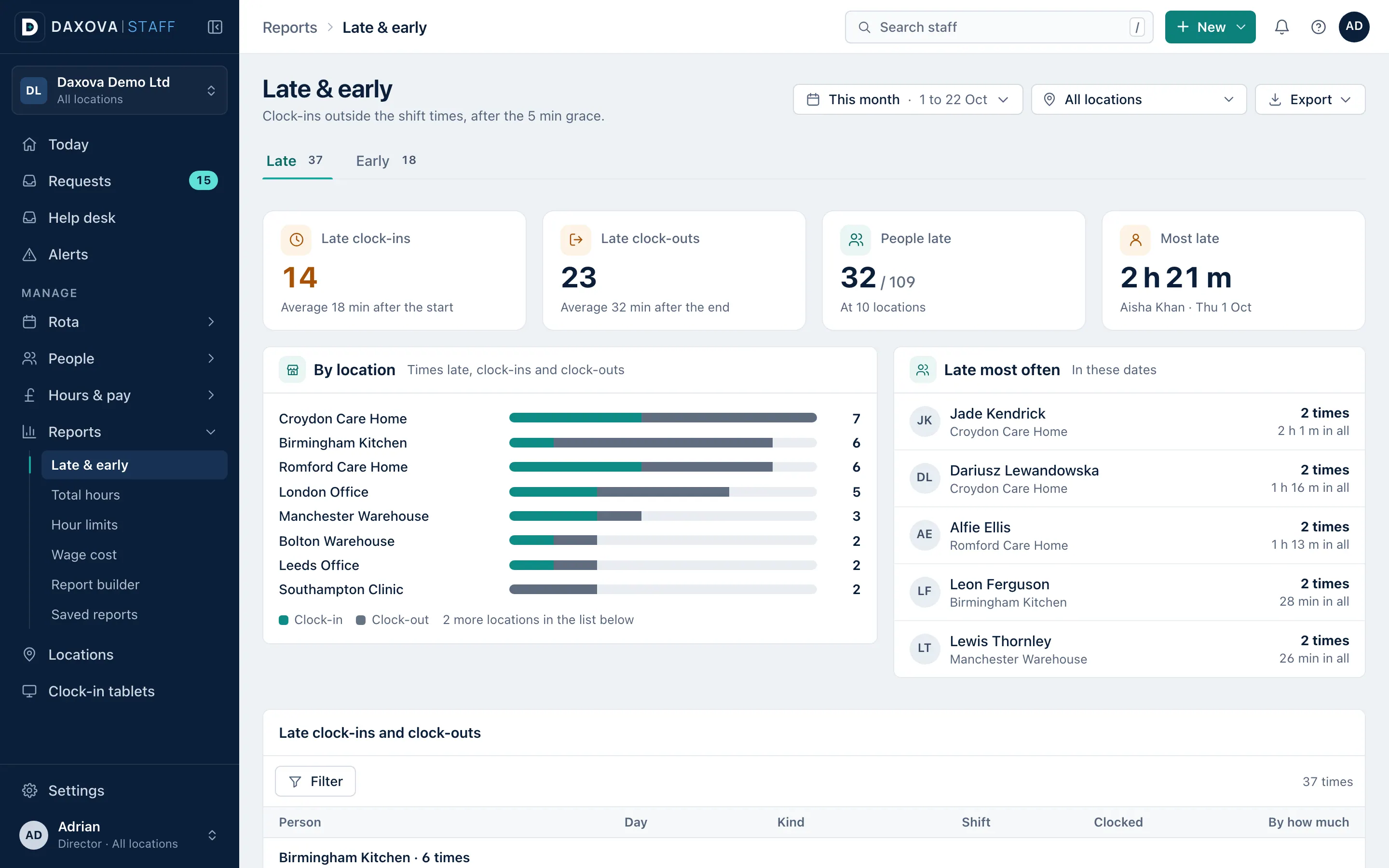
Late and early grouped under each location, with a download in Excel or PDF
Every change is kept with who, when and why, and the original is never lost
Each location’s record is checked automatically every night, and in full once a month
staff.daxova.co.uk
Late and early, location by location. Made-up data.
What it costs
£0 per location. £2 per staff member.
A chain with 60 staff pays £120 a month, and office users who only use the web portal are free.
£2 per staff member a month
£12 minimum, which covers up to 6 staff. Office users who only use the web portal are free. No VAT charged, no contract, no set-up fee.
Clock-in tablets at every location and reports for one location or all are in the £2.
Everything on this page is in the £2
UK payroll is the one add-on: £1 per person on payroll a month, free during your trial
30-day free trial, no card, nothing charged automatically
No. You pay £2 per staff member a month, however many locations you run, with no VAT charged. Owners, HR and managers who only use the web portal are free.
Can an Area Manager see locations that aren’t theirs?
No. The server checks every request against the locations each person looks after, so another location’s staff, clock-ins and reports stay out of reach.
Can someone work at two of our locations?
Yes. They keep one staff record for the whole business. Add the second location to their record and they can clock in at both.
Can each location have different rules?
Yes. Each location has its own opening hours and bank holidays (England and Wales, Scotland or Northern Ireland), its own clock-in rule (WiFi, near the location, or anywhere) and its own alert settings.
Do managers need the app?
No. Managers use the web portal in a browser. The app is for staff: Android is in testing and iPhone is not in the App Store yet.
How do we get all our locations set up?
You add your locations and import your staff list from a spreadsheet, in the portal, in a few minutes. If you would rather we did it with you, send us your staff list: there is no charge.
Something else? Email sales@daxova.co.uk and we’ll reply within one working day.
See all your locations on one screen.
Start with a free 30-day trial online in a few minutes. Add your locations and staff, or ask us to help. No card, no contract, no price per location.