UK payroll is here: £1 per staff member on payroll a month, free during your trial. See how it works

Daxova Staff features

Every job from clock-in to payslip, in one place.

Staff clock in on their own phone or your clock-in tablet. Managers see every location live in the web portal, plan the rota with working-time checks and fix mistakes in the open. Every change is kept, with who made it, when and why.

£2 per staff member a month, UK payroll as a £1 add-on. Or take the product tour.

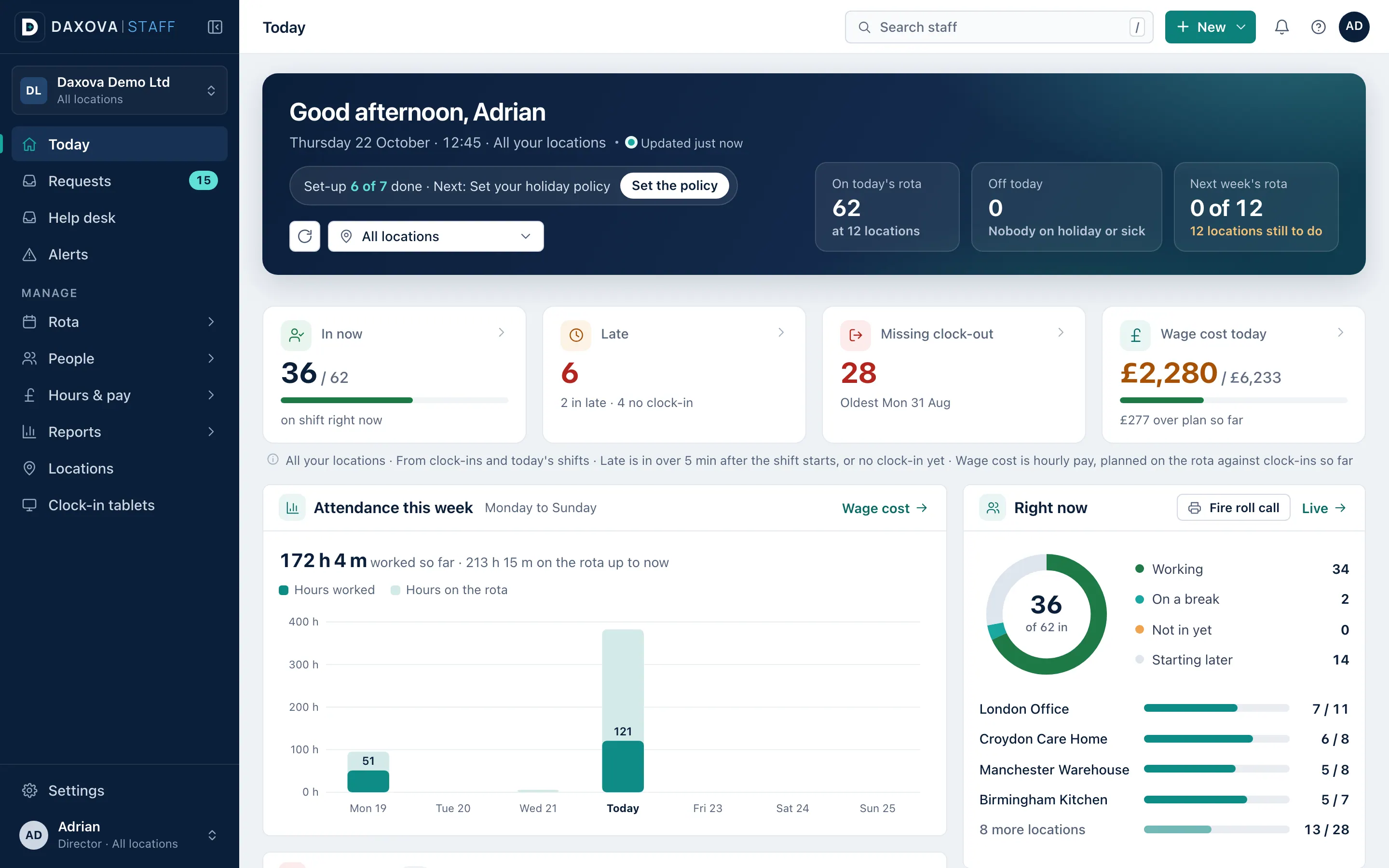
The Daxova Staff portal’s Today page, with made-up data: how many people are in now, who is late, who has not clocked out, wage cost today, an attendance chart and a Right now ring.
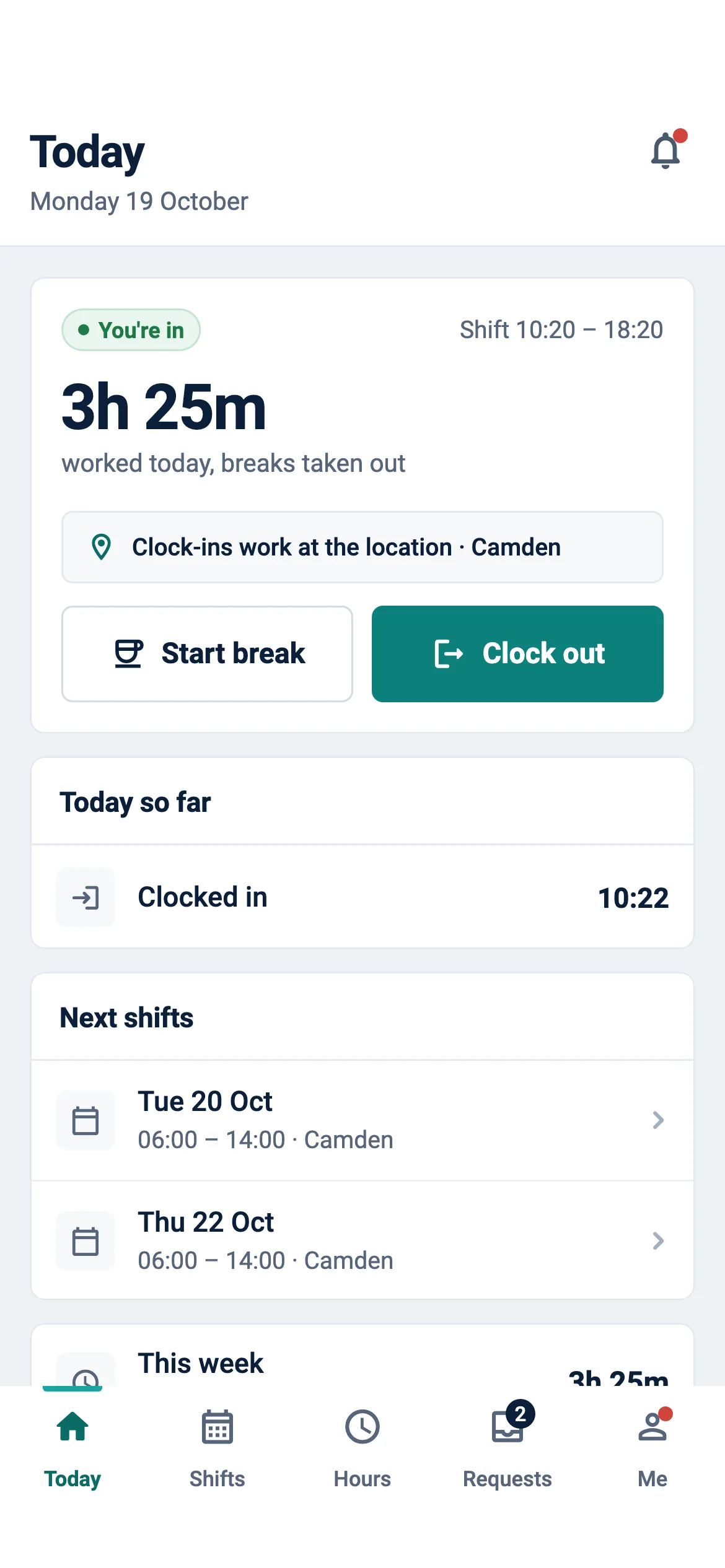
The staff app with made-up data: Today during a shift, with 3 hours 25 minutes worked, a Start break button and a Clock out button.

One record, three ways in

Staff, the door and the office all write to the same record.

Every picture on this page is a real Daxova Staff screen with a made-up company and staff.

  • The staff app

    For staff, on their own phone: clock in and out, breaks, shifts, hours, holiday, swaps and their documents.

  • The clock-in tablet

    For your location, on a screen you already own: staff code and passcode, Find your name, or a passcode from a link. Works in any web browser today.

  • The web portal

    For owners, HR and managers: Live, fire roll call, rotas, reports, alerts, record check, holidays, documents and pay. Free for office users.

Staff app status. The Android app is in testing, and the iPhone app is not in the App Store yet. The clock-in tablet works in any web browser today, so your team can clock in from the first day of your trial.

01 · Clock-in you can trust

Was it really them, really there?

Staff clock in and out, and start and end breaks, on their own phone. Each clock-in has to pass three checks before it is recorded.

  1. 1

    Their own phone

    Each clock-in is tied to the person’s own linked phone, so a friend can’t clock in for them. Change a lost phone with a new invite code. One phone used for two people raises an alert.

  2. 2

    At your location

    Checked against the location’s WiFi or the phone’s position there. Fake-location apps are refused at locations that check where the phone is. Location is read only at the moment of a clock-in, never in the background.

  3. 3

    A live photo

    A live front-camera photo at every clock-in and clock-out, stored encrypted, with every viewing logged. Nothing biometric and no face recognition: a person looks at the photo if needed.

See it in the tour
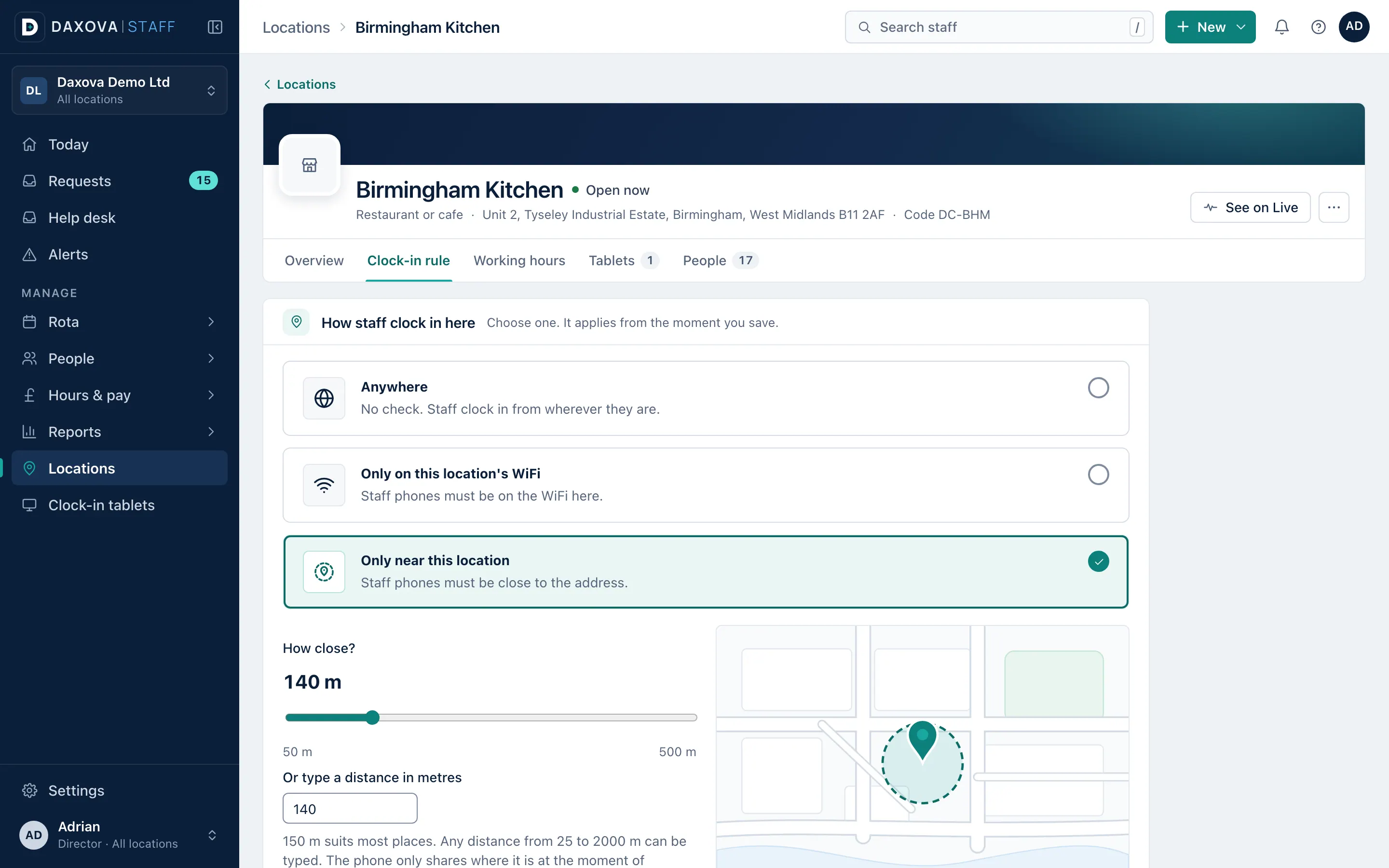
The Daxova Staff portal with made-up data: a location’s Clock-in rule tab with three choices, Anywhere, Only on this location’s WiFi and Only near this location, and a map showing the distance.
The staff app with made-up data: Today during a shift, with 3 hours 25 minutes worked.
Each location has its own rule: its WiFi, near it, or anywhere.

Phones

One phone per person, and you decide when it changes.

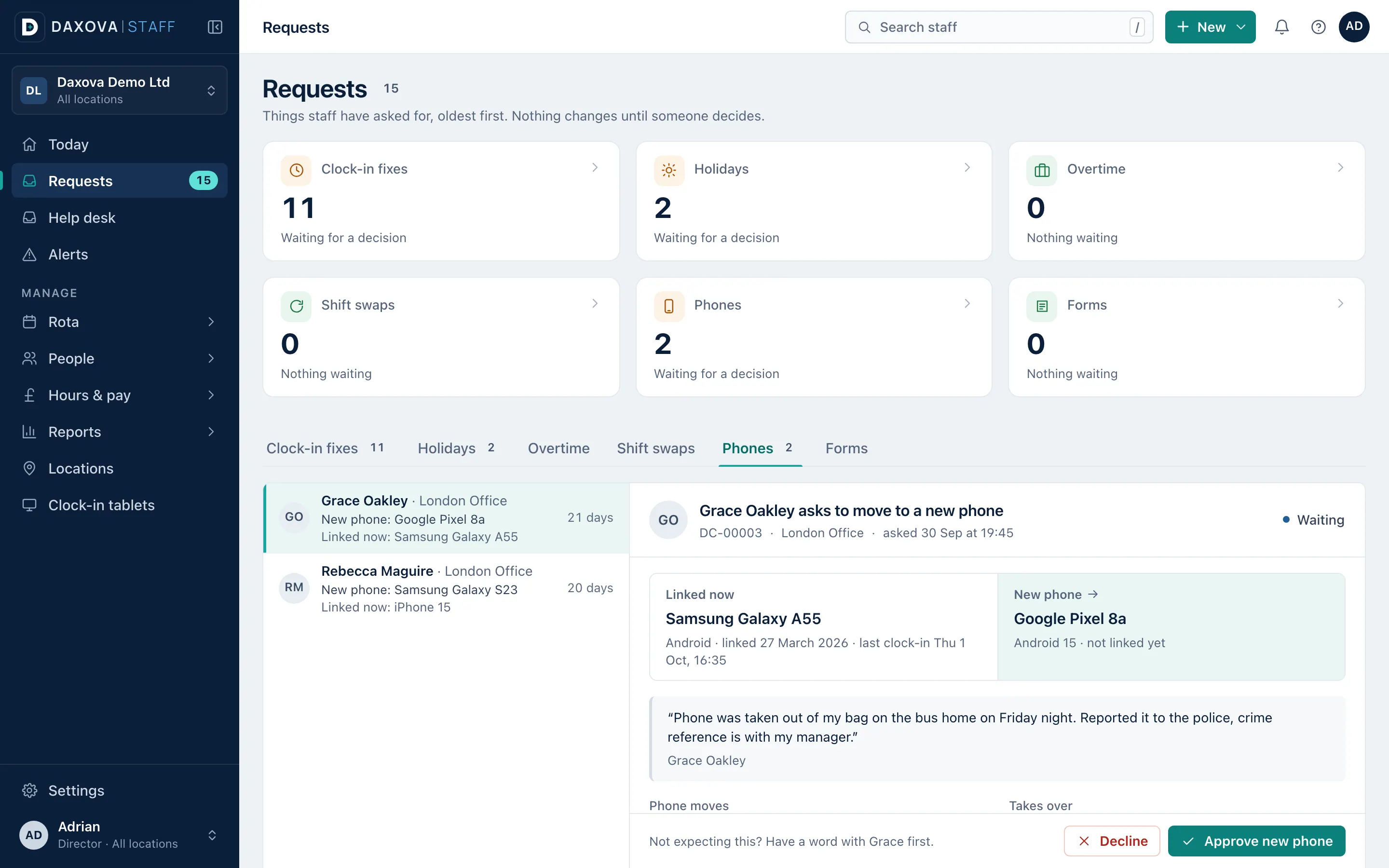
The Daxova Staff portal’s Requests, Phones tab with made-up data: a staff member asks to move to a new phone, with the old and new phone, her note and the number of phone moves in the last 12 months, and Decline or Approve new phone.
A new phone waits for a manager.Nobody moves to a new phone without it being approved.
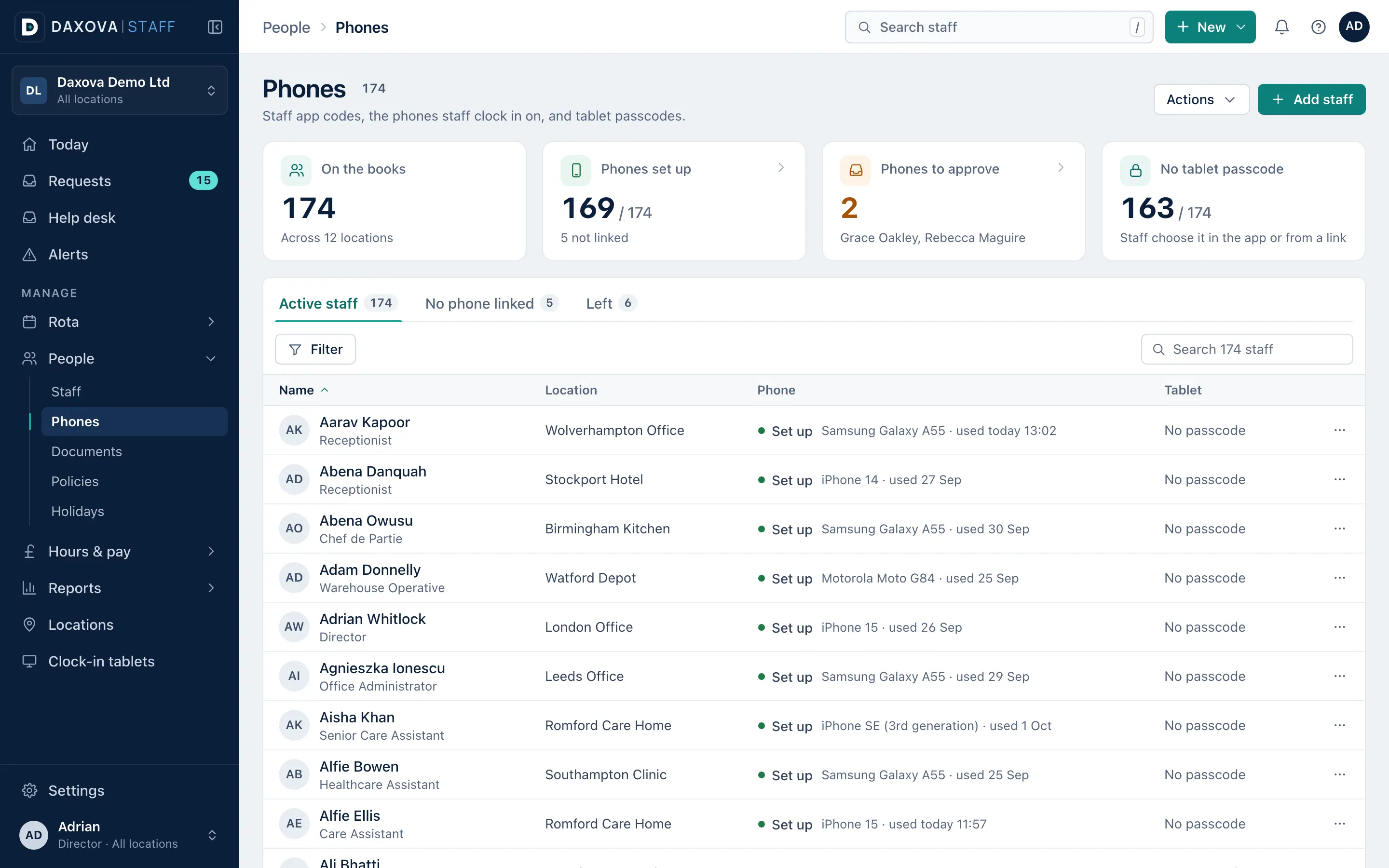
The Daxova Staff portal’s Phones page with made-up data: which phone each person is linked to, their passcode status and the phone changes waiting for approval.
See every linked phone.Link a phone with an invite code, or give a passcode link for the clock-in tablet.

02 · Rotas

Build next week in minutes. Check it before it goes out.

A weekly rota for each location, built as a draft that staff do not see. Start from last week or an Excel template, check the warnings, then publish the week.

  • Less than 11 hours’ rest
  • No day off in the week
  • More than 48 hours
  • Weekly hour limits
  • Availability and holidays
  • Right to work running out
  • Refuses a shift that overlaps another, or falls after someone’s right to work check runs out.
  • Copy last week, or import shifts from an Excel template, into the draft.
  • Publish week shows what changed and tells only the people whose shifts changed.
  • The 48-hour opt-out is the employee’s own signed choice.

Warnings never stop you. You decide, and the publish step shows exactly what staff will be told.

Short looping demo of the real portal, with made-up data: copy last week, publish the week and see who will be told.
Copy last week, check the warnings, publish.

Around the rota

Templates, swaps and extra hours, without a group chat.

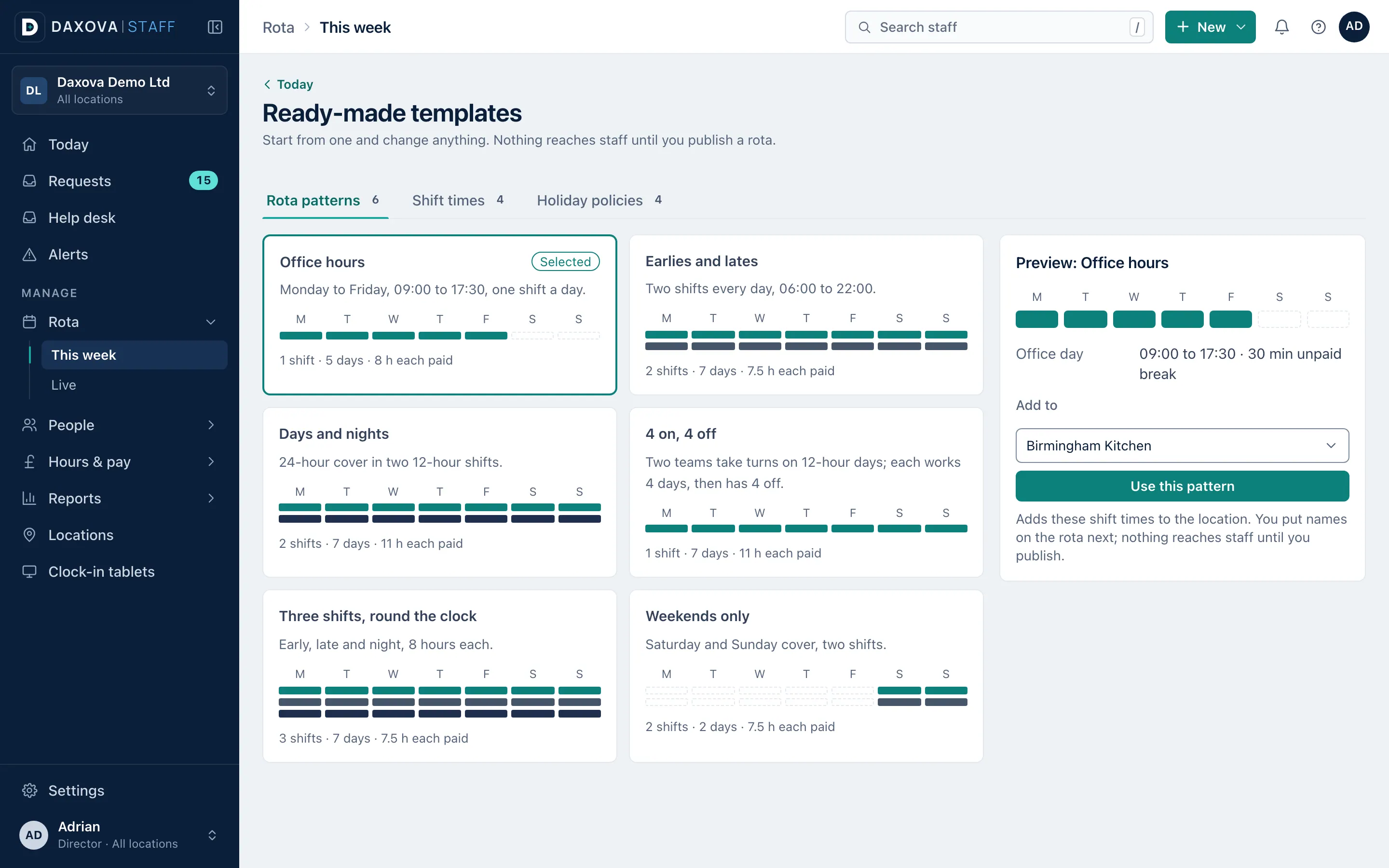
The Daxova Staff portal’s ready-made rota templates with made-up data: office hours, earlies and lates, days and nights, and weekends only.
Ready-made templatesOffice hours, earlies and lates, days and nights, weekends only. Print the week and pin it up.
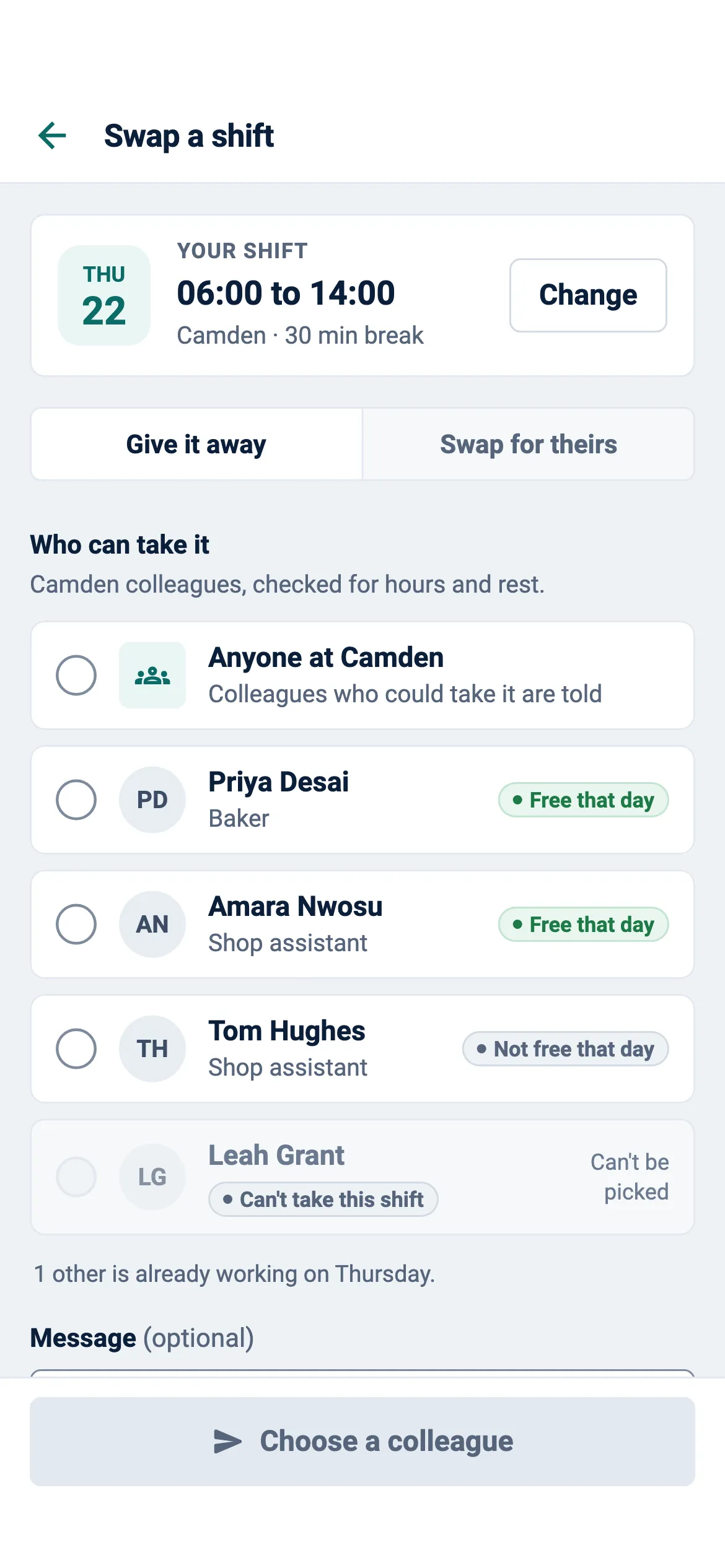
The staff app with made-up data: Swap a shift. Give a shift away or swap for a colleague’s, with colleagues checked for hours and rest.
Shift swapsThe colleague accepts, a manager approves, and the rota changes straight away.
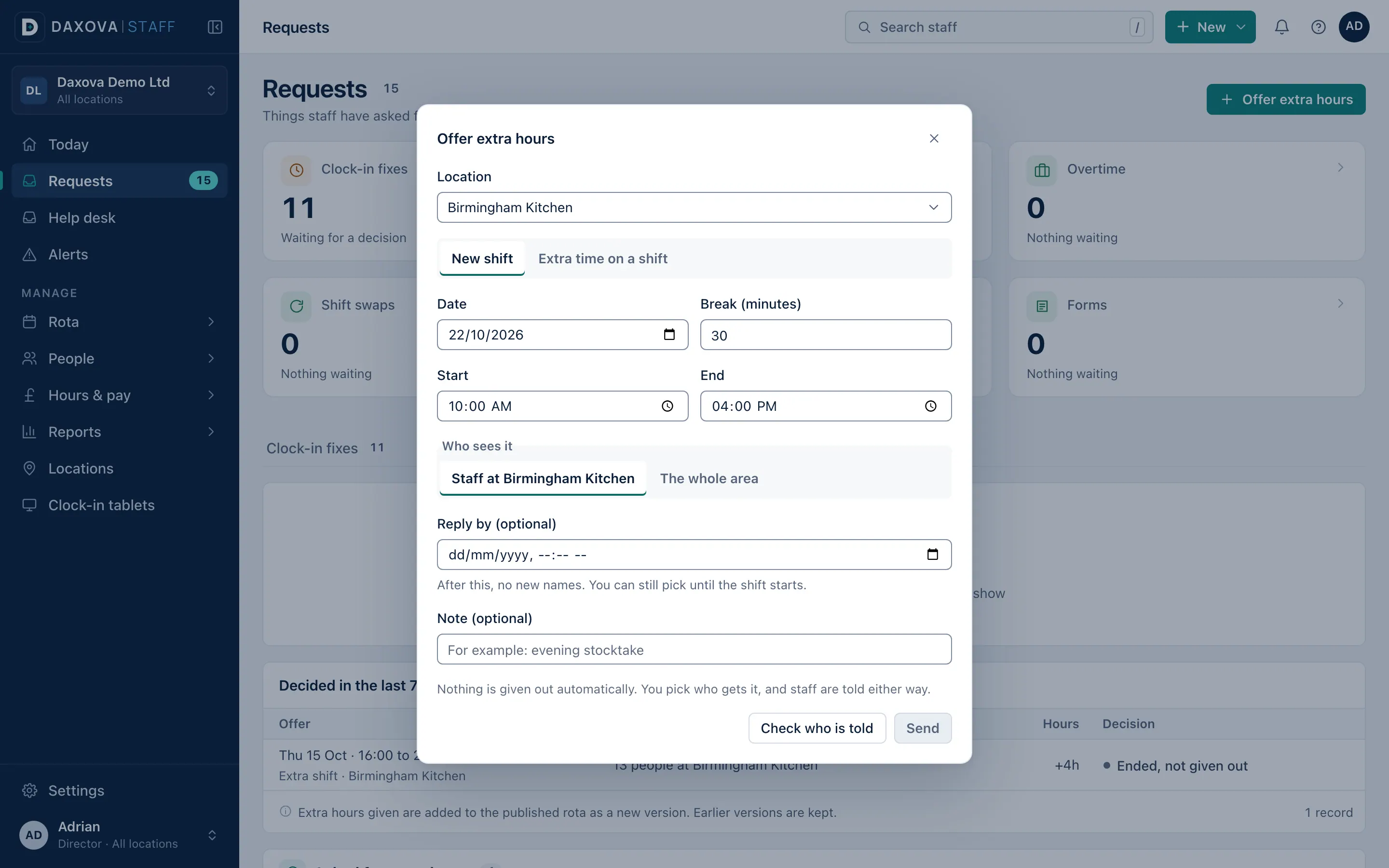
The Daxova Staff portal’s Offer extra hours dialog with made-up data: a location, a new shift with a date, times and a break, who sees it, and the line that nothing is given out automatically.
Extra hoursOffered to a location or an area. Staff put their name forward and you pick. Nobody is offered hours over their weekly limit.

Availability. Staff set in the app when they can work each week and the dates they cannot. The rota shows it while you plan, and a manager is told if someone becomes unavailable for a shift already published.

03 · Holidays and sickness

Asked for in the app. Decided in the portal.

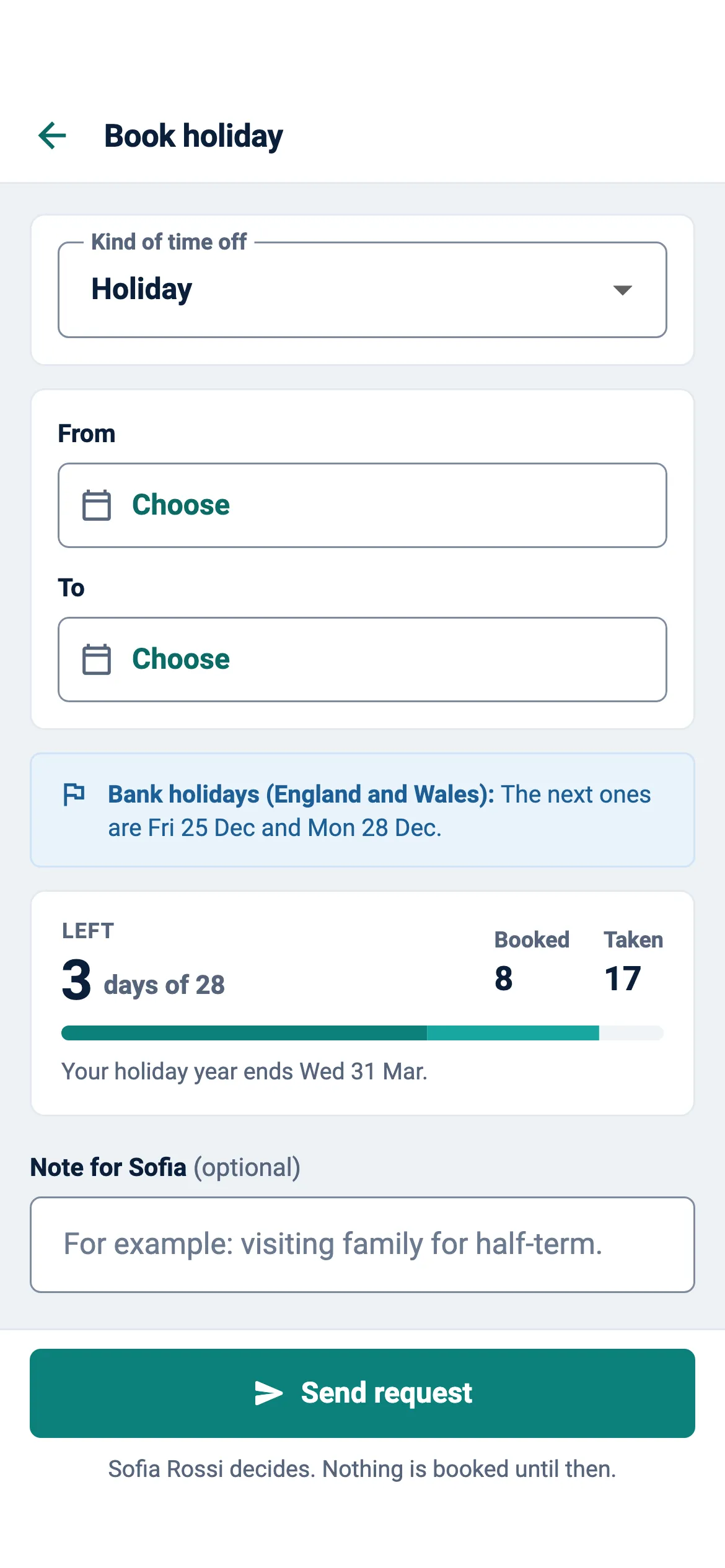
Nobody hunts for a form or a text message. The request starts on the staff member’s phone and lands with the manager who decides, with everything needed to say yes or no.

  • Staff ask in the app, in whole or half days, and see the days they have left.
  • You see the balance now and if you approve, who else is off, and the location’s limit on how many can be off at once.
  • Approve or decline: they are told in the app either way. The shifts are marked off, not deleted.
See holidays in the tour
Short looping demo of the real portal, with made-up data: approve a holiday request, with the days left now and if approved.
The staff app with made-up data: Book holiday, with From and To dates, a note on bank holidays, the balance of days left and a Send request button.
Approve a holiday. The shifts are marked off, not deleted.

Calendar and sickness

See who is off, and keep sickness private.

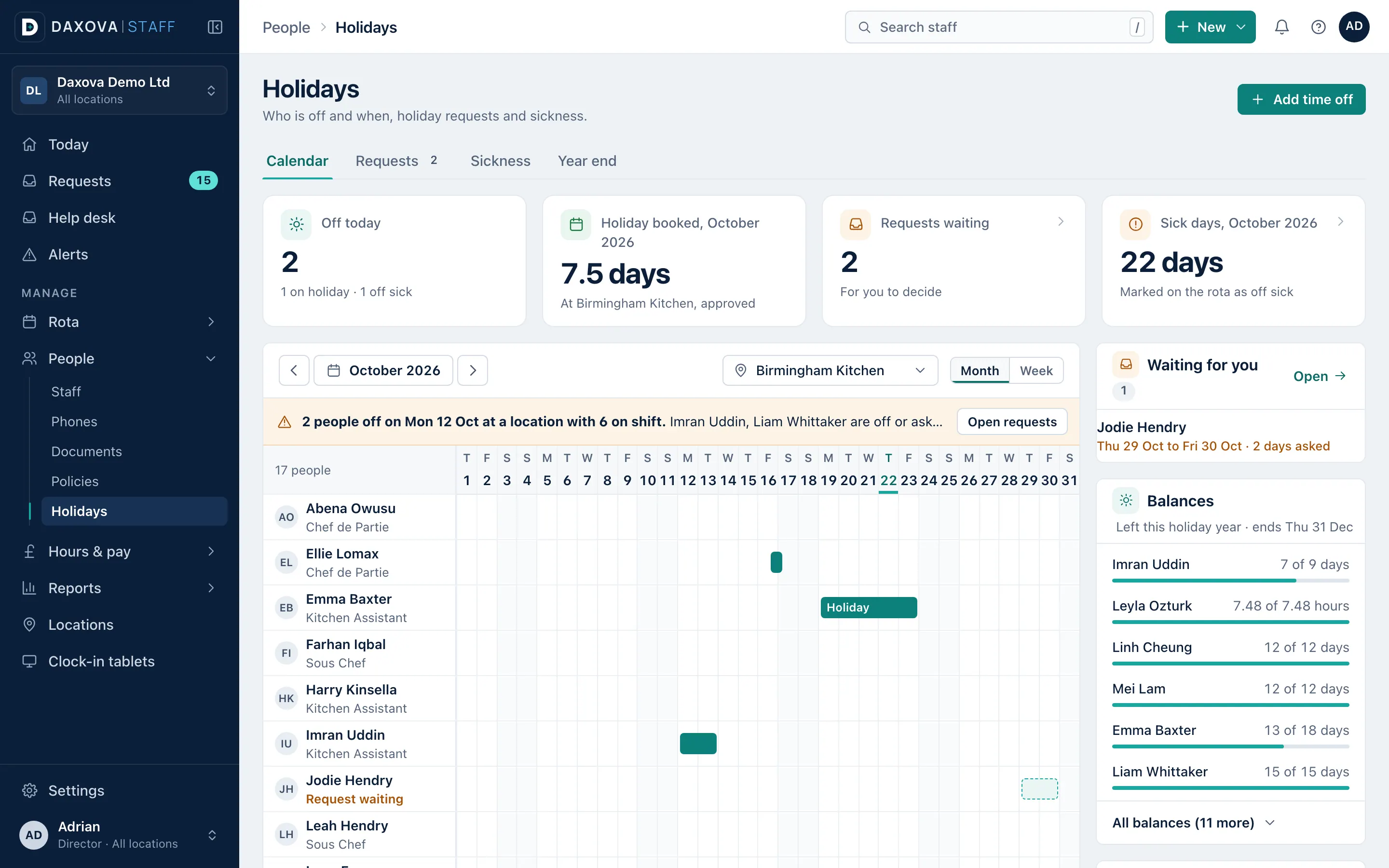
The Daxova Staff portal’s Holidays calendar with made-up data: a month grid showing who is off, balances for each person and the requests waiting.
One calendarWho is off this month, each person’s balance and what is waiting for you.
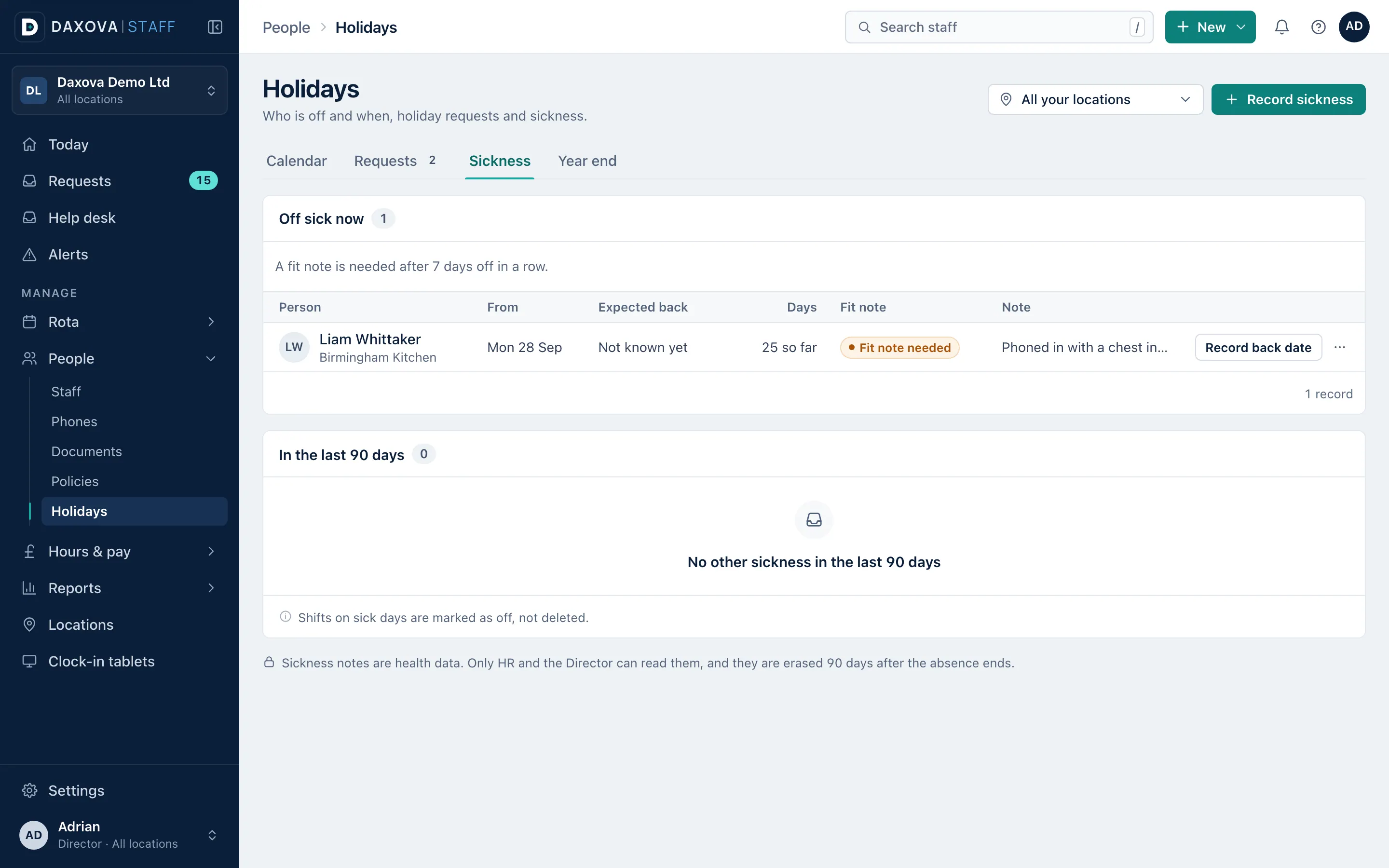
The Daxova Staff portal’s Sickness tab with made-up data: who is off sick, a fit note needed after 7 days, and a privacy line.
Sickness, without the health details going roundA note is seen only by HR, the Director and the person, and erased 90 days after the absence ends. There is no field for a diagnosis.

04 · Documents and right to work

Know who can work, and what runs out next.

Right to work checks, visas and permits, training certificates and contracts for each person. The check is recorded, never the share code.

  • Reminders 60 and 30 days before a document or check runs out, to HR and the Director.
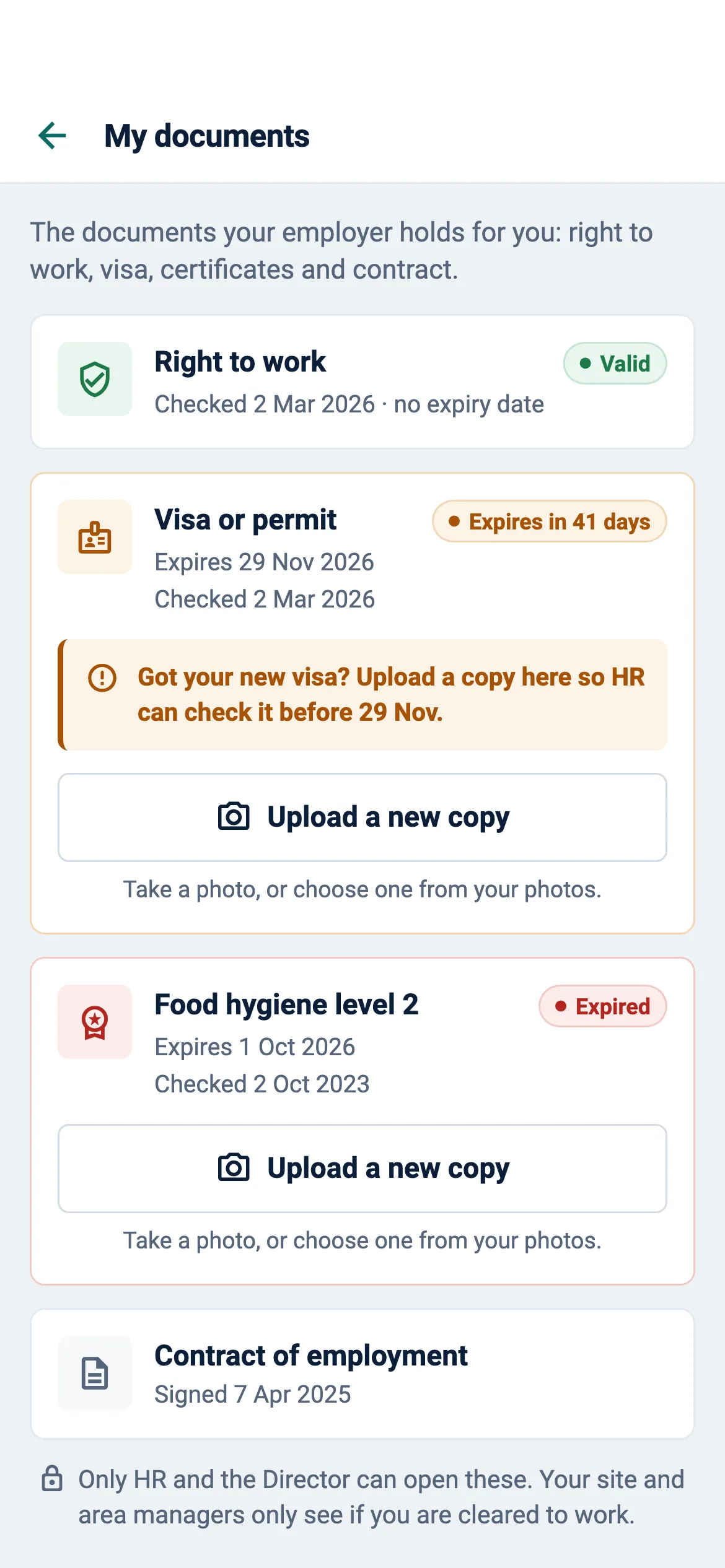
  • New copies from the app: staff send a photo of the new copy, and HR checks it.
  • Copies locked down. Only HR and the Director can open copies, which are stored encrypted.
  • Tied to the rota. The rota refuses a shift that falls after someone’s right to work check runs out.
Student and visa staff
Short looping demo of the real portal, with made-up data: filter to what is ending soon and ask for a new copy.
The staff app with made-up data: My documents, with a valid right to work check, a visa expiring soon with an Upload a new copy button and an expired certificate.
Filter to what is ending soon, and ask for a new copy.

05 · People and joining

One record per person, with everything a tab away.

Everyone has a single staff record for the whole company, with a staff code like DC-00116. Send people a joining link and they fill in their own details. Or send us your staff list and we import it for you.

  • Contact details, contract and hours, and employment history, in one place.
  • NI numbers and bank details are stored encrypted.
  • Link a phone with an invite code, or give a passcode link for the tablet. There is no password to forget.
  • Nobody can change their own contract terms or role.
Short looping demo of the real portal, with made-up data: the tabs of one staff profile: Shifts and hours, Holidays, and Pay and contract.
One staff profile, tab by tab.

Getting people in

From a link to a payroll-ready person.

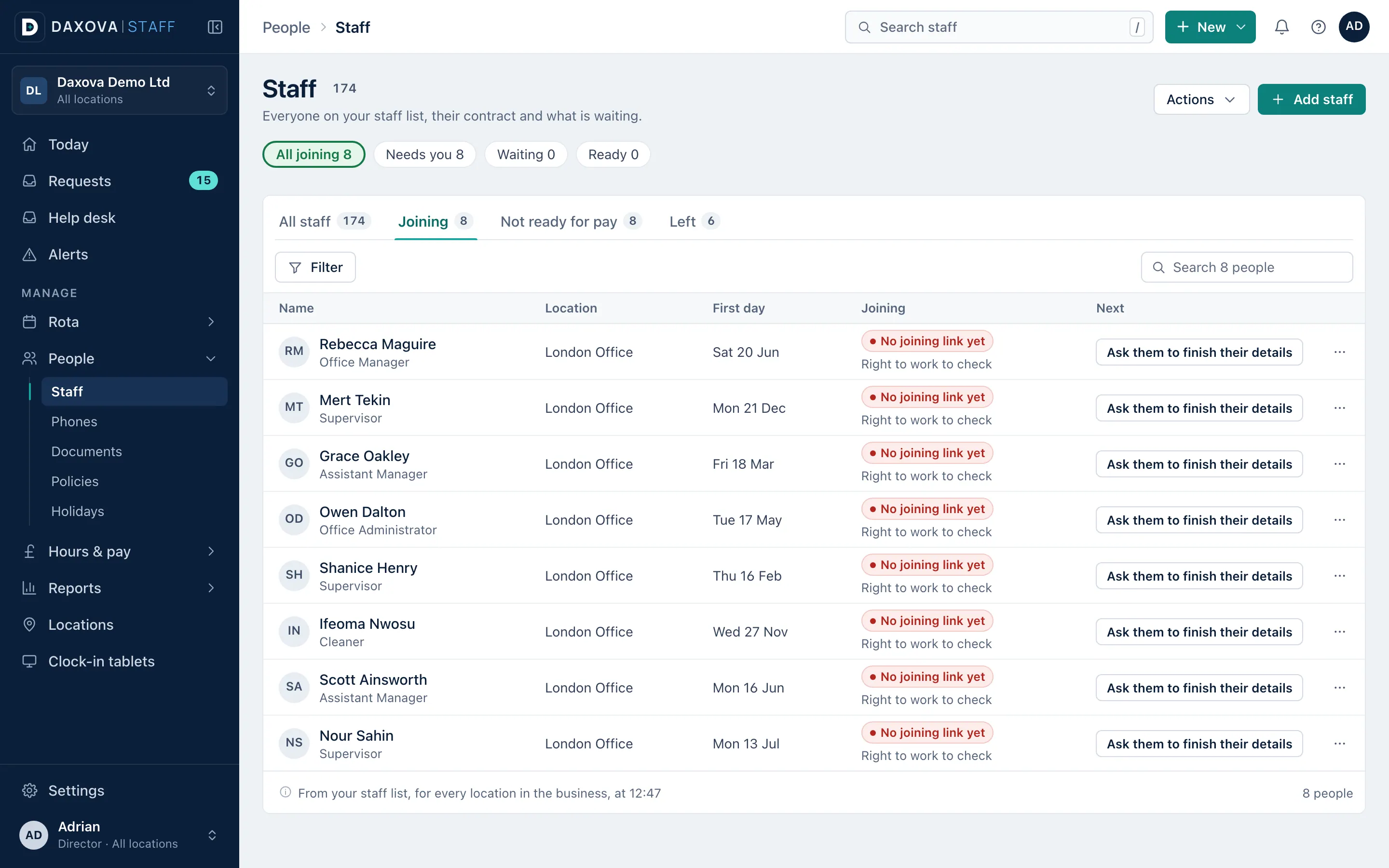
The Daxova Staff portal’s staff list, Joining tab, with made-up data: people who still need to finish their details, the joining link status and an Ask them to finish button.
JoiningPeople finish their own details from a link. You see who is still to do, and ask them to finish.
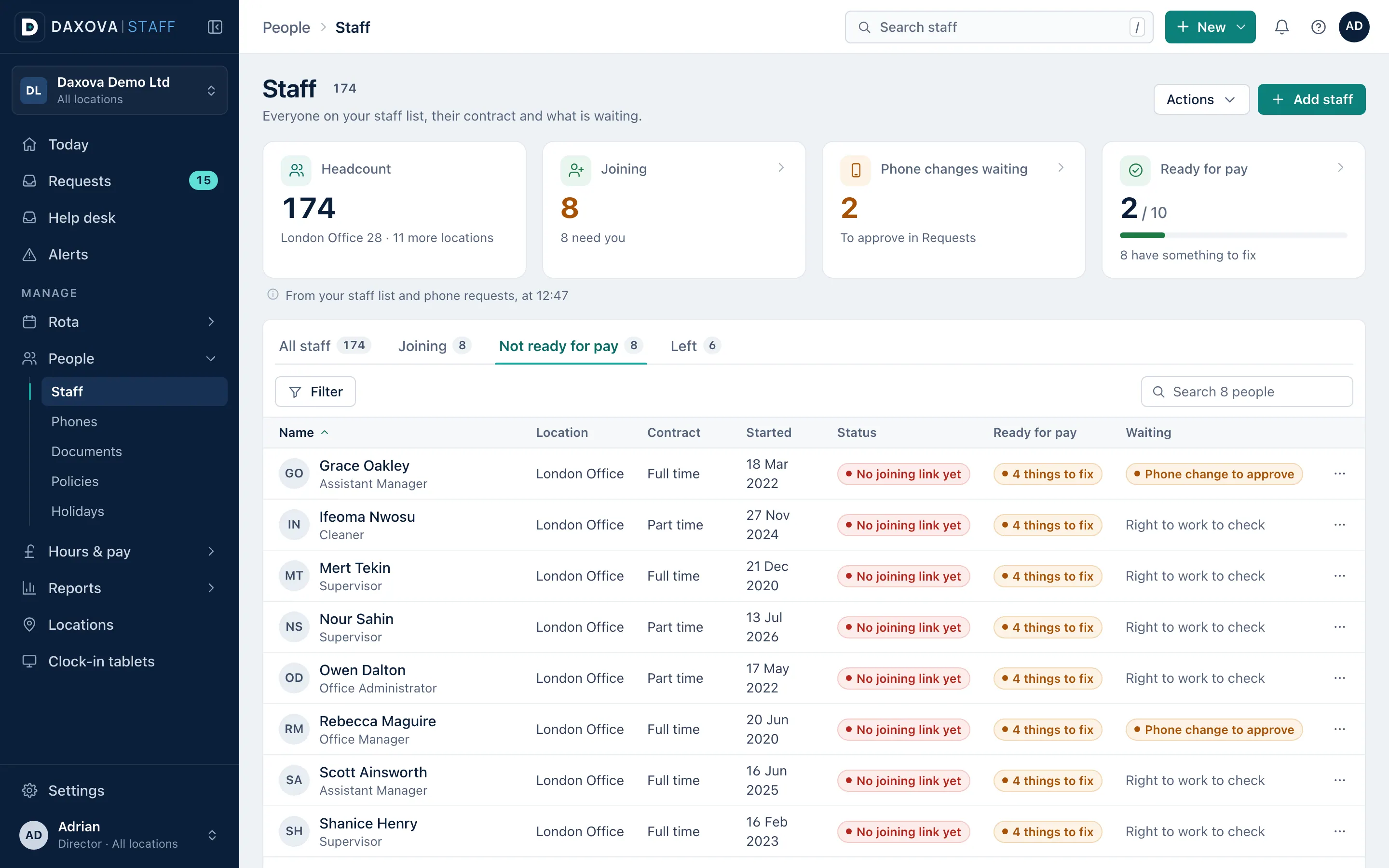
The Daxova Staff portal’s staff list, Not ready for pay tab, with made-up data: what each person still needs before payroll.
Ready for paySee exactly what each person still needs before payroll, so nothing is a surprise on pay day.

06 · Live and fire roll call

Every location on one screen. Everyone accounted for.

Today tells a manager the state of every location at a glance. Live shows who is in right now, and turns into a fire roll call when the alarm goes.

  • Today: who’s in, late, on break and not in yet, plus what needs your attention.
  • Live refreshes every 30 seconds, with the photo from each phone clock-in. It fits a phone too.
  • Fire roll call: a named list to tick off, print, or mark “Off site, confirmed by phone”.
  • Every roll call kept, with a CSV for your records.
See Live in the tour
Short looping demo of the real portal, with made-up data: Live, then the Start a fire roll call dialog.
Live, and a fire roll call one tap away.

Live and alerts

Problems surface on the day. Nobody gets accused.

Alerts are worded as notes, never accusations. Each one is closed with a written explanation, so the reason stays with the record.

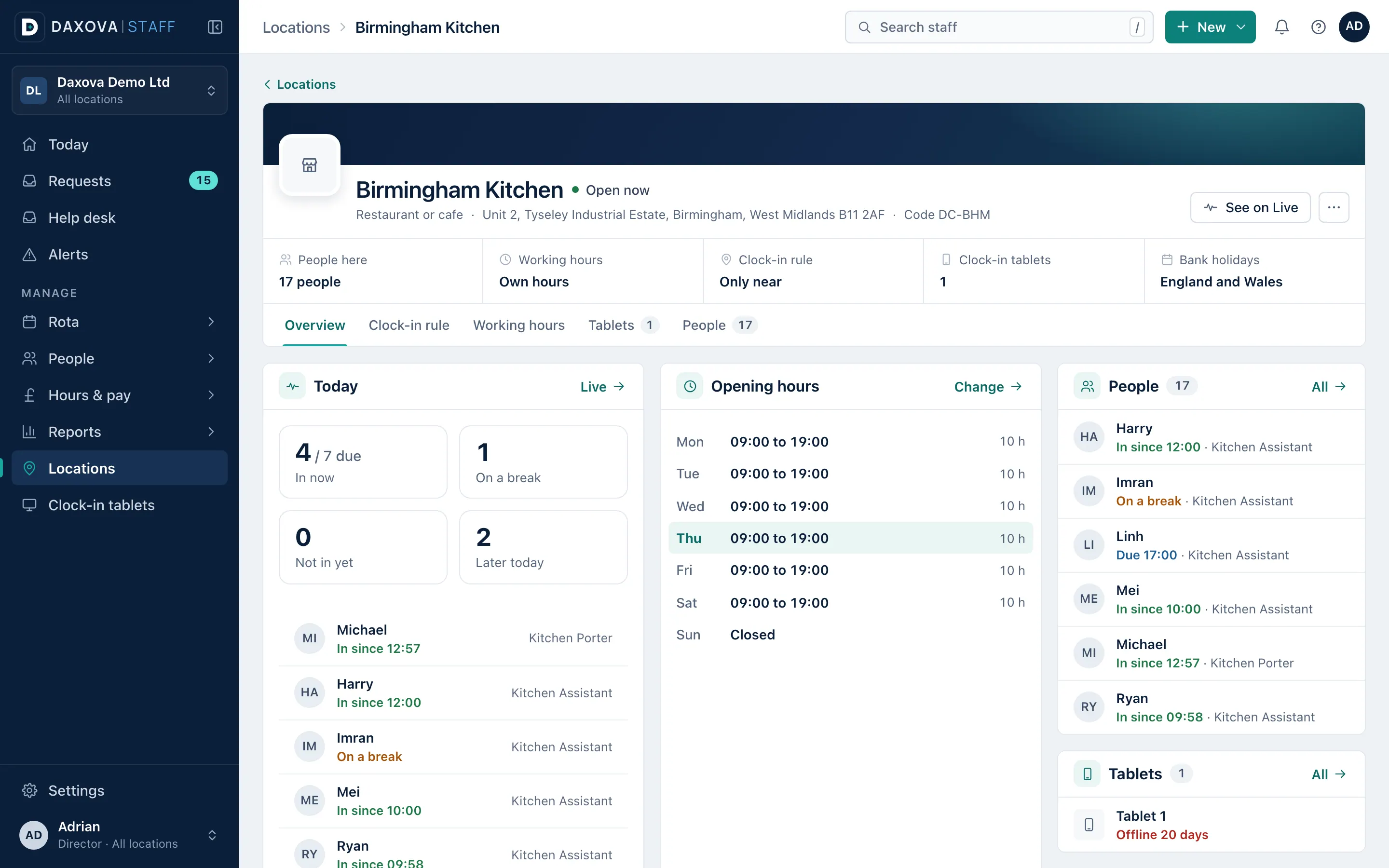
The Daxova Staff portal’s page for one location with made-up data: who is in now, on a break and not in yet today, the opening hours, the people and the tablets.
One location, todayIn now, on a break and not in yet, with its opening hours and tablets.
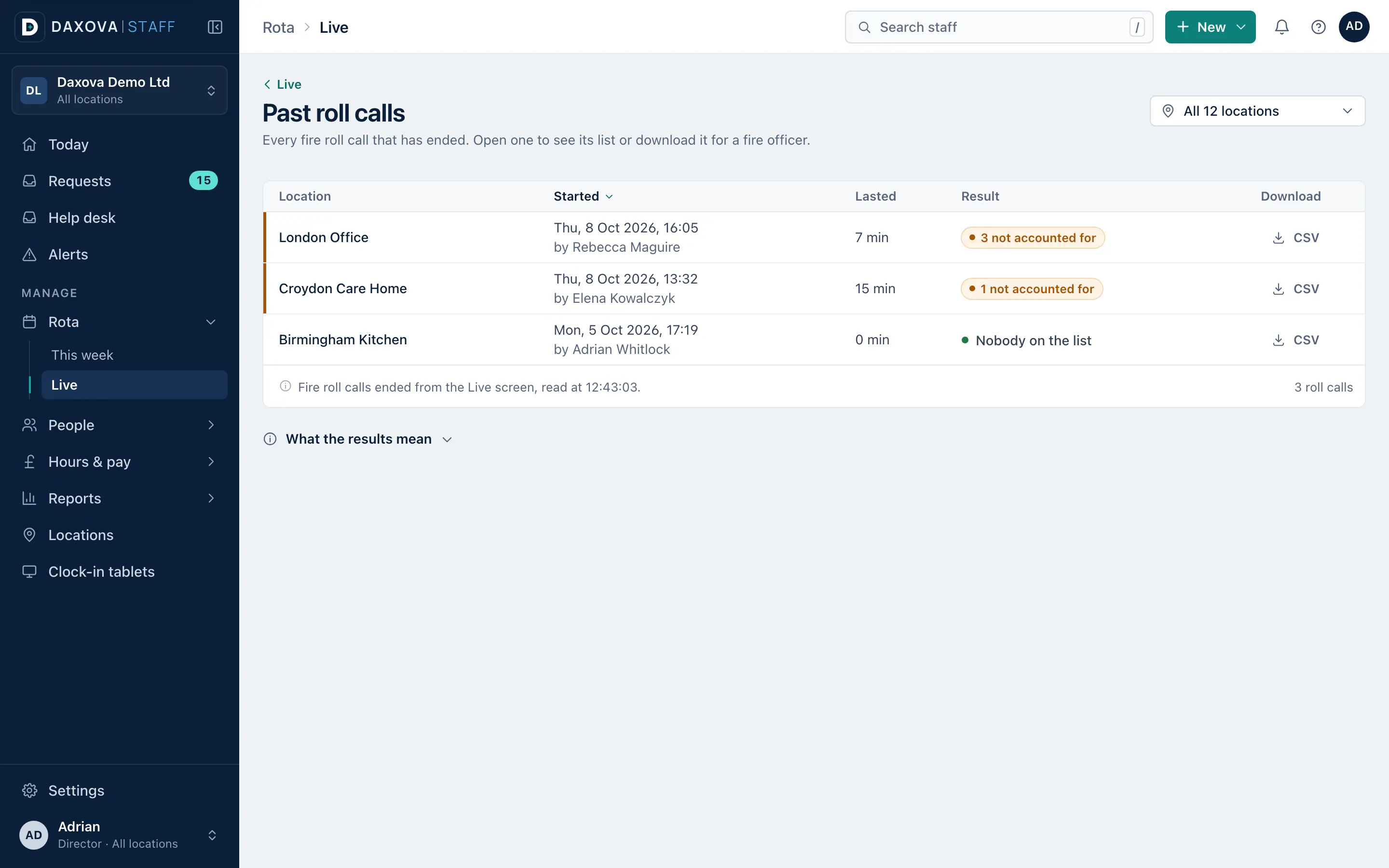
The Daxova Staff portal’s past fire roll calls with made-up data: the location, who started each one, how long it took, how many were accounted for and a CSV download.
Every roll call keptWho started it, how long it took and how many were accounted for.
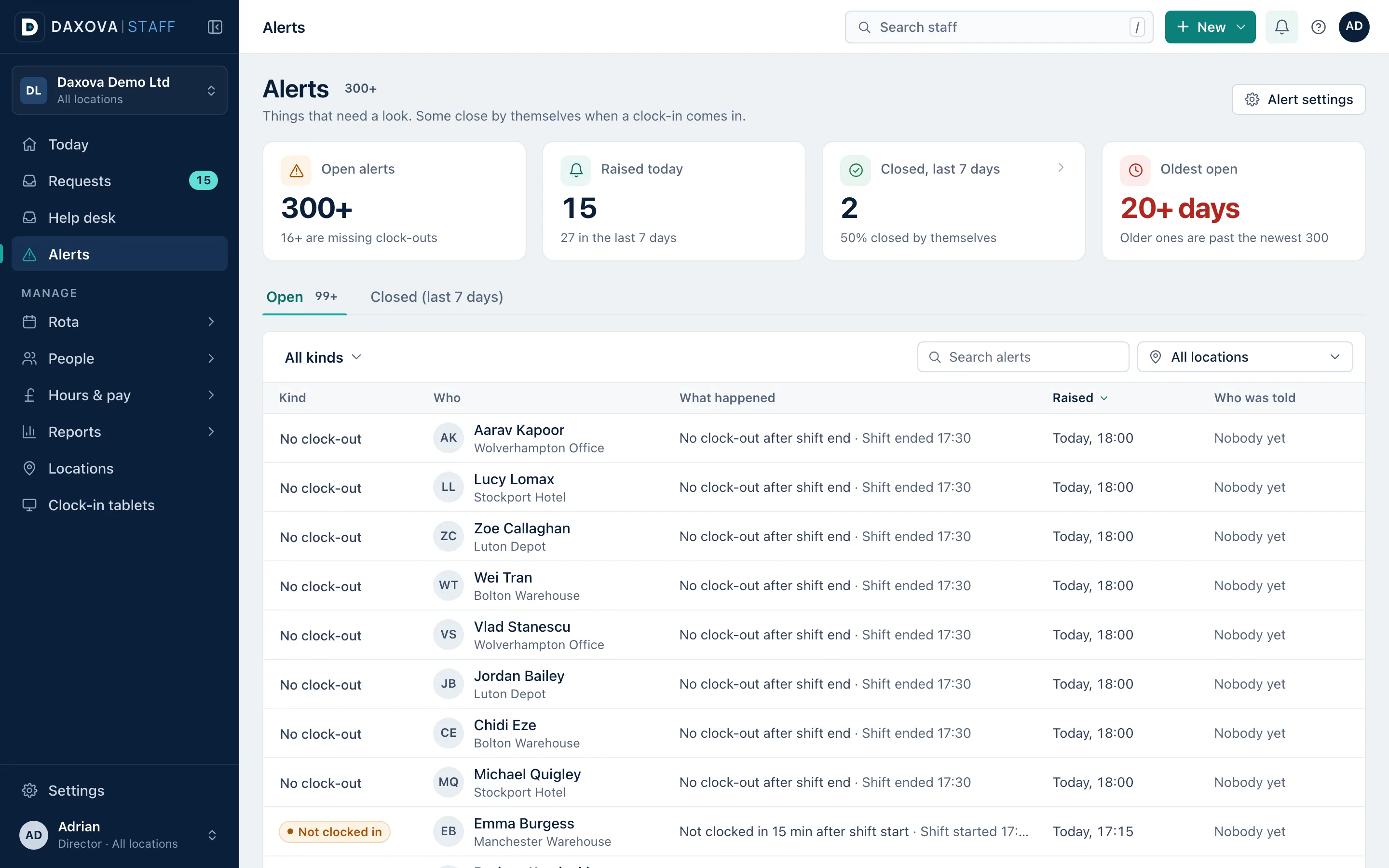
The Daxova Staff portal’s Alerts list with made-up data: open alerts by kind, who they are about and what happened, such as no clock-out after a shift ended.
Alerts, as notesA missing clock-out, no clock-in at the rostered start, a long break, or a clock-in tablet that went offline.
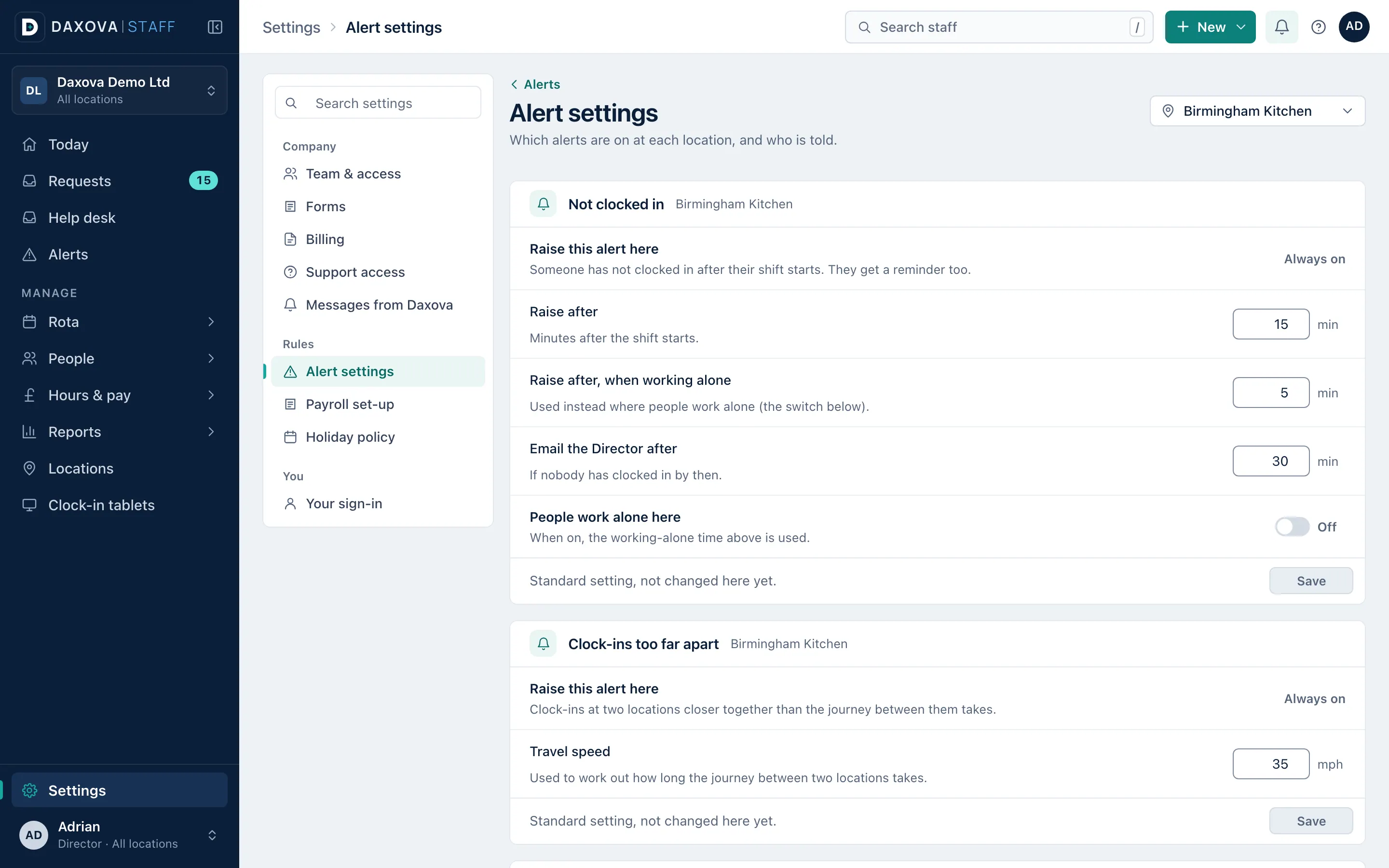
The Daxova Staff portal’s Alert settings with made-up data: when each alert is raised and who is told.
You chooseWhen each alert is raised and who is told, for each location.

07 · Reports for your accountant

Month end in four steps, with proof at the end.

Check the hours, fix what was wrong in the open, lock the pay period and hand over the proof. Reports export to Excel, PDF and CSV.

  1. 1

    Check the hours

    Total hours, worked against the published rota, person by person.

  2. 2

    Fix mistakes as new entries

    A fix is added with a reason, and shows who added it. The original is kept.

  3. 3

    Lock the pay period

    Clear the checks, lock it and download a payroll CSV, or run payroll.

  4. 4

    Hand over the proof

    Record check and a monthly records file your accountant can check.

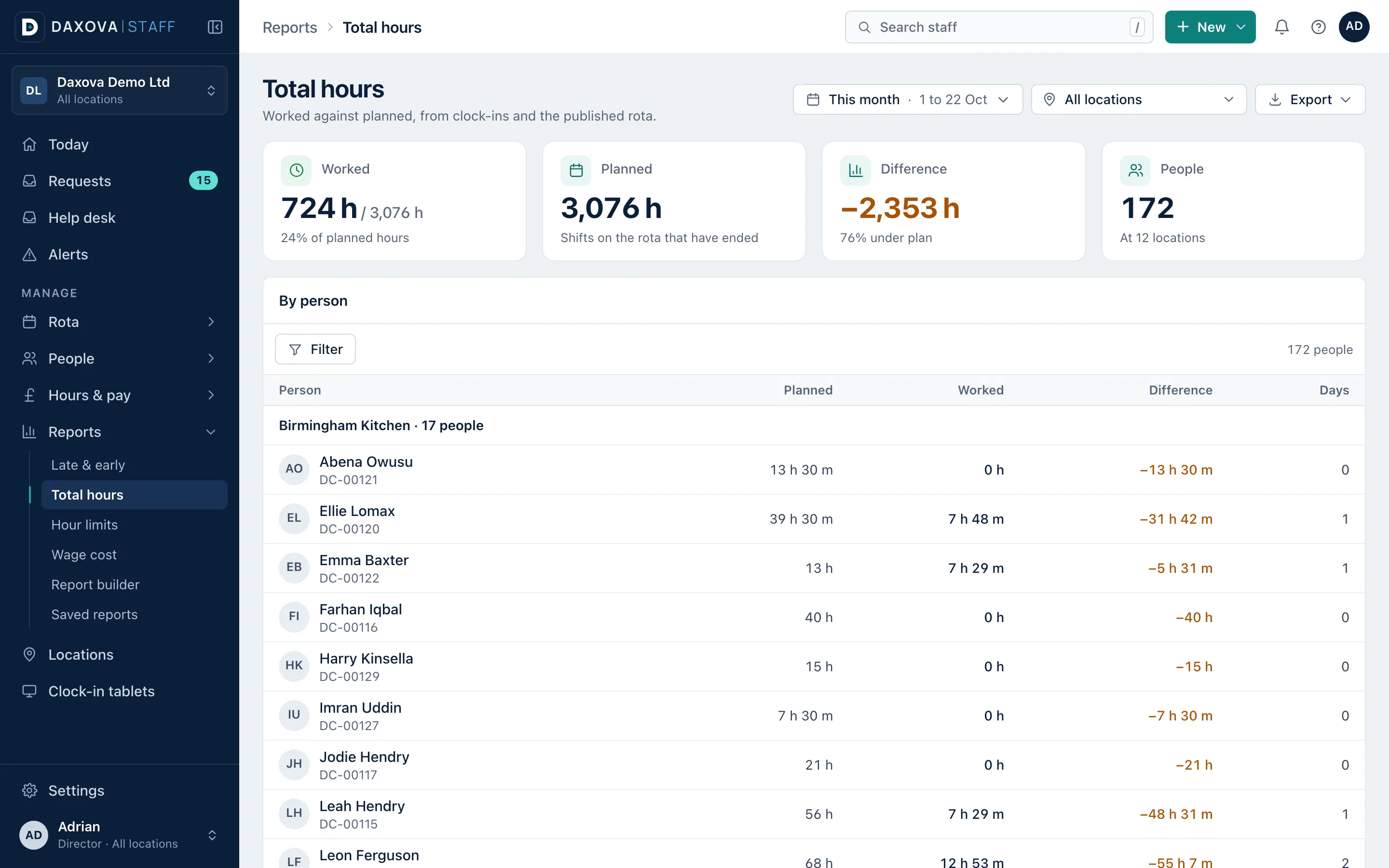
The Daxova Staff portal’s Total hours report with made-up data: hours worked against hours planned, by person and by location.
Total hoursWorked against planned, ready for your payroll provider.
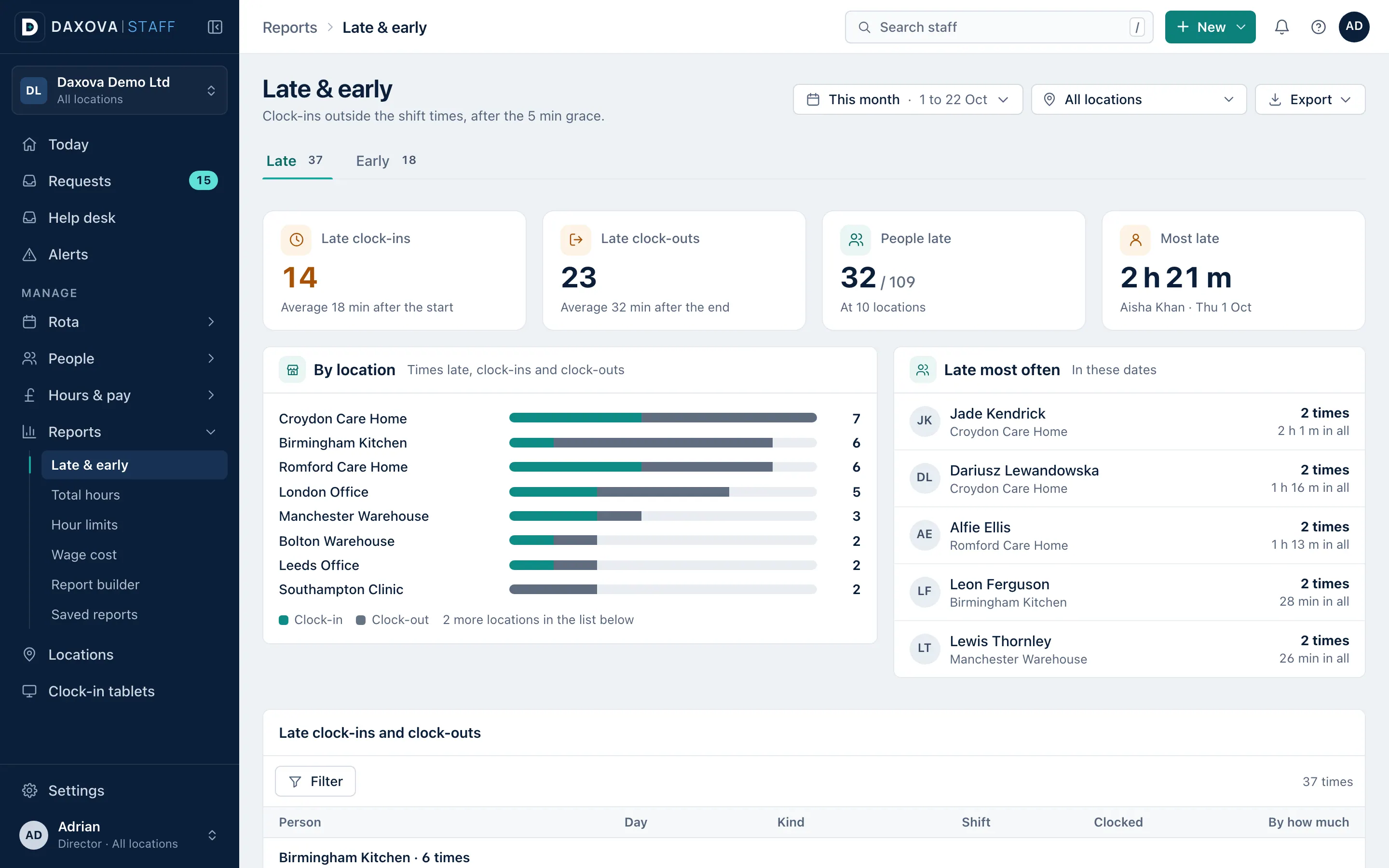
The Daxova Staff portal’s Late and early report with made-up data: late clock-ins and clock-outs by location and by person.
Late & earlyWith a grace period you set, 5 minutes to start with.
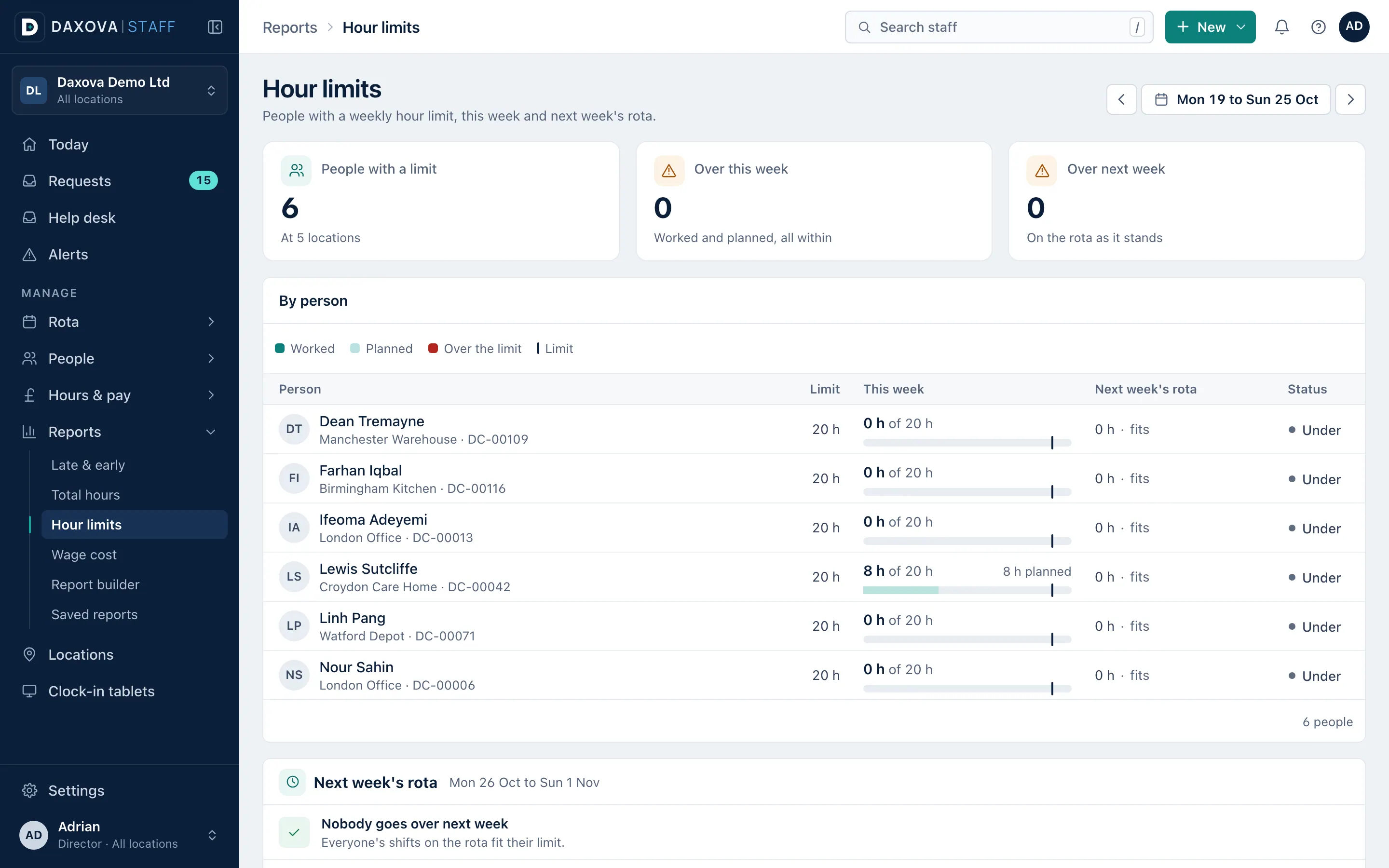
The Daxova Staff portal’s Hour limits report with made-up data: people with a weekly cap, hours worked and planned against the limit, and next week’s rota check.
Hour limitsWeekly caps against hours worked and planned, so student and visa staff stay in their hours.

Build your own report

Choose what it is about (People, Hours, Absence or Pay), pick the columns and the period, and download it. Wage cost compares planned cost from the rota with the actual cost from clock-ins, for each location and day. HR and the Director also see a check against the minimum wage for each person’s age. These are estimates before tax and deductions.

Short looping demo of the real portal, with made-up data: choose Hours and the columns appear.

08 · The full history

Every change is kept: who, when and why. The original is never lost.

When a clock-in is wrong, nobody has to guess what happened. A fix is added as a new entry with a reason and a note, and it shows who added it. The person is told either way.

  • The original stays. You see what was recorded beside what is asked for, and both are kept.
  • Fixed in the open. A Director who changes their own clock-ins triggers an alert to HR.
  • Checked every night. Each location’s record is chained and checked automatically every night, and in full once a month.
  • Proof for your accountant. Record check gives a monthly records file, and a free checking tool that runs on their own computer.
How the record is sealed
Short looping demo of the real portal, with made-up data: Check all locations, and every record matched its seal.
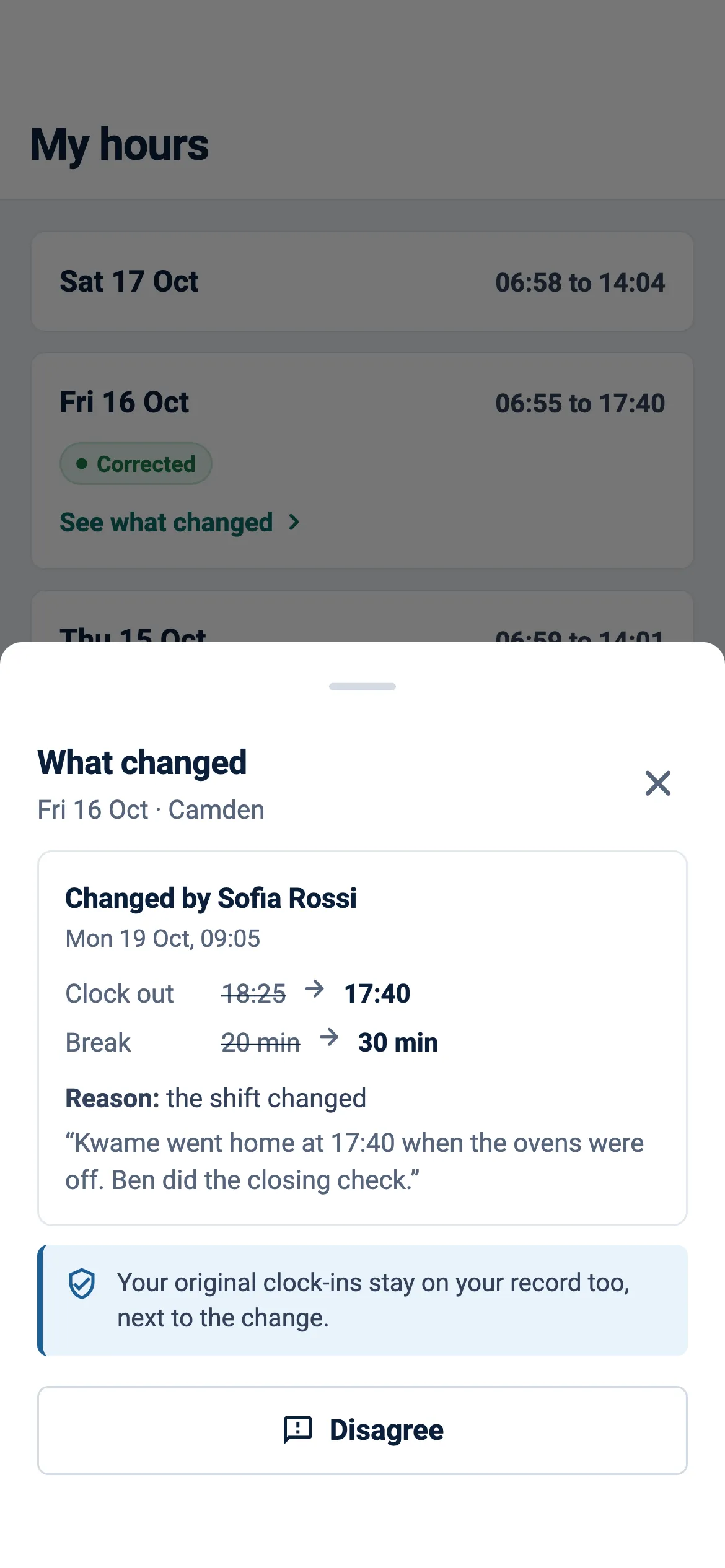
The staff app with made-up data: What changed: a manager’s change to a clock-in with a reason, the original kept, and a Disagree button.
Record check: every location matched its seal. Staff can see changes to their own clock-ins.

09 · UK payroll, the one add-on

Pay them from the hours you already record, for £1.

UK payroll is £1 per staff member on payroll a month, free during your trial. Directors and HR see every payslip in the portal now; staff see their own in the staff app from its next update.

Short looping demo of the real portal, with made-up data: the pay runs list, then a finished pay run.
The pay runs list, then a finished run. Made-up data.
  • Pay and tax

    Weekly to monthly pay, tax codes including Scottish and Welsh, National Insurance for every category and for directors, and student and postgraduate loans.

  • Statutory pay and pensions

    SSP, SMP and SPP, and auto-enrolment pensions, worked out from the same locked pay period.

  • Payslips and the bank file

    A payslip for every person and the bank file to pay them.

  • Reports for your books

    The reports, including the P32 and a journal.

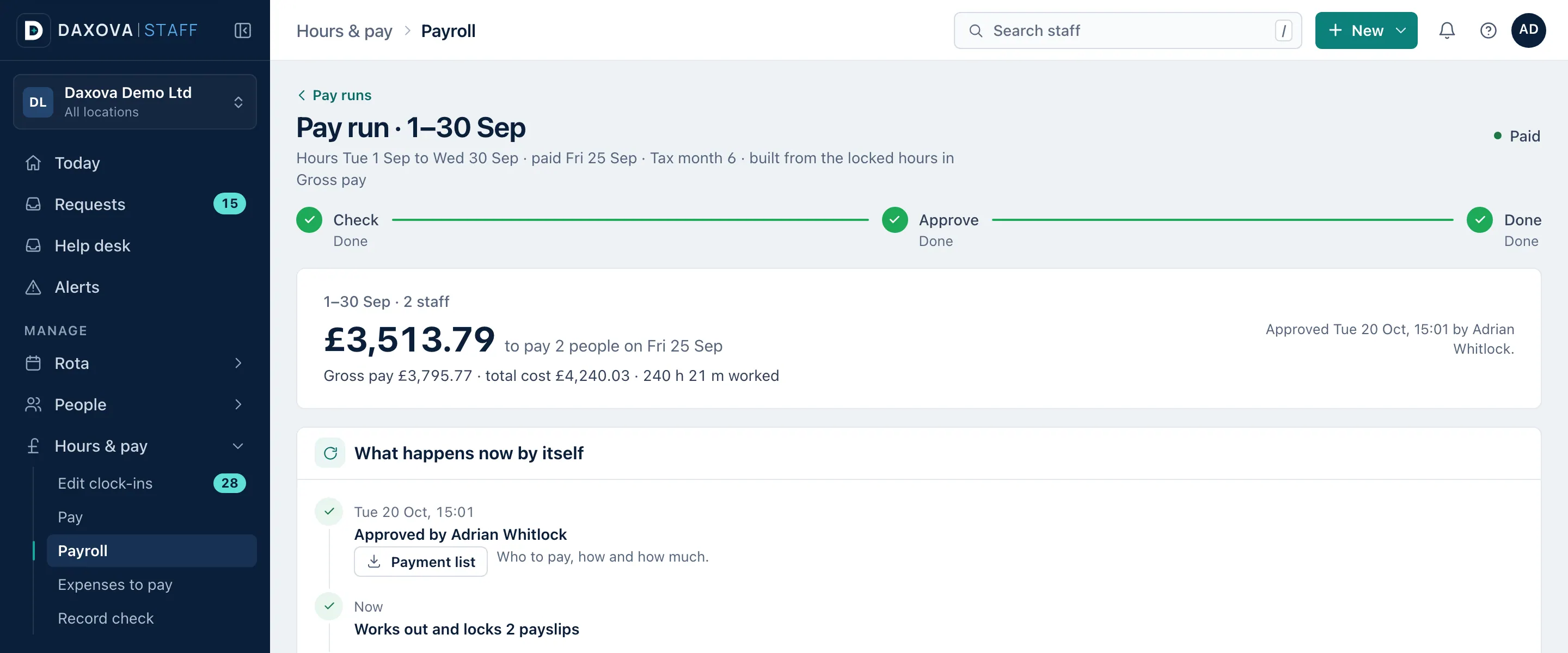
The Daxova Staff portal’s finished pay run with made-up data: Check, Approve and Done ticked, the take-home total, who approved it and what happens now.
Check, approve, doneThe pay run is built from the locked hours.
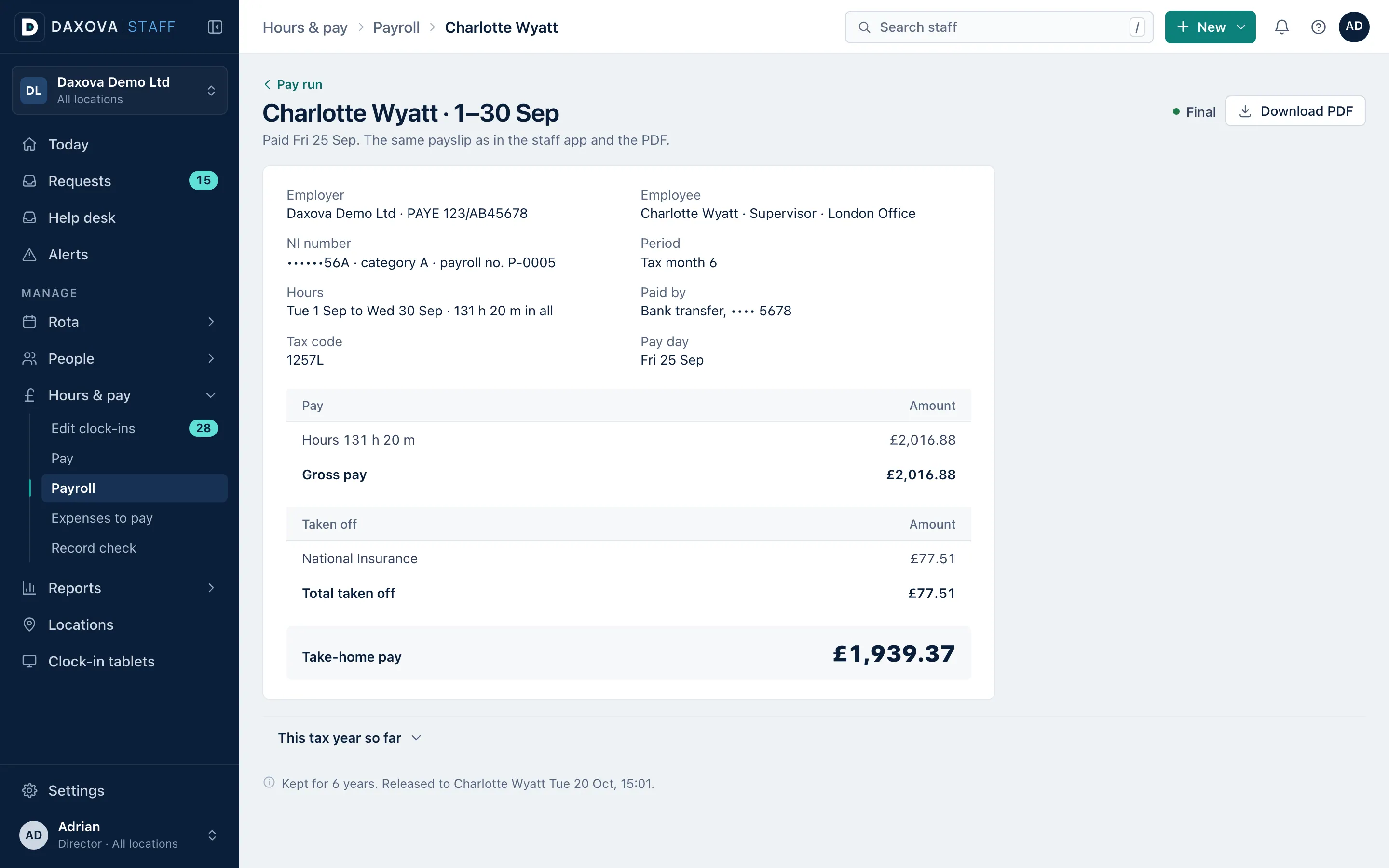
One payslip in the Daxova Staff portal with made-up data: hours, gross pay, income tax, National Insurance, take-home pay and the tax code.
PayslipsGross pay, tax, National Insurance and take-home pay, per person.
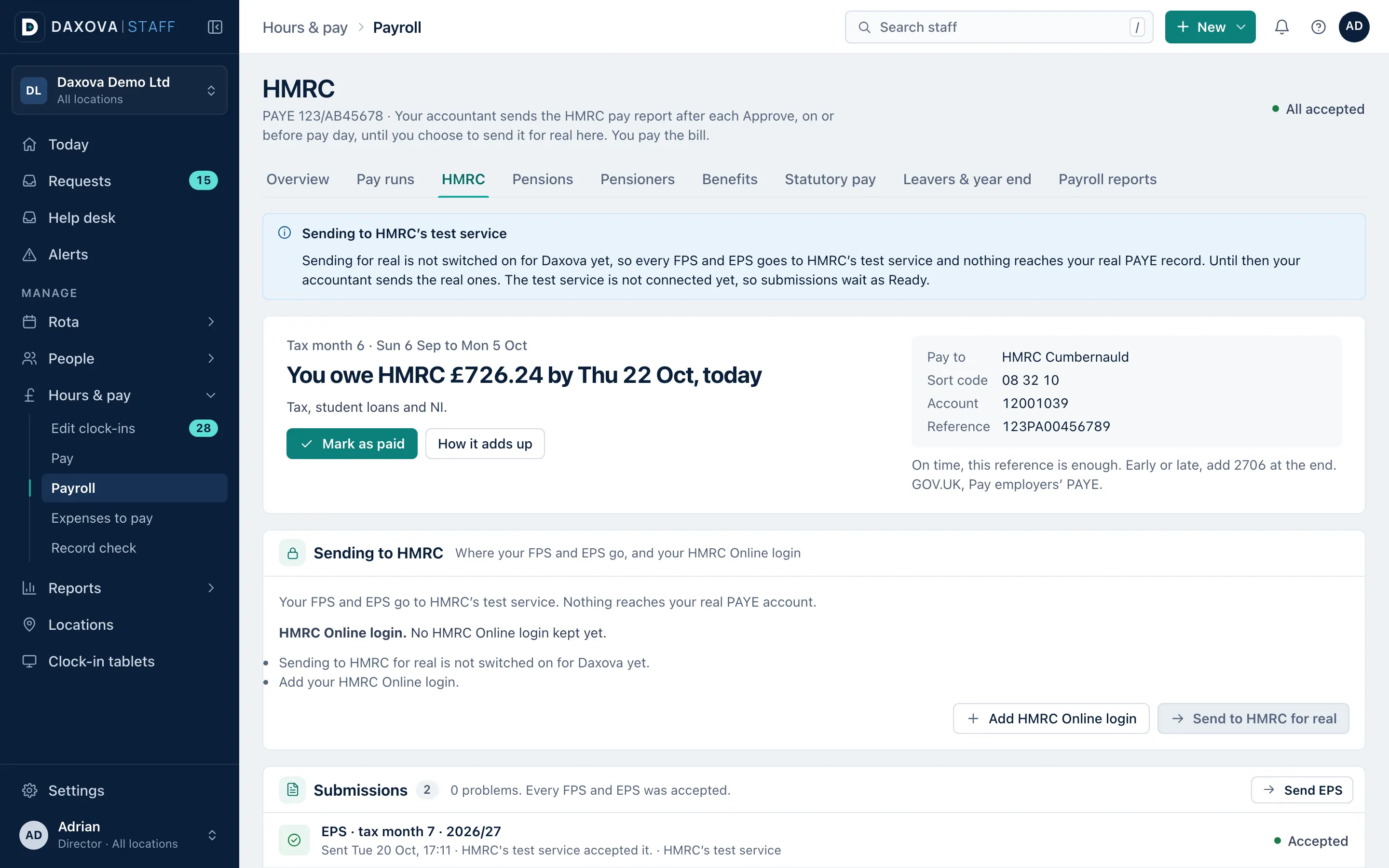
The Daxova Staff portal’s HMRC page with made-up data: the PAYE reference, what you owe, sending to HMRC’s test service, Add HMRC Online login, Send to HMRC for real and the accepted submissions.
HMRCSent from Daxova, when you choose.

Sent to HMRC by Daxova, or by your accountant.

Daxova sends the FPS and EPS to HMRC when you choose: add your HMRC Online login and switch on sending for real. It has passed HMRC’s External Test Service, including the full 12-month scenario. Our PAYE Recognition application is in progress.

How UK payroll is priced

10 · The staff app

What your staff carry in their pocket.

Clocking in and out, breaks, shifts, hours, holiday and swaps, and their own documents, on their own phone. Staff sign in with a passcode, so there is no password to forget.

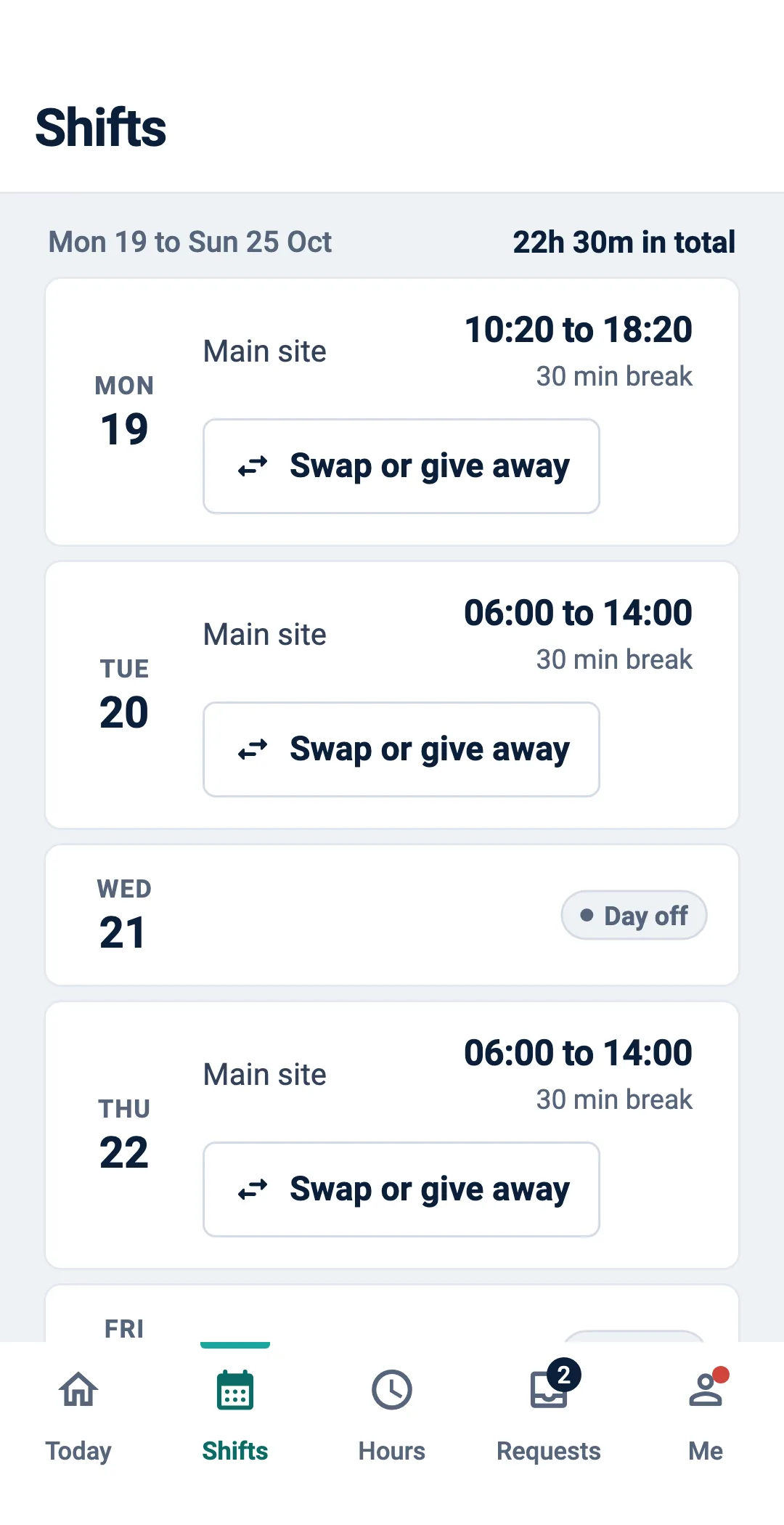
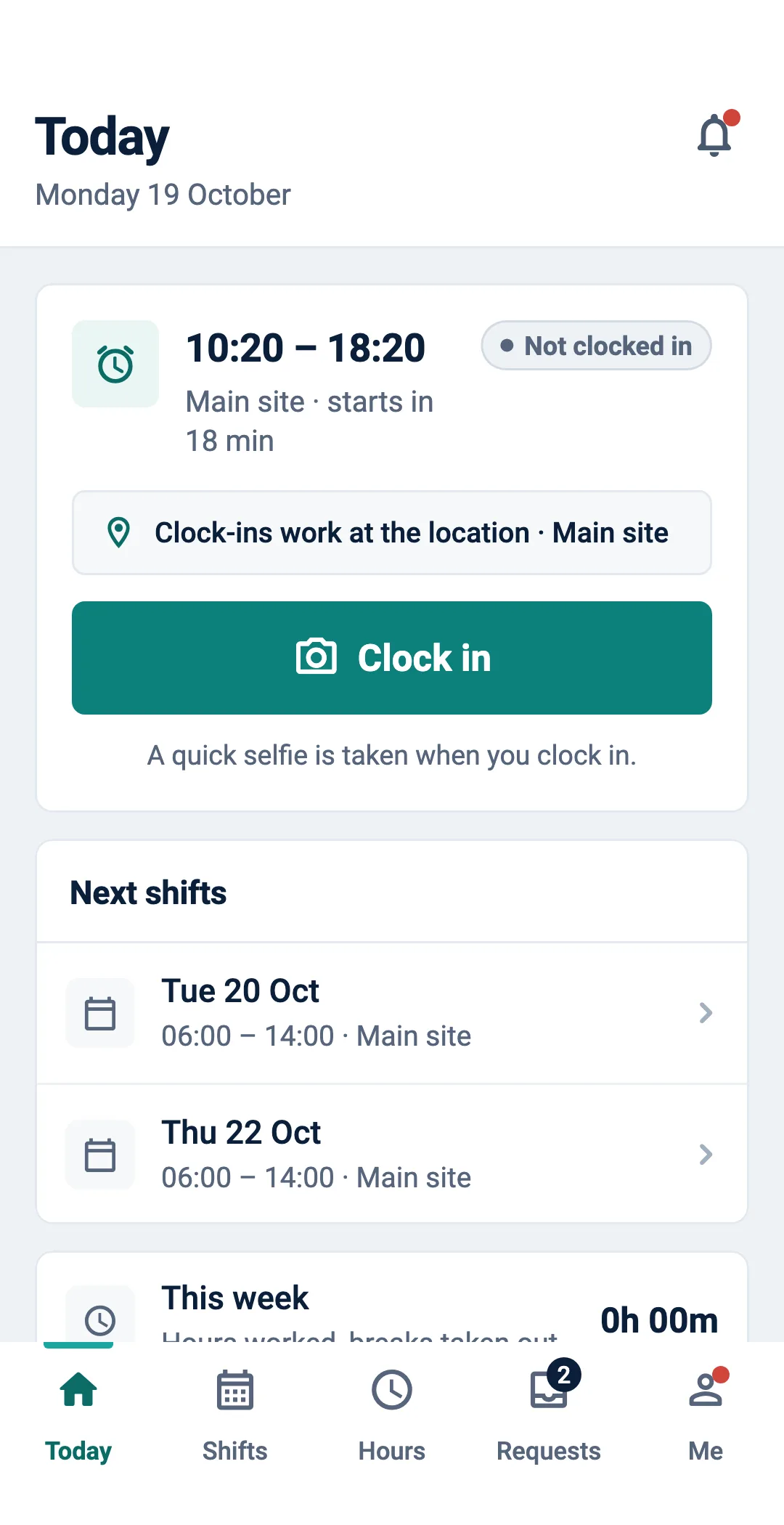
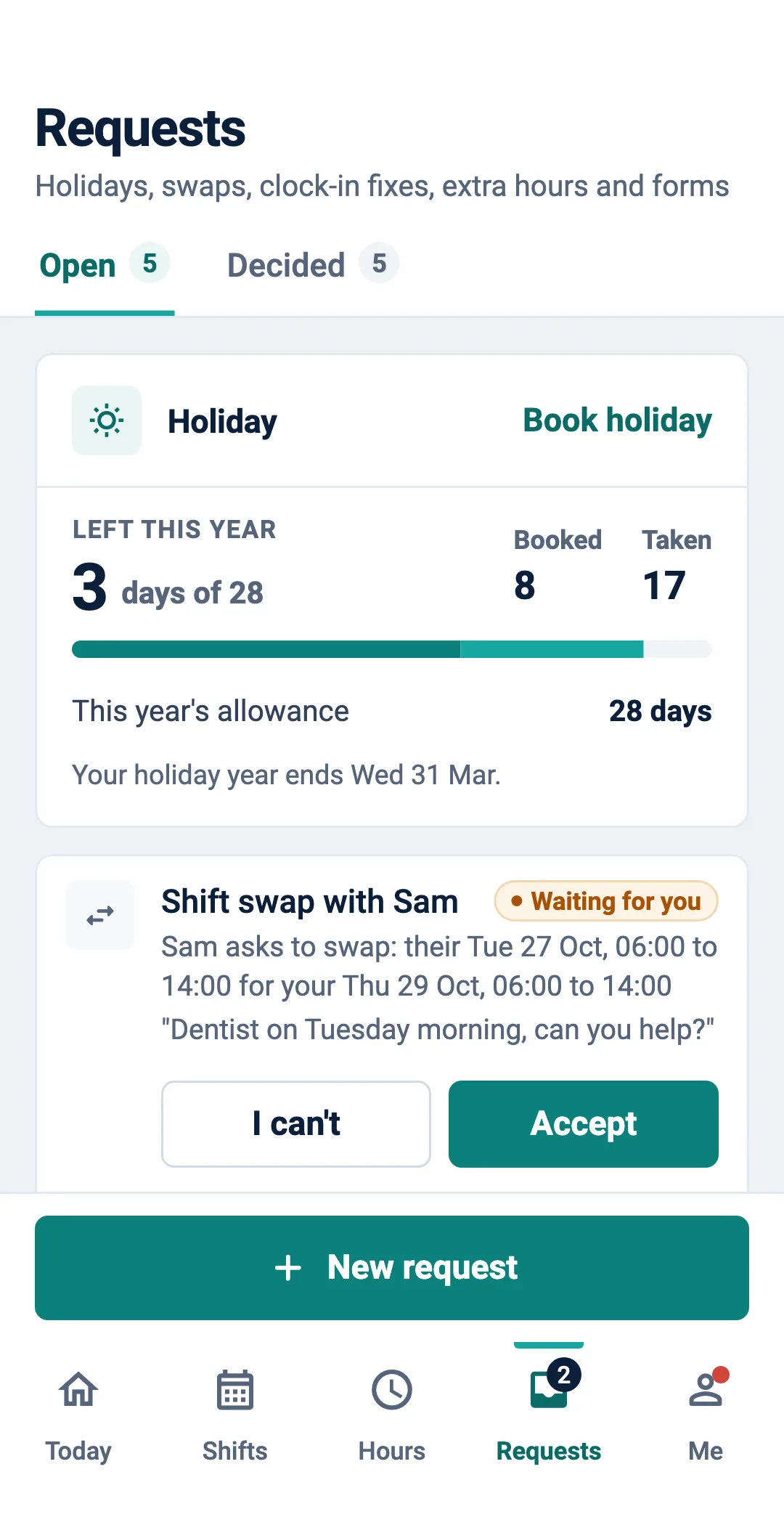
The staff app with made-up data: Shifts for the week, each shift with its location and a Swap or give away button. The staff app with made-up data: Today before a shift: 10:20 to 18:20, Not clocked in, a Clock in button and a note that a quick selfie is taken. The staff app with made-up data: Requests, with the holiday balance, a shift swap waiting with I can’t and Accept, and a New request button.
  • Clock inWith a live photo
  • ShiftsChanges marked
  • SwapsAnd extra hours
  • HolidayAnd sickness
  • DocumentsSend a new copy
  • NoticesTold when it matters

Where it is. The Android app is in testing, and the iPhone app is not in the App Store yet. Staff without the app clock in on the clock-in tablet, using a passcode they choose from a link. Staff app help

11 · The clock-in tablet

Use the screen you already have.

Turn any tablet or screen at your location into a clocking-in point, set up once from a link. It is a kiosk without the kiosk bill, and it works in any web browser today.

  • No smartphone needed. Staff use their staff code and passcode, or find their name.
  • Keeps nothing about anybody. No staff list, no hours or pay, and no photos.
  • An alert tells you if the tablet goes offline, switched on or off for each location.
More about the clock-in tablet
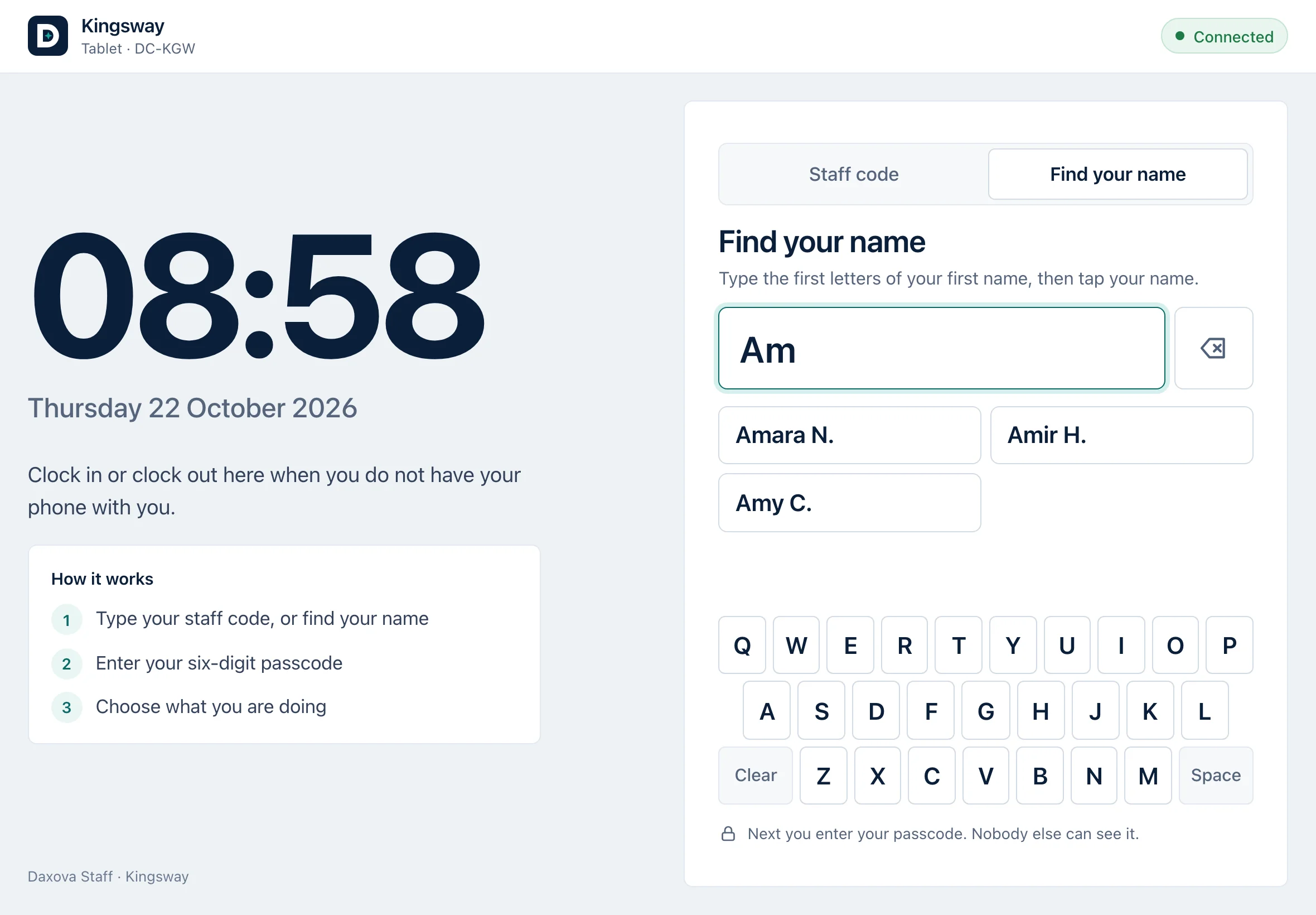
The clock-in tablet with made-up data: Find your name chosen, Am typed, and three of the location’s staff to tap, each a first name and a surname initial, above a letter keyboard.
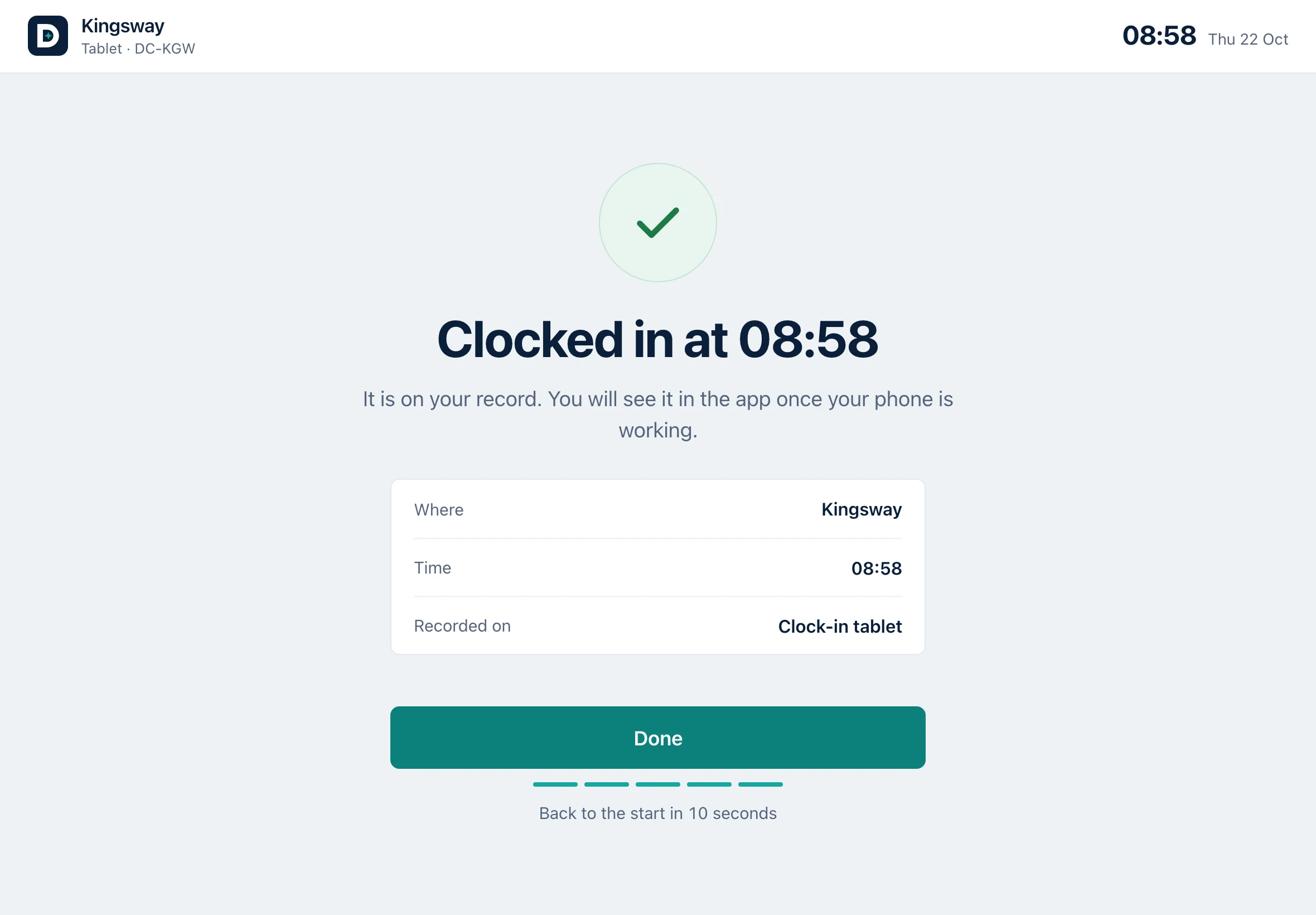
The clock-in tablet after a clock-in, with made-up data: Clocked in at 08:58, where, the time, recorded on the clock-in tablet, and a Done button.
Type the first letters, tap your name, then a passcode.

12 · Forms, policies and a help desk

The paperwork that follows the people, switched on when you want it.

Staff ask for what they need in the app. You decide who approves and in how many steps, and the answer comes back to them.

  • Approval forms: expense claims, training requests, equipment, a salary advance, or your own form, with a live preview of what staff see.
  • Policies: add a PDF, choose who must read it and by when.
  • A help desk: private questions from staff, with open, answered and closed.
  • Off until you switch them on, for each company.
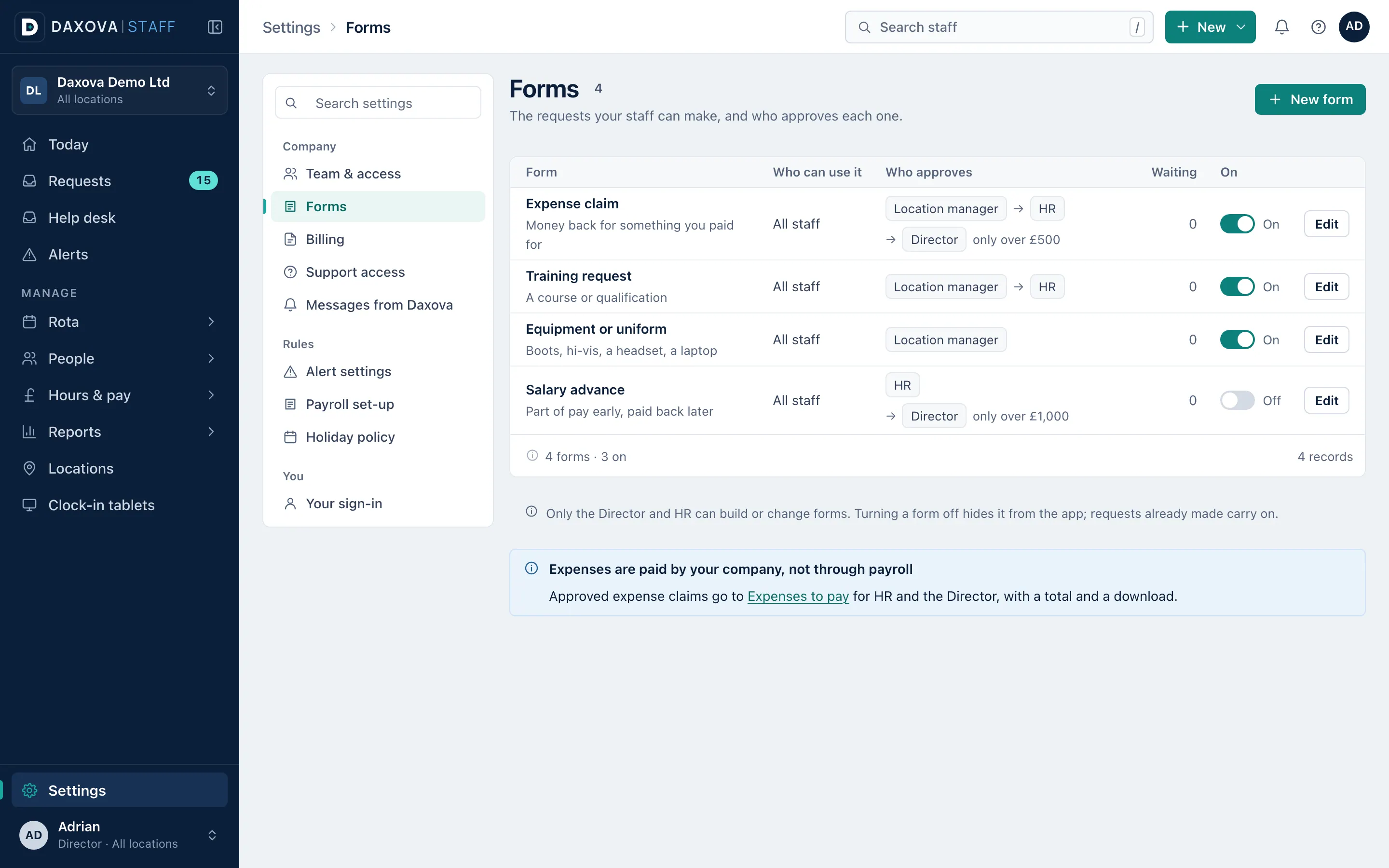
The Daxova Staff portal’s Approval forms list with made-up data: expense claim, training request, equipment and salary advance forms, who can use each and who approves.
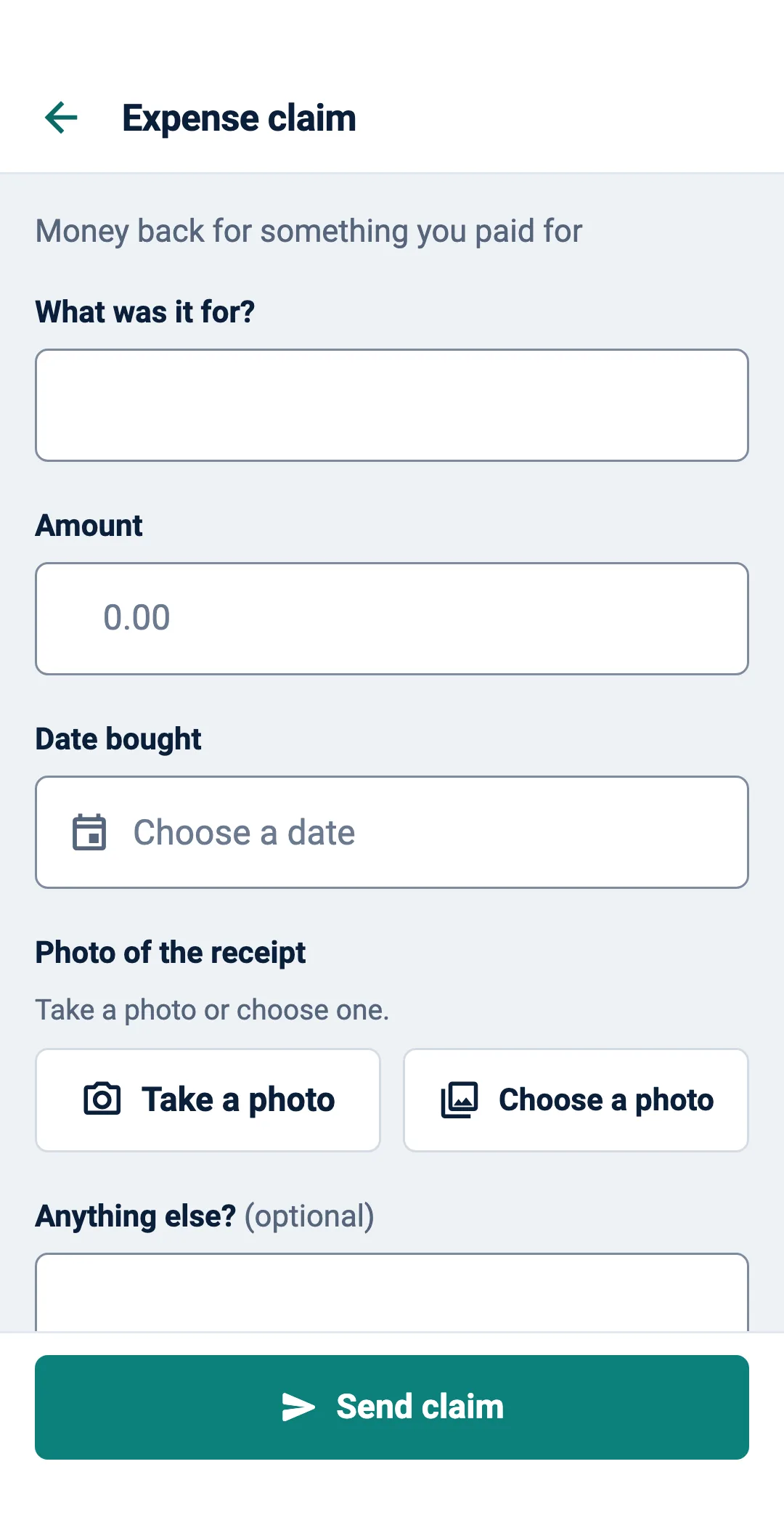
The staff app with made-up data: An expense claim form in the app: what it was for, the amount, the date and a receipt photo.
An approval form in the portal, and the same form on a phone.

13 · Access and your data

The right view for every manager. Your data stays yours.

Four office roles, each limited to the locations they look after. Office users work in the web portal, and those who only use the portal are free.

  • Director, HR, Area Manager and Site Manager. An Area Manager sees only their locations, and a Site Manager only their own.
  • Two-factor sign-in is required for every office user, with 10 recovery codes.
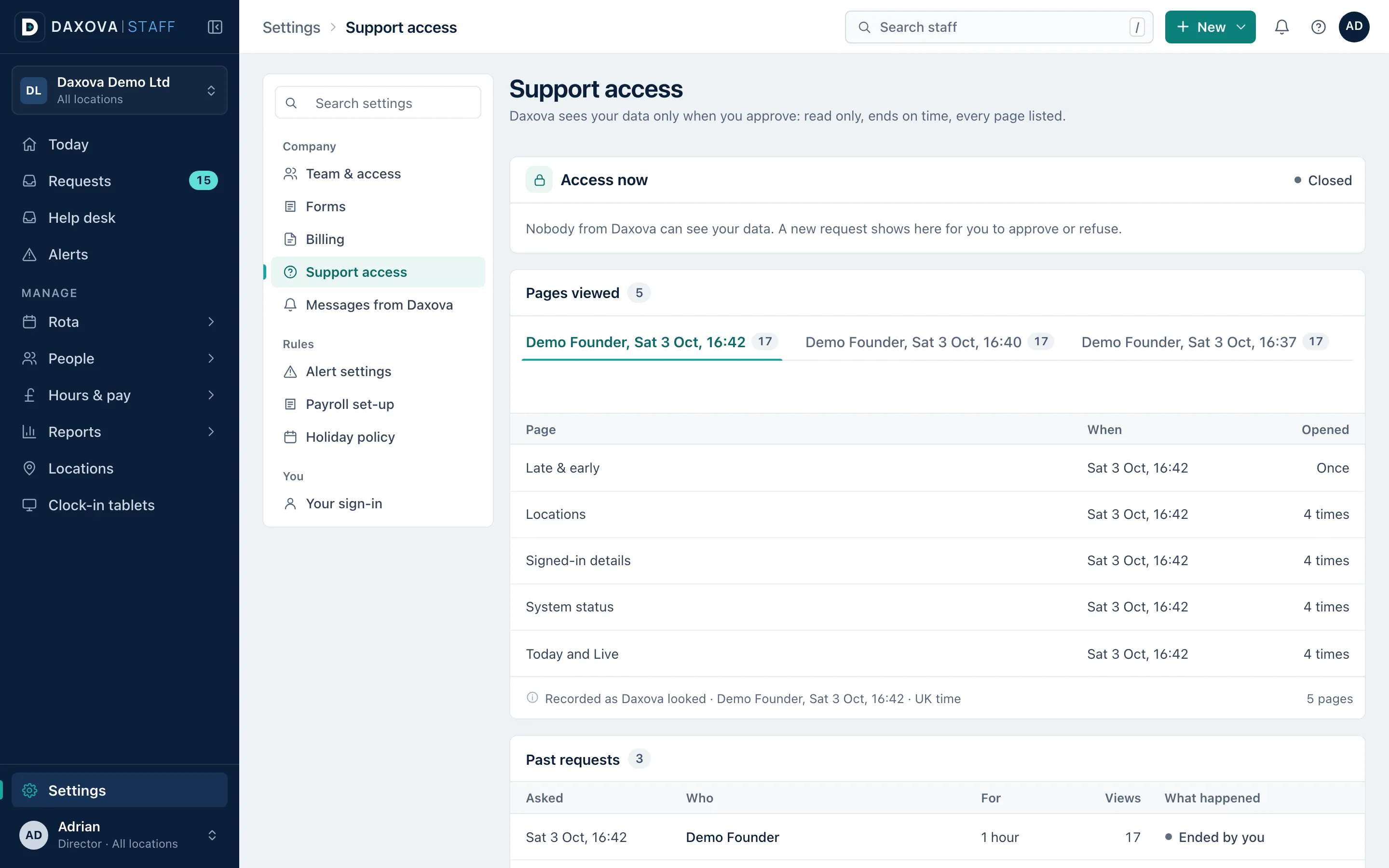
  • Support sees nothing unless a Director approves. It is read-only, ends after 1, 4 or 24 hours, and every page we read is logged.
  • Hosted in London, with a full export when you leave and your data deleted 30 days after your last day.
How we look after your data
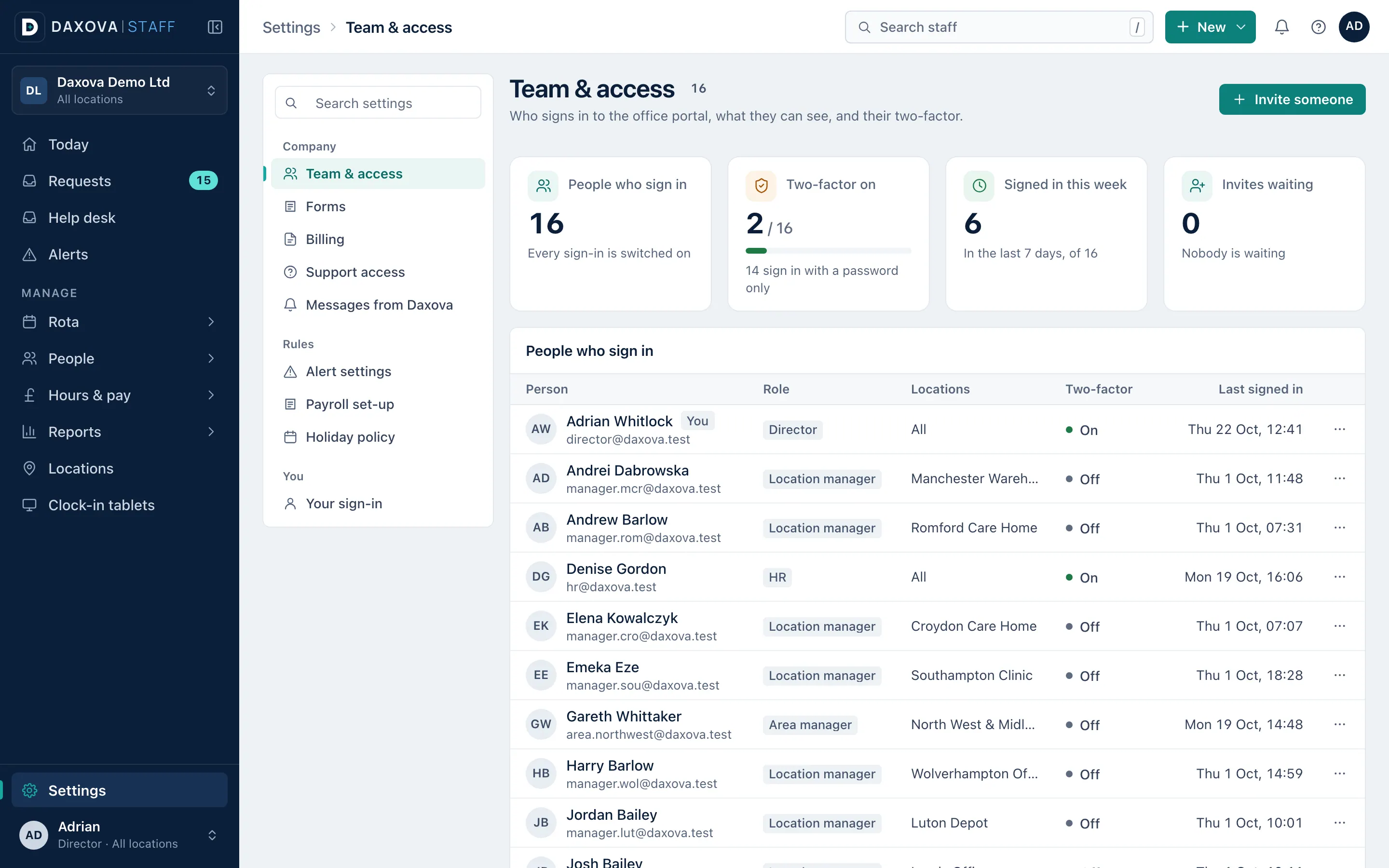
The Daxova Staff portal’s Team and access page with made-up data: who signs in to the office portal, their roles, whether two-factor is on and when they last signed in.
The Daxova Staff portal’s Support access page with made-up data: nobody from Daxova sees your data unless a Director approves, and a log of the pages viewed.
Who signs in and what they see, and who from Daxova can look.

Before you decide

What Daxova Staff doesn’t do.

Better you hear it now than find out in your second month.

  • No integrations or API

    There are no links to accounting or HR software yet. You export to Excel, PDF and CSV.

  • No Google or Microsoft sign-in

    Office users sign in with a password and two-factor, which everyone must use.

  • No offline clocking in

    Clocking in needs a connection: the location’s WiFi or mobile data.

  • No text messages

    There are no SMS or WhatsApp alerts. Alerts wait for you in the web portal.

  • No manager app

    Managers use the web portal in a browser. The app is for staff.

  • No face recognition or tracking

    A live photo is taken at each phone clock-in, and a person looks at it if needed. A phone’s location is read only at the moment of a clock-in.

Also on the way from DAXOVA LIMITED: Daxova POS and Daxova ERP. Ask to hear first.

Pricing

One price. Payroll is the only add-on.

£2 per staff member a month

£12 minimum, which covers up to 6 staff. Office users who only use the web portal are free.

  • Everything on this page is in the £2.
  • UK payroll is £1 per person on payroll, free during your trial.

10 staff cost £20 a month, or £30 with all ten on payroll.

30-day free trial, no card, nothing charged automatically. No VAT charged, no contract, no set-up fee.

Founding 50

£1.50 per staff member a month

£9 minimum. For the first 50 companies that start a trial before 31 March 2027. Your price is locked until 31 March 2030.

  • A 60-day free trial.
  • Set-up done with our team.
See the offer

See it with your own locations. Try Daxova Staff free for 30 days.