Some of your team can only work so many hours a week, often because of a visa. Set each person’s limit, and Hour limits puts it against the hours worked at all your locations, the hours still planned and next week’s rota.
Part of the same £2 per staff member a month. Nothing extra.
staff.daxova.co.uk
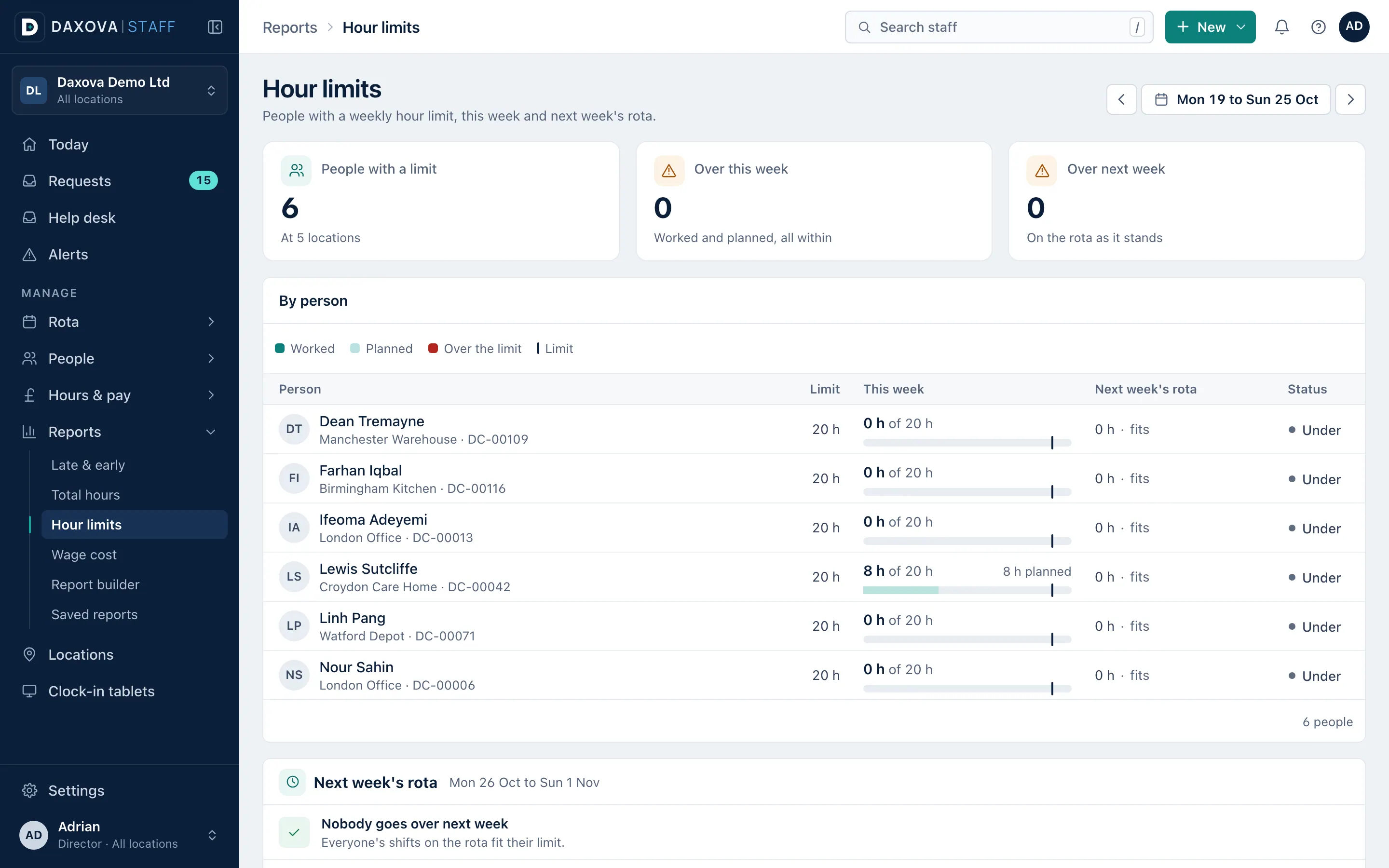
Hour limits: everyone with a limit, at every location, this week and the week after. Made-up data.
A limit for each person
All locations counted together
Checked as you plan the rota
A planning tool, not a legal promise
An example week
Monday to Sunday, against a 20-hour limit.
What the report works out for each person, shown with a made-up week.
14 h worked8 h planned
20 h limit
14 hworked so far, at one location and another
8 hstill planned on this week’s rota
Going over2 hours over. Move a shift before it is worked.
The statuses, most urgent first: Over (hours already worked are over the limit), Going over (worked and still planned together go over), Close, and Within.
What counts
Six things to know about the weekly limit.
The numbers on the report match these six points.
Set on the person’s record
HR or a Director sets it: 1 to 48 hours a week, halves allowed, with a reason. Each person has their own, or none.
Monday to Sunday
Each week is counted Monday to Sunday: the week at the top of the report. Term and holiday dates are not part of it.
Worked plus planned
Hours worked so far and hours still planned on the rota count together, so you see the problem coming.
Every location together
They work at two locations and each looks fine alone? Hours at any location count towards the same limit.
Next week checked too
Next week’s rota is put against the same limit, person by person, so you can change a shift before it is worked.
Only people with a limit
Only people with a limit appear in Hour limits, with the people to look at first at the top.
See it coming
By Friday the week has been worked. So check it where it is planned.
The limit is checked where the hours are made: in the rota as you build it, and whenever staff swap a shift or put their name forward for extra hours.
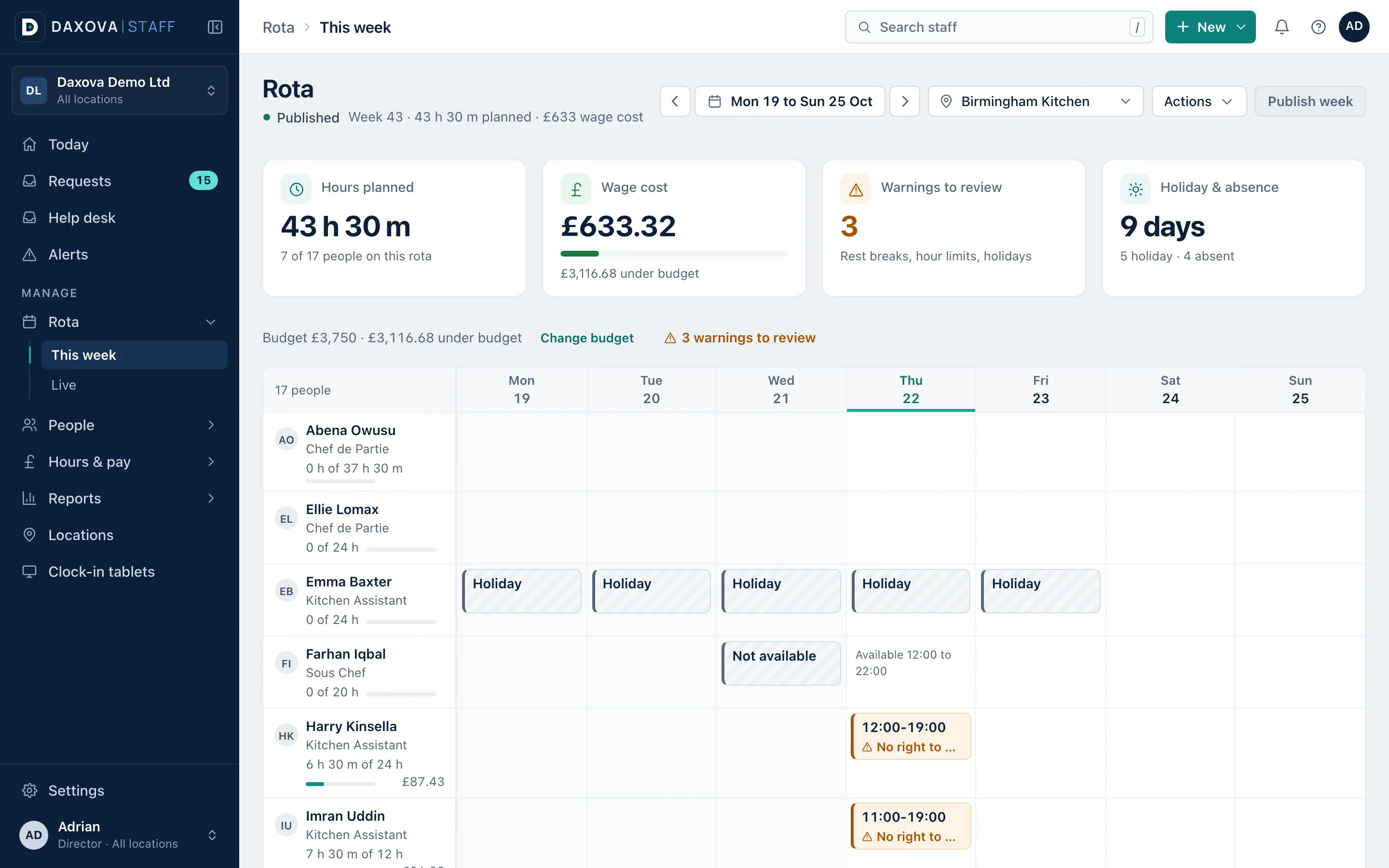
As you plan, the rota marks a shift that takes someone over their limit as Over limit. Saving and publishing stay your decision
A swap that would take someone over is refused, after a check on hours and rest
Extra hours are never offered to someone they would take over their weekly limit
The rota as you plan: warnings sit beside each shift. Made-up data.
Right to work and visas
The visa on their record, with its end date.
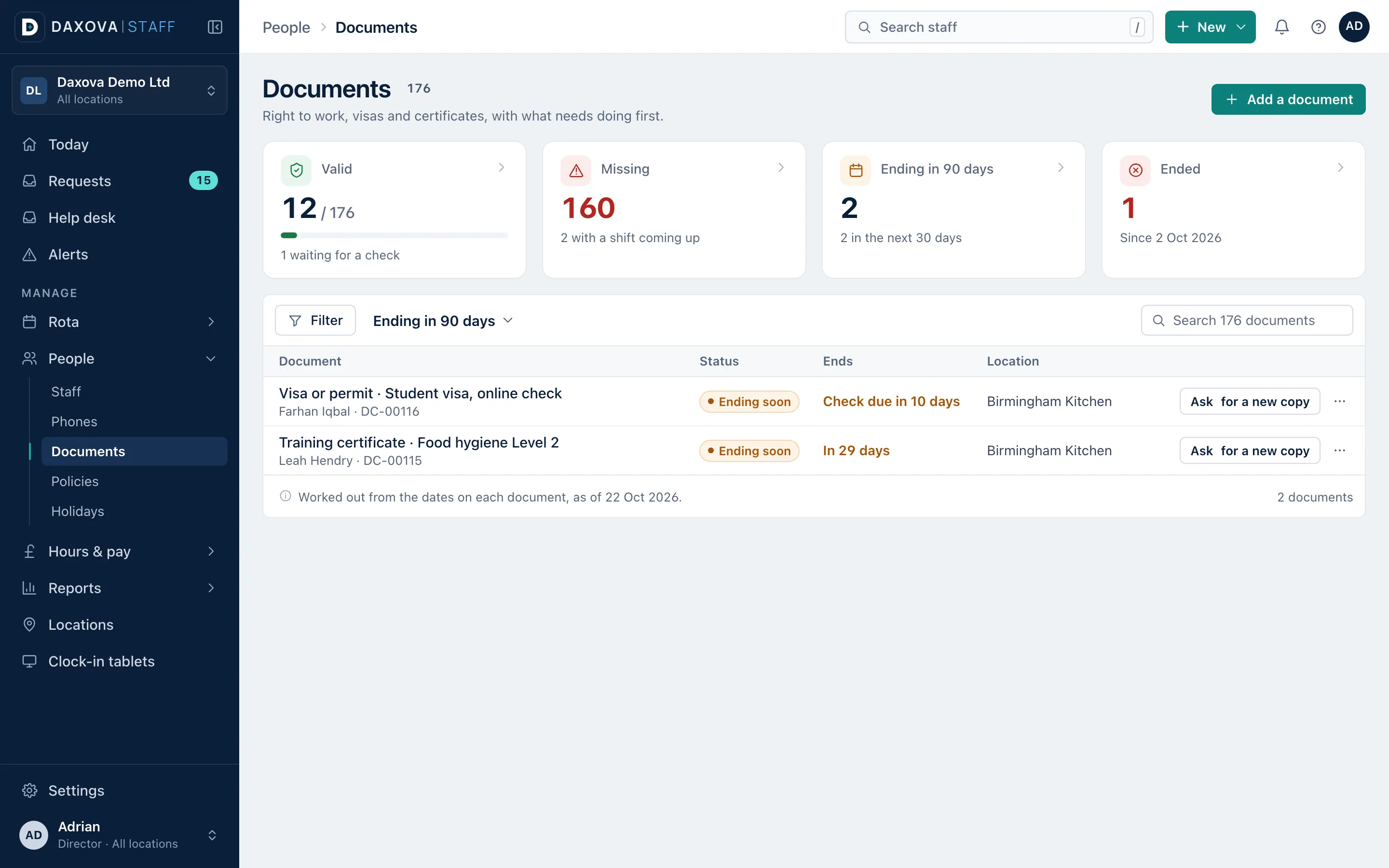
With Documents, HR records right to work checks, visas and certificates for each person, and can note a visa’s weekly hours to use as the limit. HR and the Director get reminders 60 and 30 days before a document or check runs out.
The check is recorded, never the share code. A Home Office share code is not stored
No shifts after the check runs out. A shift that falls after it is refused
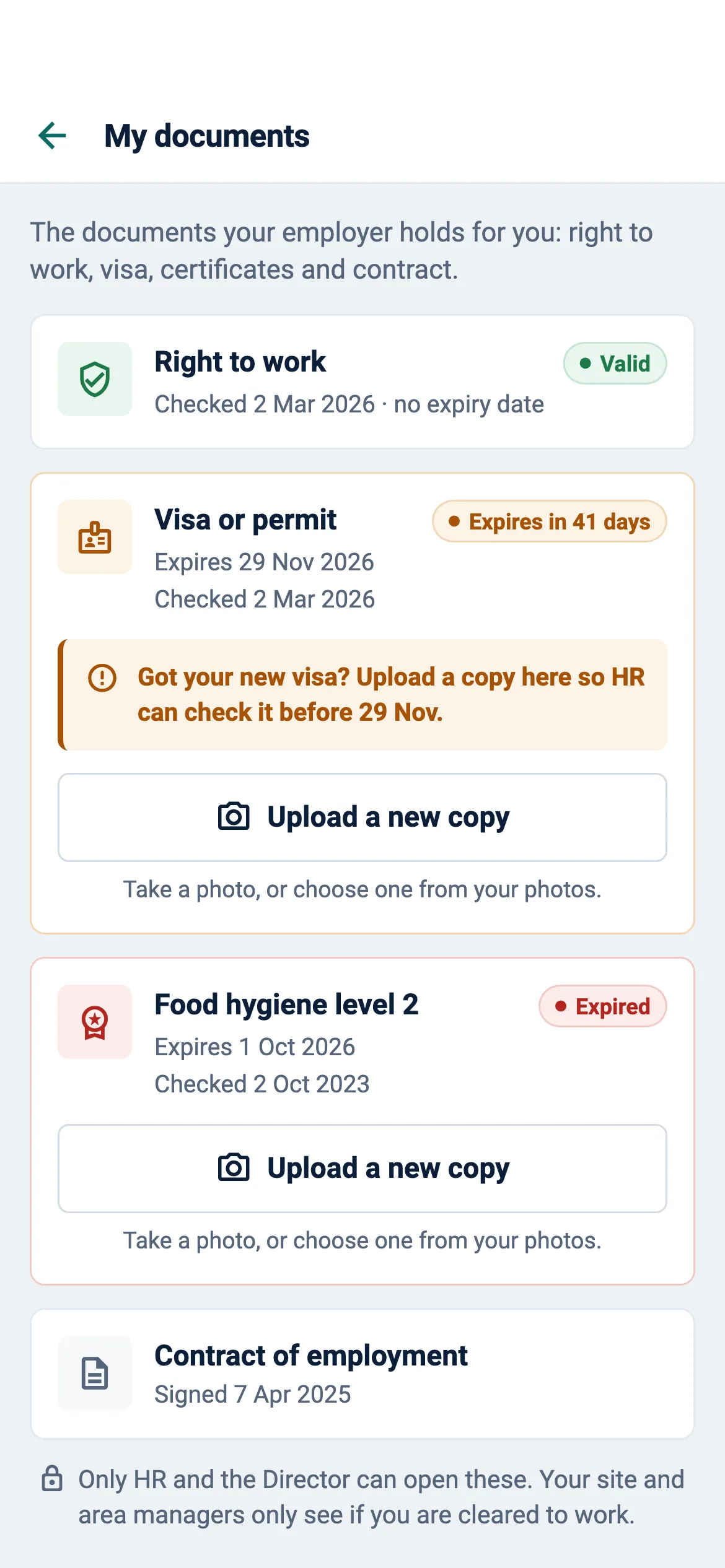
A new copy from the app. Staff photograph the new visa and upload it for HR to check
Only HR and the Director can open copies, which are stored encrypted
Documents ending soon: a visa check due in 10 days. Made-up data.
Term time and holidays
Daxova does not know your term dates. The limit on the record applies every week.
When the hours someone may work change outside term, you change the limit once, with a reason.
Every week, Monday to Sunday
Their limit on the record applies, at every one of your locations.
You change the limit
HR or a Director enters the new limit, with a reason. Each change is kept with their employment history.
A planning tool, not a legal promise
Your part, and what Daxova does.
No software can promise you will meet the conditions of someone’s visa. Hour limits shows you the hours early enough to act. Deciding the limit, and acting on it, stays with you.
1
Decide their weekly limit and set it on their staff record, with a reason.
2
Record their right to work check and visa in Documents, with the dates.
3
Change the limit for the holidays, and back for term.
4
Look at Hour limits before the week starts and move any shift that takes someone over.
5
Record a new check when the reminder comes, before the old one runs out.
staff.daxova.co.uk
Filter to what ends soon, then ask for a new copy. Made-up data.
What it costs
Hour limits is in the £2.
It is part of the same price as clocking in, rotas, fire roll call and records. UK payroll is the one add-on.
£2 per staff member a month
£12 minimum, which covers up to 6 staff. Office users who only use the web portal are free. No VAT charged, no contract, no set-up fee.
Everything on this page is in the £2
UK payroll is the one add-on: £1 per person on payroll a month, free during your trial
30-day free trial, no card, nothing charged automatically
No, and no software can promise that. Daxova Staff counts each person’s hours against the weekly limit you set, so you can see a problem coming and change the rota. Deciding the limit, and acting on it, stays with you.
Can each person have a different limit?
Yes. Each person has their own weekly limit in their staff record, or none at all. Only people with a limit appear in Hour limits.
What about term time and holidays?
Daxova Staff doesn’t know term or holiday dates. The limit on someone’s record applies every week, Monday to Sunday, so when it changes for the holidays, and back for term, HR or a Director changes it there.
Does it count hours at all our locations?
Yes. Hours worked and planned at any of your locations count towards the same weekly limit.
Will the rota stop a manager going over someone’s limit?
It warns you. As you plan, the rota marks a shift that takes someone over their weekly limit as Over limit, and Hour limits shows them as Going over. Saving and publishing stay your decision. A shift swap or an offer of extra hours that would take someone over their limit is refused.
Is Hour limits an extra cost?
No. It is part of the same £2 per staff member a month, everything included, with no VAT charged.
Something else? Email sales@daxova.co.uk and we’ll reply within one working day.
Know where everyone stands before Monday.
Start with a free 30-day trial online in a few minutes. Add your locations and staff, or ask us to help. No card, no contract.